For the past few years, artificial intelligence has mostly entered the creative process as a collection of individual tools.
One tool generates images. Another writes copy. Another removes backgrounds, produces mockups, summarizes research, creates presentation slides, edits video, or suggests interface layouts.
Each tool can save time, but the designer still has to connect the entire process manually.
That is beginning to change.
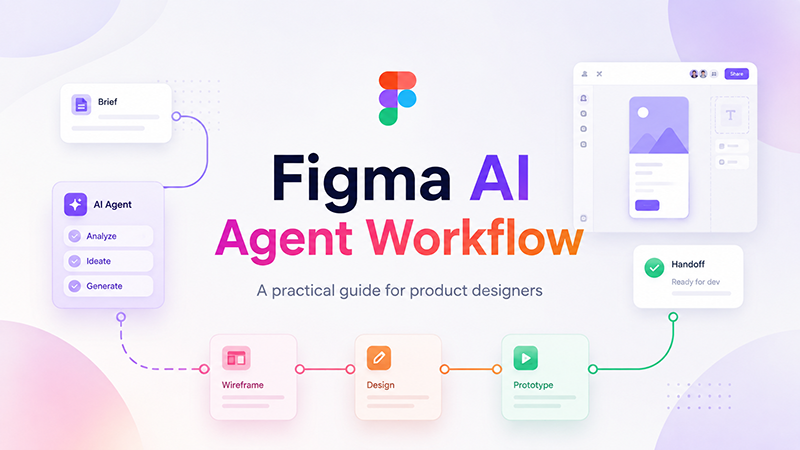
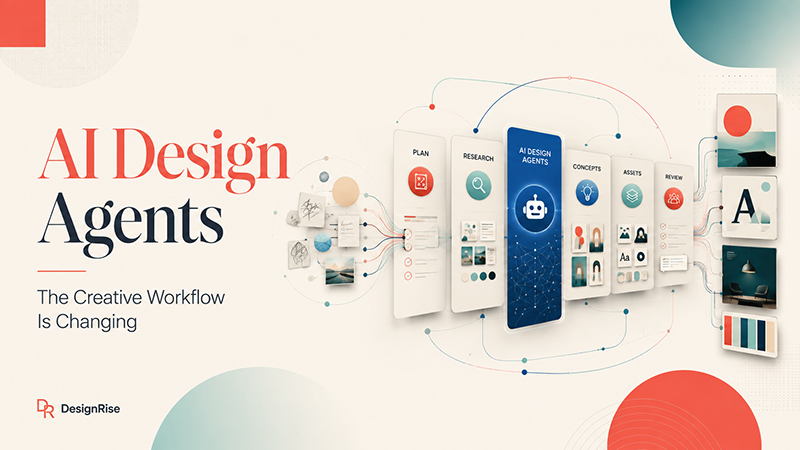
The next shift in creative technology is not simply about better image generation or more powerful prompts. It is about AI design agents: systems that can participate across multiple stages of a creative project, retain context, follow broader objectives, coordinate tasks, and help move work from an initial brief toward a finished result.
For designers, this is a much bigger change than another new AI generator.
It changes where human value sits inside the workflow.
At DesignRise, we believe the most important question is no longer simply, “Which AI tool should designers use?”
The better question is:
What happens when AI stops being a tool used inside the workflow and starts helping coordinate the workflow itself?
This guide explores what AI design agents are, how they differ from traditional AI assistants, where they can fit into professional creative work, what designers should automate, what should remain human-led, and which skills will become more valuable as creative workflows become increasingly agent-based.
Last updated: August 2026
How to use this guide
This article is written for designers, creative teams, agencies and founders who want to understand where AI agents fit inside a real creative workflow—not just which new tool is trending.
- Use the first sections to understand the difference between assistants, copilots and agents.
- Use the workflow sections to decide which creative tasks can safely be supported by automation.
- Use the checklists to protect brand quality, originality and human review before scaling AI-assisted production.
Explore More DesignRise Resources
- AI Design Workflow in 2026 — start with the broader creative process before introducing agent-based systems.
- 10 AI Tools Every Designer Should Try in 2026 — compare practical AI tools for branding, visuals, UI, content and creative production.
- Top AI Tools for UI/UX Designers in 2026 — explore AI tools for prototyping, user research, UX writing and product design workflows.
What Is an AI Design Agent?
A traditional generative AI interaction is usually simple:
Prompt → Output → Review → New Prompt → New Output
You ask an AI system to create something. It produces a result. You evaluate it, change the instruction, and try again.
An AI design agent moves toward a broader model.
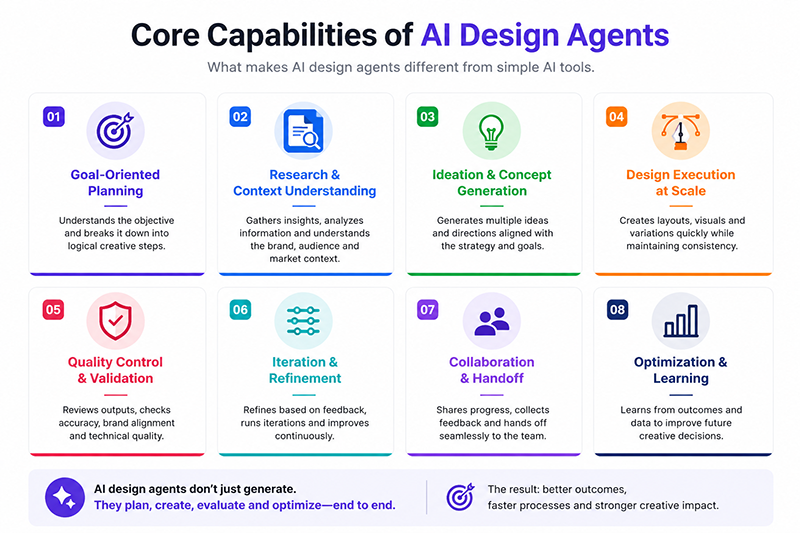
Instead of receiving only one isolated request, an agent can be given an objective and work through several connected tasks required to achieve it.
Imagine a designer receives this brief:
“Develop a visual direction and landing-page concept for a productivity platform aimed at independent creative professionals.”
In a traditional AI workflow, the designer might separately:
- research the audience;
- summarize competitors;
- write positioning ideas;
- create several visual directions;
- generate moodboard imagery;
- develop headline options;
- create interface concepts;
- prepare supporting graphics;
- adapt the strongest direction into different formats.
An agent-based system can potentially help connect those stages around the same goal.
The key difference is therefore not simply automation.
It is continuity.
The AI is no longer helping with only one small creative action. It begins participating in a sequence of decisions where the output of one step becomes context for the next.
AI Assistant, Copilot or Agent: What Is the Difference?
The terminology around AI can become confusing because products often use words such as assistant, copilot, agent, automation and workflow interchangeably.
For designers, a practical distinction is more useful than a technical one.
| System | How It Works | Typical Creative Use |
|---|---|---|
| AI Assistant | Responds to individual requests | Write copy, summarize research, suggest ideas |
| AI Copilot | Works beside the designer inside a tool or process | Generate variations, edit assets, suggest layouts |
| AI Agent | Works toward a broader objective across multiple steps | Research, plan, generate, evaluate and coordinate connected tasks |
These categories overlap, and the boundaries will continue to change.
But the practical difference for designers is clear: an assistant waits for the next instruction, while an agent is designed to help move a larger process forward.
Why AI Design Agents Matter More Than Another New AI Tool
Creative professionals already have access to more AI tools than most teams can realistically use.
The problem is often not a shortage of capabilities.
The problem is fragmentation.
A designer might research in one application, generate images in another, write copy somewhere else, organize assets in a project-management platform, create layouts in a design tool and then manually move information between all of them.
Every transition creates friction.
Context gets lost. Decisions are repeated. Files become disconnected. Prompts need to be rewritten. Brand rules are forgotten.
Agent-based workflows attempt to reduce that fragmentation.
Instead of asking:
“How can AI generate this asset?”
the workflow begins asking:
“How can AI help move this project from one approved stage to the next?”
DesignRise Perspective
The most valuable AI workflow is not the one that generates the largest number of assets. It is the one that removes unnecessary friction while preserving creative judgment.
How the Creative Workflow Changes
A traditional creative workflow is largely human-coordinated.
The designer or creative director decides what happens next, opens each tool, transfers information, requests revisions and checks whether every new asset still reflects the original brief.
AI agents introduce the possibility of a more connected system.
| Traditional Creative Workflow | Agent-Based Creative Workflow |
|---|---|
| One prompt solves one task | One objective can connect several tasks |
| Context is repeatedly rebuilt | Project context can persist across stages |
| Designer manually coordinates every application | AI can assist with coordination and handoffs |
| Outputs are often isolated | Outputs can become inputs for the next stage |
| Automation focuses on production | Automation can support planning, production and review |
| Designer spends more time moving information | Designer spends more time evaluating decisions |
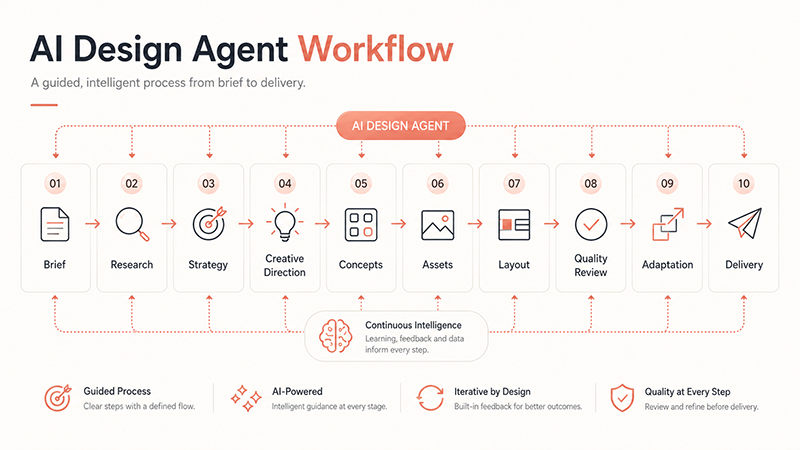
A more connected process might eventually look like this:
Brief → Research → Strategy → Creative Direction → Concepts → Assets → Layout → Quality Review → Adaptation → Delivery
AI does not need to own every stage.
The important development is that it can increasingly participate across several of them.
Explore More DesignRise Resources
Building a connected AI workflow becomes much easier when the brand itself is structured.
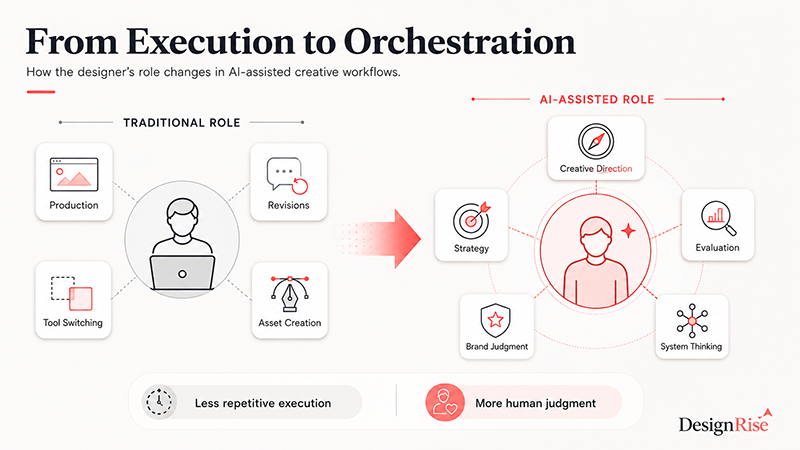
The Designer Is Moving From Operator to Orchestrator
One of the biggest misunderstandings around AI and design is the assumption that faster execution automatically reduces the need for designers.
In many workflows, the opposite can happen.
When producing options becomes easier, choosing between those options becomes more important.
Imagine that a team previously had enough time to develop three campaign directions.
AI can help produce thirty.
That sounds like a major advantage until someone has to decide:
- Which direction actually solves the business problem?
- Which idea looks distinctive rather than merely polished?
- Which concept can scale across channels?
- Which visual language still feels relevant six months later?
- Which direction matches the audience rather than the personal taste of the team?
- Which outputs are strategically useful and which are simply attractive?
Generation becomes easier.
Selection becomes the harder creative skill.
This pushes designers toward a role that looks increasingly like creative direction.
The designer defines the problem, establishes boundaries, provides context, chooses references, evaluates alternatives, rejects weak directions and protects the integrity of the final system.
Prompt Engineering Is Only the Beginning
For a while, prompting was often described as one of the defining skills of AI-assisted creativity.
It still matters.
But agent-based workflows make something else more important: creative orchestration.
An agent needs more than a descriptive prompt.
It needs a working environment.
That environment may include:
- a clear creative brief;
- audience definitions;
- approved brand assets;
- visual references;
- design-system rules;
- tone-of-voice guidelines;
- technical restrictions;
- examples of good and bad output;
- approval checkpoints;
- quality criteria.
A beautifully written prompt cannot compensate for an unclear strategy.
If the brand has no visual system, the AI has nothing stable to follow.
If the audience is vague, the output will often be vague.
If nobody defines what “good” means, faster generation simply produces more material to review.
Design Systems Become Infrastructure for AI
Design systems were originally created to help human teams work consistently at scale.
They define reusable components, spacing, typography, colors, layout behavior, accessibility rules and interaction patterns.
In an agent-based workflow, those systems become even more valuable.
They can act as constraints that help AI understand what belongs to the brand and what does not.
For example, an agent working with a mature design system could be told:
- use only approved typography;
- respect the defined spacing scale;
- use the primary accent only for high-value actions;
- follow approved button styles;
- never place light text on inaccessible backgrounds;
- use existing components before inventing new ones;
- follow the brand’s photography direction;
- maintain the established tone of voice.
That is much more useful than simply asking AI to “make it look on brand.”
The stronger the rules, the easier it becomes to automate execution without destroying consistency.
Brand Identity Becomes a Competitive Advantage
Generative AI can make competent visual production widely available.
This creates an interesting paradox.
When more companies can quickly create polished images, presentations, social posts and landing pages, visual polish alone becomes less differentiating.
Brand identity matters more.
A company needs recognizable choices:
- a distinctive voice;
- a consistent point of view;
- specific visual rules;
- repeatable typography;
- recognizable imagery;
- consistent editorial judgment;
- a clear reason for existing.
This is particularly important for creative publications, SaaS brands, creative studios and media companies.
A strong design or technology brand should not simply publish “another article about AI.”
The value comes from building a recognizable editorial system around AI, design, creative workflows and practical technology for modern creators.
That means every article, asset, landing page and campaign should strengthen the larger brand library rather than exist as an isolated output.
Where AI Agents Can Fit Into a Real Design Project
1. Research and Brief Development
Before visual production begins, an agent can help organize project information.
It might summarize existing documents, group customer feedback, identify repeated themes, organize competitor observations or transform a messy set of notes into a structured brief.
The human designer should still decide which information matters.
Research automation becomes dangerous when AI-generated summaries are treated as verified evidence rather than material for review.
2. Creative Direction
AI can help explore multiple visual territories around the same strategic idea.
Instead of creating ten nearly identical moodboards, the team can deliberately request contrasting routes:
- minimal and technical;
- editorial and intellectual;
- bold and expressive;
- premium and restrained;
- playful and experimental.
The designer then evaluates which territory deserves development.
3. Concept Development
Once a creative direction is selected, AI can support concept generation.
This may include early compositions, headlines, visual metaphors, image directions, rough interface structures or campaign variations.
The most productive workflow does not ask AI for “more.”
It asks AI for meaningfully different options.
4. Production
This is where automation can create the most obvious time savings.
An approved concept can be adapted into:
- different social formats;
- alternative image crops;
- campaign variations;
- supporting graphics;
- presentation assets;
- different headline lengths;
- multiple visual treatments.
But production should begin only after the direction is approved.
Automating a weak concept simply produces weak work faster.
5. Quality Control
AI can also assist after generation.
A workflow might check whether assets use approved terminology, whether required elements are present, whether files follow naming conventions or whether an obvious inconsistency exists between outputs.
This should support human review rather than replace it.
6. Repurposing
One strong creative idea rarely needs to exist in only one format.
A long article can become a LinkedIn post, newsletter summary, carousel outline, visual guide, short video script and social campaign.
This is one of the areas where agent-based coordination can become especially valuable because all outputs can remain connected to the same source material and messaging.
What Should AI Do and What Should Designers Keep?
| AI Can Assist With | Human Designers Should Own |
|---|---|
| Organizing large amounts of information | Defining what information matters |
| Generating variations | Choosing the strongest direction |
| Repetitive production | Creative direction |
| Formatting and adaptation | Brand judgment |
| Finding obvious inconsistencies | Evaluating cultural and emotional meaning |
| Exploring many options quickly | Deciding which options should exist at all |
The Risk of Generic AI Design
The biggest creative risk of AI is not necessarily low quality.
It is sameness.
Generative systems are extremely good at producing work that feels visually plausible.
But “plausible” is not the same as distinctive.
Many AI-generated visuals fall back on familiar patterns:
- dark backgrounds with glowing gradients;
- floating 3D objects;
- oversized futuristic interfaces;
- generic startup illustrations;
- perfectly balanced compositions;
- polished faces without personality;
- abstract visual metaphors that could belong to almost any brand.
When AI agents begin generating larger quantities of content, this risk increases.
A brand can publish more while becoming less recognizable.
Designers therefore need to deliberately introduce specificity.
That may come from:
- custom photography;
- original illustration;
- distinctive typography;
- brand history;
- real materials and environments;
- cultural references;
- unexpected composition;
- human stories;
- editorial restraint.
DesignRise Principle
AI should expand the number of creative possibilities available to a designer—not flatten every brand into the same aesthetic.
More Output Does Not Automatically Mean More Value
AI changes the economics of experimentation.
Producing a new visual direction, headline or layout variation becomes dramatically easier than it was in a completely manual workflow.
But this creates a new bottleneck.
Attention.
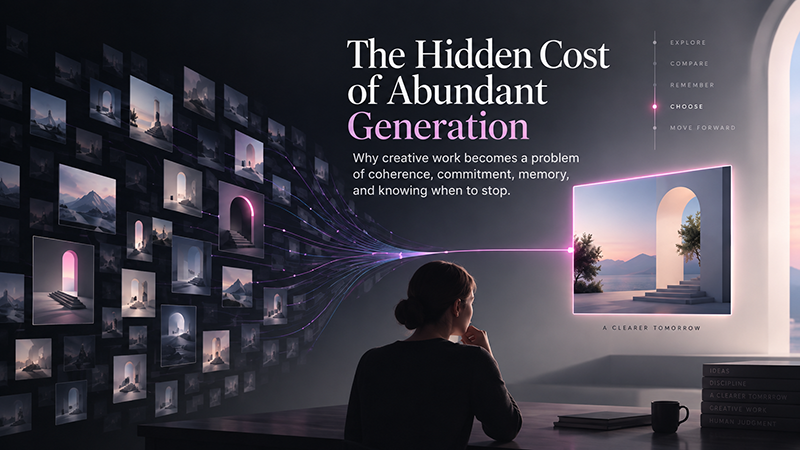
When ten options become one hundred, someone still has to review them.
The cost of generation decreases while the cost of selection increases.
This is why the future of creative work may reward taste more than speed.
A designer who can recognize the best three concepts from a set of fifty can create more value than someone who simply generates fifty more.
A Practical Agent-Ready Workflow for Designers
Step 1: Start With an Objective, Not a Tool
Do not begin with:
“I want to use an AI agent.”
Begin with:
“Which part of this workflow creates unnecessary friction?”
Automation should solve a real problem.
Step 2: Build a Strong Brief
Define:
- the audience;
- the desired outcome;
- the message;
- the channel;
- the brand constraints;
- the deadline;
- the required deliverables.
An agent is only as useful as the context it receives.
Step 3: Define What AI Is Allowed to Decide
Not every decision should be delegated.
Create clear boundaries.
For example:
- AI may propose three directions;
- a designer approves one;
- AI may generate supporting variations;
- a designer approves final assets;
- AI may adapt approved assets into formats;
- publishing still requires human review.
Step 4: Give the System Brand Rules
Provide approved colors, typography, tone, components, examples and restrictions.
The more structured the brand, the safer it becomes to automate repetitive work.
Step 5: Build Approval Checkpoints
Do not wait until the end of a long automated process to discover that the creative direction was wrong.
Approval should happen at key moments:
Brief → Direction → Representative Asset → Scaled Production → Final Review
Step 6: Automate Repetition, Not Judgment
Reformatting twelve approved assets is a strong candidate for automation.
Deciding what the campaign should communicate is not.
Step 7: Measure Whether the Workflow Actually Improved
Automation should create measurable value.
Track:
- time to first concept;
- number of manual handoffs;
- number of revision rounds;
- consistency problems;
- production time per asset;
- percentage of generated work that is actually usable.
Generating faster is meaningless if most outputs are discarded.
Agent-Ready Creative Workflow Checklist
Before a team introduces AI agents into a design process, it should check whether the workflow has enough structure for automation to be useful. An agent can speed up connected tasks, but it cannot fix unclear strategy, weak brand rules or missing approval criteria.
| Question | Why It Matters |
|---|---|
| Is the creative objective clear? | Agents work better when the goal is specific, measurable and connected to a real project outcome. |
| Are the brand rules documented? | Typography, color, tone, imagery, layout and accessibility rules help prevent generic or inconsistent output. |
| Which decisions must remain human-led? | Creative direction, final approval, cultural meaning and strategic positioning should not be delegated blindly. |
| Where are approval checkpoints placed? | Reviewing only at the end can multiply weak decisions across many assets. |
| Can the workflow be repeated? | A useful agent-based workflow should become a reusable system, not a one-off experiment. |
DesignRise takeaway: the strongest AI design agents will not replace creative judgment. They will make structured creative judgment easier to apply across more stages of the work.
The Skills Designers Will Need More, Not Less
Creative Direction
Designers need to define what a project should feel like before asking AI to produce anything.
Systems Thinking
Creative work increasingly connects research, content, brand, interface design, automation and production.
Understanding those connections becomes essential.
Evaluation
The ability to recognize weak, generic, inaccurate or inappropriate output becomes one of the most valuable skills in an AI-heavy workflow.
Brand Thinking
Designers need to understand how individual assets contribute to a larger identity.
AI Literacy
Designers do not need to become machine-learning engineers, but they need to understand what AI systems can do well, where they fail and where supervision is essential.
Original Thinking
When tools make execution easier, unusual ideas become harder to replace.
The most valuable creative contribution may increasingly be the idea that the model would not have selected by default.
Explore More DesignRise Resources
Continue exploring how AI is changing professional creative production:
AI Agents Will Make Creative Operations More Important
As creative teams automate more production, organization becomes increasingly important.
Someone needs to define:
- where approved assets live;
- which version is current;
- which brand rules are authoritative;
- what AI systems are allowed to access;
- who approves final work;
- how changes are documented;
- when generated material must be reviewed manually.
This means AI adoption is not simply a technology project.
It is also an operations project.
A chaotic creative team does not automatically become organized because it adds AI.
Without structure, automation can scale the chaos.
Will AI Design Agents Replace Designers?
The more useful question is not whether AI can perform individual design tasks.
It already can assist with many of them.
The real question is whether a system can independently understand business context, audience expectations, brand history, cultural meaning, taste, emotional nuance and long-term creative consequences well enough to replace professional judgment.
For most serious creative work, human direction remains critical.
The likely future is therefore not:
Designer vs. AI.
It is:
Designer + AI system + structured workflow.
The designer becomes responsible for deciding how those pieces work together.
The Future of Creative Work Is Hybrid
The most effective creative teams will probably not be the teams that automate everything.
They will be the teams that understand exactly what deserves automation.
AI can reduce repetitive production.
It can organize information.
It can generate alternatives.
It can accelerate adaptation.
It can help teams explore more ideas before committing resources.
But creative direction, strategy, taste, context and accountability still need ownership.
The result is a hybrid workflow where humans and AI contribute different strengths.
Selected DesignRise Resources for AI Creative Workflows
AI design agents make the most sense when they sit inside a larger creative system. These DesignRise resources can help readers continue from strategy to practical execution:
- AI Design Workflow in 2026 — the foundation for understanding how AI supports research, ideation, production and delivery.
- 10 AI Tools Every Designer Should Try in 2026 — a tool-focused guide for choosing practical AI platforms.
- AI Brand Identity Workflow — a practical framework for using AI without losing brand consistency.
Frequently Asked Questions About AI Design Agents
What is an AI design agent?
An AI design agent is a system designed to work toward a broader creative objective across multiple connected steps rather than responding only to one isolated prompt.
How is an AI agent different from an AI design tool?
A traditional AI tool usually performs one task at a time. An agent is designed to coordinate or continue several tasks around the same objective and context.
Do designers need AI agents today?
Not every workflow needs an agent. Simple tasks are often better solved with simple tools. Agents become more interesting when a project contains repeated steps, multiple handoffs, large amounts of information or scalable content production.
What should designers automate first?
Start with repetitive work that has clear rules: formatting, adaptation, organization, research summaries, first-pass variations and selected production tasks.
What should not be fully automated?
Creative direction, final brand judgment, important strategic decisions, cultural interpretation and final quality approval should retain human oversight.
Will prompting still matter?
Yes, but prompting becomes part of a larger skill set that includes context management, creative direction, workflow design and evaluation.
Why are design systems important for AI agents?
A design system gives AI structured rules for typography, color, components, spacing, accessibility and brand behavior. Without those constraints, automated outputs are more likely to become inconsistent.
Can AI agents make brands look generic?
They can if automation relies too heavily on default model aesthetics and generic references. Strong brand systems, custom creative direction and human review help maintain differentiation.
Final Thoughts
AI design agents represent a deeper shift than another generation of creative tools.
They move artificial intelligence from isolated execution toward connected creative workflows.
That does not make designers irrelevant.
It changes the part of the process where designers create the most value.
As generation becomes faster, direction becomes more important.
As variations become cheaper, selection becomes more valuable.
As automation expands, brand systems become more necessary.
And as more creative work becomes technically possible, human judgment becomes the difference between content that is simply produced and creative work that actually deserves attention.
At DesignRise, this is the shift we are watching most closely: not AI replacing creativity, but AI changing the structure around creativity.
The designers who benefit most will not necessarily be those who use the largest number of AI tools.
They will be those who build better systems, ask better questions, protect originality and understand exactly where human decisions still matter.
Explore the Future of Design With DesignRise
DesignRise covers AI design workflows, creative technology, branding, design tools and practical systems that help designers work smarter without sacrificing creative judgment.