











A practical system for collecting copy, images, decisions and approvals before they delay a website launch.
By Ing. Jozef Krutek
A well-organized client content handoff is essential for keeping website design projects on schedule. When designers and clients have a clear process for collecting website copy, images, feedback, and approvals, they can reduce delays and avoid unnecessary revisions. This guide explains a practical approach to managing website content from the first request to final publication.
A website can be beautifully designed and technically ready to launch, yet still be held up by one missing team photograph, an unapproved headline or a document nobody can find. Content is often treated as something the client will “send over” during production. In practice, collecting it is a project of its own.
The solution is not to send more reminders. It is to make content requests small, ownership explicit and approval decisions visible. The following workflow is designed for freelance designers and small web teams that need a reliable process without adding another complicated system.
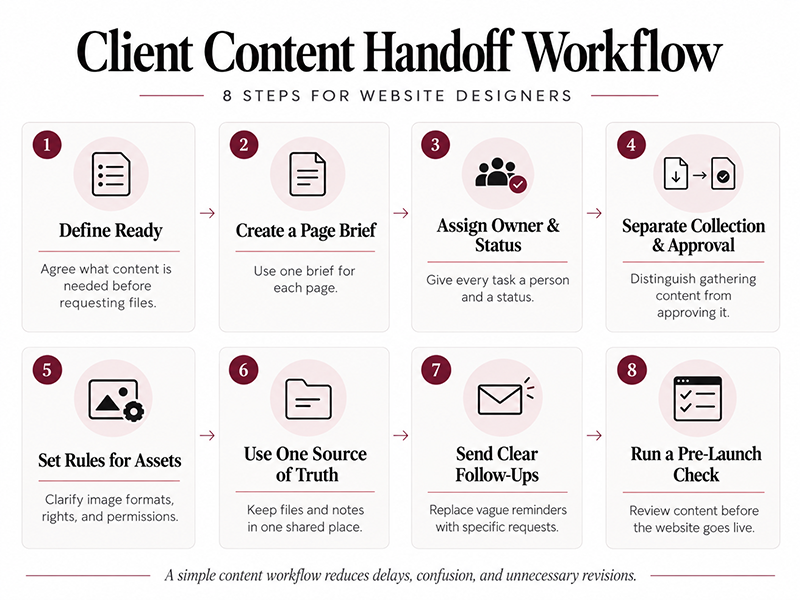
1. Define “ready” before asking for files
Start by agreeing what the team needs to build and publish each page. A page is not ready merely because a text document has arrived. It is ready when its purpose, copy, required assets, reviewer and next decision are clear.
For a typical service page, “ready for build” might mean an approved page headline, a short service description, three key benefits, a clear call to action and any imagery with permission to use it. A page with an unresolved legal claim or an image of uncertain ownership remains blocked, even if everything else is present.
Separate “ready for layout” from “approved for publication.” This allows design work to proceed where appropriate without silently treating a first draft as final copy.
2. Make one short brief for each page
Clients often struggle with an open-ended request such as “Please send all the website content.” A page-by-page brief is easier to answer. Keep each brief short enough to scan at a glance and use the same fields throughout the project.
| Page brief field | What to include |
|---|---|
| Page purpose | What should this page help a visitor understand or do? |
| Primary audience | Who is the page for? |
| Main message | One sentence the visitor should remember. |
| Key points | Three concise facts or benefits to explain. |
| Evidence | A verified example, credential or approved quotation, if available. |
| Next action | What should the visitor do next? |
| Assets and rights | Required photos, graphics and confirmed permissions. |
| Owner / due date | Who provides and who approves the content, and by when? |
This brief is deliberately minimal: each answer should make the next content decision easier, not create more paperwork.
3. Organize Your Client Content Handoff: Owners and Statuses
Use one shared content register, whether it is a simple table or a document everyone can access. Give each required item a page name, an owner, a due date, a link or file reference and a status. The status should describe the work, not the person.
A useful sequence is: Not requested → Requested → Received → Needs clarification → Approved. When something is blocked, add a specific question and name the person who can answer it. “About page: final team portraits” is a trackable item; “still waiting for content” is not.
Keep the file itself in a predictable location, and point to it from the register. A clear filename such as about-team-photo-01-final.jpg is easier to review than several attachments labelled “new final 2.”
4. Ask one answerable question at a time
Break large requests into small decisions. Instead of “Write the homepage,” ask: “What should a visitor understand within five seconds of arriving?” Instead of “Send your services,” ask: “Which three services do you most want visitors to enquire about?”
Provide length guidance and a concrete example when it helps. For instance: “For each service, send a 30–50-word explanation in your own words. We will help shape it for readability.” This reduces ambiguity without taking away the client’s voice.
Do not invent testimonials, statistics or credentials to fill gaps. If proof is missing, mark it as missing and either request a verified source or redesign the section so the page makes a narrower, supportable claim.
5. Set two explicit review gates
A single “Can everyone review this?” email often produces contradictory edits and no clear decision. Appoint one client-side coordinator to consolidate feedback, even if several people contribute internally.
Use two checkpoints. First, a content review: are the statements correct, complete and suitable for the audience? Second, a final pre-publication review: does the approved copy appear in the right place, alongside the correct imagery, links and calls to action?
Record decisions as Approved, Changes requested or Blocked, with the date and reviewer. Silence should not be treated as consent. If a deadline passes, make the consequence visible: the page remains unpublished, the section is removed by agreement or the launch scope is adjusted.
6. Treat image permissions and accessibility as content work
Images need more than a filename. Ask who owns them, whether the team has permission to publish them and where they should appear. For staff photographs, confirm that the relevant people have been informed about the planned use. For supplied logos or third-party assets, keep the usage permission with the asset record.
Collect brief descriptions of meaningful images so the team can prepare useful alternative text. Decorative images can be handled differently, but the distinction should be intentional. Also check that important information is not available only inside an image.
7. Replace random chasing with a predictable rhythm
A consistent client content handoff process also makes follow-up communication easier by giving each request a clear owner, deadline, and expected outcome.
Agree on a short weekly content check-in with one consolidated update. List only open decisions, not every file already received. Make it easy for the client to reply with an answer, an owner or a new date.
A useful follow-up sounds like this:
Subject: Three items needed for the website review
Hello [Name],
To keep the next review on track, could you please help with these three items by [date]?
1. Confirm the final headline for the Services page.
2. Upload the approved team photographs and identify who may appear on the website.
3. Name the person who can approve the Contact page wording.
If any item needs more time, please reply with an owner and a realistic date. We will keep the remaining approved pages moving.
Thank you,
[Project lead]
The message is specific, respectful and easy to act on. It also gives the team an agreed alternative when a deadline cannot be met.
8. Measure readiness, not the number of reminders
To understand whether content collection is working, track a few operational measures: the share of required items approved, the number of blocked pages, how long a decision has been waiting and which person owns the next action. These measures reveal bottlenecks more clearly than an inbox full of follow-up messages.
Before each milestone, review the remaining blockers by their impact. A missing hero image for the homepage and an unapproved privacy statement may affect a launch more than an optional paragraph for a secondary page. Make trade-offs deliberately and document them.
A repeatable handoff beats a heroic last-minute rescue
A good content process should make the next step obvious to both the designer and the client. Each page has a purpose. Each item has an owner. Each file has a location. Each approval has a named decision-maker. And every blocker has a specific question rather than a vague reminder.
That is the point at which content stops being a surprise at the end of a web project and becomes something the team can plan, review and complete with confidence.
About the author
Jozef Krutek is an entrepreneur based in the Czech Republic. He works on practical digital templates and document-based workflows, with a focus on making business processes clearer and easier to follow. His current projects include resources for organizing client content and handoffs in small website projects.
Discover more from DesignRise
Subscribe to get the latest posts sent to your email.