










By Hongliang Wang
A product scene can be persuasive before anyone has checked the product. A soft shadow, a convincing surface and a well-placed prop may make an image useful for discussing a visual direction. They leave a separate question unanswered: does this version still show the item described in the brief?
A rejection sheet gives that question a place in the design process. For each relevant detail, it records what must stay true, the source supporting it, what the reviewer can observe and what should happen next. Its purpose is to make a decision understandable when a concept moves between a designer, a colleague and a client.
The method below is a proposed review workflow, not a validated accuracy test. It applies to concepts prepared for discussion. Final product imagery needs its own approval process.
Give the concept a defined job
Write one sentence describing the decision this image should help someone make. For example: “Explore a quiet desk setting for an internal discussion about composition.” That purpose gives the reviewer a boundary. A background choice may be open for discussion while the product’s visible features remain fixed.
Record the intended audience and the concept label that should accompany the file. “AI-generated concept for setting discussion” is more informative than a filename containing only “final”. Keep the label visible wherever the image is shared, including slides and exported previews.
Then identify the scene choices the brief allows. These might include background colour, lighting direction or the position of a separate styling prop. Naming those choices helps prevent a personal preference from becoming a rejection reason. Conversely, a beautiful arrangement should not excuse a change to a feature the brief requires.
Agree on that distinction before reviewing alternatives. If the brief changes, record the change and review the affected details again.
Establish what the references support
Start with reference files you have permission to use for the intended work. Record their filenames, versions, visible views and permission status. If permission is unresolved, record a hold and resolve it before proceeding with that use. A downloaded image alone does not establish permission.
Create a short list of product facts with a source beside each one. A front view may support the presence of a visible stripe. A side view may show the handle attachment. A supplied item list may establish that the product is sold without a lid. Keep those sources distinguishable so another reviewer can follow the comparison.
Limit each observation to what its source supports. One photograph cannot reveal every hidden edge. A glossy appearance does not establish a material’s composition or performance. Apparent size in a scene does not establish dimensions. Record missing information as an unknown and identify the reference view or specification needed to resolve it.
Check whether the concept and reference are comparable. A different camera angle can make a handle look narrower without proving that its geometry changed. When an important detail is obscured, request an unobstructed view or a more comparable concept. Enlarging an ambiguous area does not supply the missing evidence.
This preparation creates the basis for rejection. Without it, “the product looks wrong” can mix an actual contradiction with an unsupported assumption.
Turn the brief into observable checks
Use six categories to organise the review. Each row needs a requirement and source, an observation about this version, a status and a next action. Write enough detail for someone to locate the issue without asking what “off” means.
Count and identity. Check the number of items and the intended variant against the brief and item list. A duplicated object or a mixture of features from different variants needs a specific correction. Reflections and background objects also deserve inspection when they make the count ambiguous.
Shape and proportions. Compare visible outlines, openings, joints and attachments using suitable views. Name the feature at issue. “The handle meets the body at one visible point, while the side reference shows two attachments” provides a reviewable reason. A general impression of distortion does not explain what to fix.
Lettering and marks. Compare visible wording and marks with a readable reference or supplied text. Check individual characters and placement where the brief requires them. If the lettering is too small or obscured to inspect, put that check on hold. Do not silently treat unreadability as a match.
Surface and colour. Record visible changes in texture, finish or colour appearance, along with the limits of the comparison. Different lighting and viewing conditions complicate this check. Avoid promising exact colour accuracy from ordinary screen inspection. If exact colour matters to the use, request an agreed reference and review method.
Accessories and packaging. Distinguish included components from styling props using the supplied item list. A plausible lid, cable or package can imply that it belongs to the product. Its visual plausibility is not evidence that it is included.
Scene implications. Ask what the arrangement suggests about scale, use or performance. A decorative setting should not introduce a factual claim the available evidence cannot support. Record an unresolved implication as a hold rather than filling the gap with a persuasive caption.
Keep the rows separate. An acceptable background does not cancel an altered mark, and five clear checks do not compensate for one unresolved required detail. The sheet records reasons, not an average quality score.
Work through a hypothetical mug brief
The following exercise is hypothetical. It presents no actual product, reference image, generated output, customer project or measured result.
Imagine a brief for one ceramic mug in a quiet desk setting. For this exercise, assume permission-cleared front and side references show a single mug, one rounded handle and a blue vertical stripe. The supplied item list explicitly excludes a lid and matching saucer. The image will be discussed internally for composition only.
Candidate A adds a lid. In the accessories row, write the requirement as “Mug only; no lid, according to the supplied item list.” Record the observation as “A fitted lid appears on the mug.” Mark the row Reject. The next action is to remove the lid and review the revised version. Calling it a styling choice would conflict with the recorded brief.
Candidate B places the handle attachment behind the mug. The required attachment cannot be inspected. Mark that check Hold, explaining which area is hidden. Request an unobstructed concept view and compare it with the side reference. This decision does not assert that the handle is wrong; it identifies the evidence needed to judge it.
Candidate C shows the recorded visible details and places a notebook beside the mug. The notebook may be an allowed scene choice if its separation is clear and the brief permits it. Check that it cannot reasonably be mistaken for part of the supplied item. If all relevant checks are resolved, the overall decision may read “Reviewed for this concept brief only.”
That wording preserves the exercise’s scope. It does not establish the mug’s dimensions, capacity or suitability for a catalogue. Nor do these invented candidates demonstrate the capabilities of an image tool. They illustrate how different observations lead to different actions.
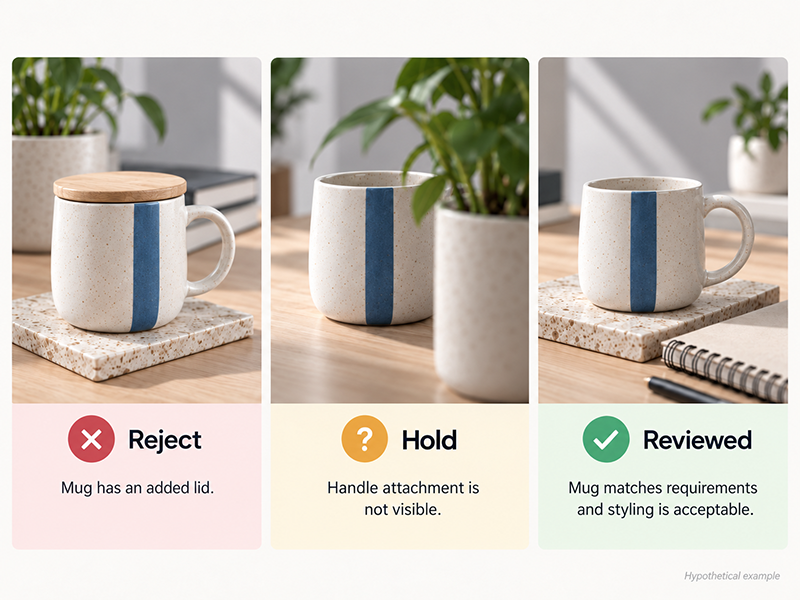
Hypothetical review decisions at a glance
Illustrative example only: no real product, AI generation test, or customer outcome.
| Concept | Observation | Decision |
|---|---|---|
| Candidate A | An unlisted lid appears on the mug | Reject |
| Candidate B | The handle attachment is obscured | Hold |
| Candidate C | A notebook is added as a separate styling prop | Reviewed for this concept brief only, if all relevant checks are resolved |
Use the sheet during revision
Complete one sheet for each concept version. Put the reference and concept identifiers at the top before entering observations. Leave room for brief notes, but keep longer evidence in a clearly identified companion record when necessary.
Use Reject when the concept contradicts a supported fact or a recorded brief requirement. Use Hold when required evidence is missing or a relevant detail cannot be inspected. “No visible issue” applies only to the inspected detail and views. For an inapplicable check, record why it is outside this brief rather than leaving an unexplained blank.
Make the overall decision follow the unresolved rows. Any rejection requires correction. If no rejection remains but a relevant hold is unresolved, the concept stays on hold. Use “Reviewed for this concept brief only” when the relevant checks are complete and no rejection or hold remains.
Assign the next action to an owner. Preserve the rejected file and its reason so the next reviewer can see what changed. A new file, altered reference or revised brief triggers another review of the affected checks; an earlier decision should never travel silently to a different version.
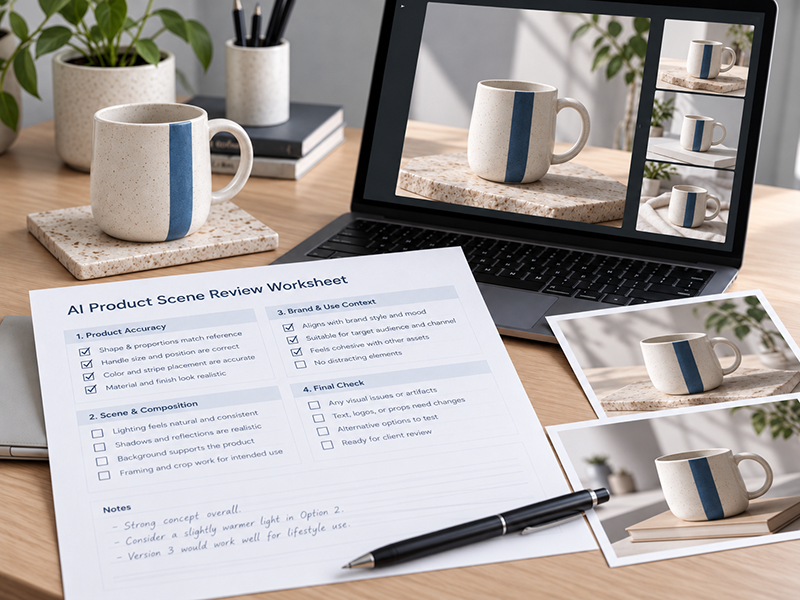
Download the Product Scene Review Worksheet
Use the blank, unbranded worksheet to record product-scene checks, decisions, and follow-up actions. Choose the printable PDF or editable Word version.
Hand over the decision with its limits
Share the sheet with the exact image version it describes. Carry forward the concept label, source records and any limits on the review. If a concept is passed to someone who did not attend the discussion, the accompanying record should explain what they may use it to consider.
Keep final publication approval separate and explicit. A concept review cannot establish product specifications, safety, performance or actual customer experience. Those claims need their own evidence and appropriate review for the intended use.
At the next revision, start with the recorded reason. Obtain the missing view, correct the changed component or clarify the brief. Then inspect the new version against the same supported requirements. The useful outcome is a decision that another person can understand and act on, with the image’s remaining limits still attached.
Author bio
Hongliang Wang is a software builder interested in practical image-review workflows.
AI assistance disclosure
AI assistance was used to structure, draft and edit the article and worksheet. The worked example is hypothetical and does not report an actual product test, customer project or measured result.
Discover more from DesignRise
Subscribe to get the latest posts sent to your email.