For years, AI entered creative software one feature at a time.
Remove a background. Generate an image. Rewrite a headline. Extend a canvas. Suggest a layout. Turn a sketch into an interface. Produce three variations.
Useful? Absolutely.
But the workflow remained largely unchanged. The designer decided what needed to happen, selected the appropriate tool, executed one operation, reviewed the result, and then decided what to do next.
AI design agents change that relationship.
Instead of completing only one isolated command, an agent can increasingly work toward a broader outcome. It can inspect project context, use existing assets or systems, perform several related actions, respond to feedback, and continue working inside the same creative environment.
The shift may appear subtle:
Old interaction: “Generate this.”
Agentic interaction: “Help me solve this.”
That difference has consequences far beyond faster production.
It changes what designers need to be good at.
If software can increasingly perform the mechanical steps between an idea and a usable design, then the most valuable human skills move toward direction, judgment, context, systems thinking, critique, research, and taste.
The question is no longer simply whether AI can create a screen, image, layout, or campaign asset.
The more important question is:
What happens when AI begins participating in the workflow itself?
What Is an AI Design Agent?
An AI design agent is a system that can work toward a creative or design objective through multiple connected actions rather than responding only to a single generation request.
A conventional generative tool often follows a simple pattern:
Instruction → Generation → Output
You request an image.
You receive an image.
You request another version.
The AI waits for the next command.
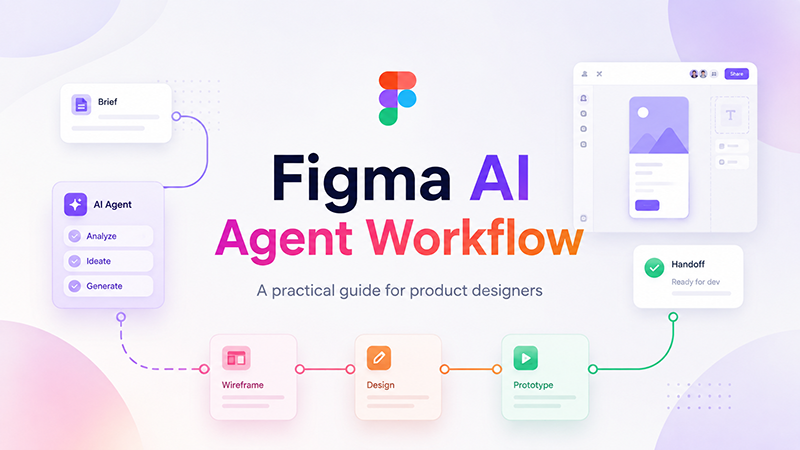
An agentic workflow can look more like:
Goal → Context → Actions → Evaluation → Revision → Outcome
That means the system may need to determine which intermediate steps are necessary rather than waiting for the designer to explicitly specify every one.
A simple example
Imagine you are working on an onboarding flow for a mobile application.
A standard AI feature might respond to:
Generate an onboarding screen for a fitness app.
An AI design agent could potentially receive a much broader instruction:
Review this onboarding flow, reduce unnecessary friction, preserve our existing design system, improve the hierarchy of the primary actions, create the missing error and loading states, and prepare two alternatives for review.
The second task requires more than generation.
The agent needs to understand what already exists. It needs to recognize the design system, identify patterns, preserve some decisions, question others, create related states, and produce work that fits the surrounding product.
That is why agentic design is not simply another name for generative AI.
The unit of automation is becoming larger.
AI Tool vs AI Assistant vs AI Agent
The terminology around AI can become confusing quickly, so it helps to separate three different levels of interaction.
| Type | What You Provide | What AI Does | Typical Example |
|---|---|---|---|
| AI Tool | Specific command | Performs one operation | Remove a background |
| AI Assistant | Question or request | Suggests or generates | Suggest three headline alternatives |
| AI Agent | Goal + context + constraints | Carries out connected steps toward an outcome | Improve an onboarding flow while preserving the product system |
These categories can overlap in real products, but the distinction is useful.
An assistant helps with the task. An agent begins to participate in the process.
The DesignRise Shift: Tool → Assistant → Agent → Creative Partner
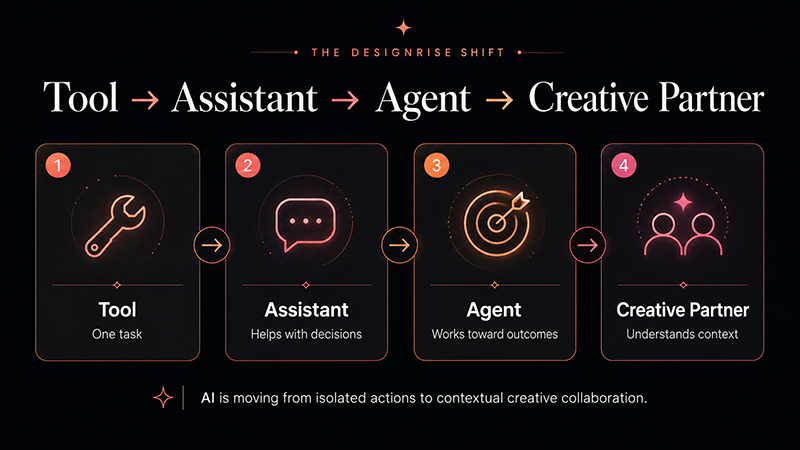
At DesignRise, we think the evolution of creative AI can be understood as four stages.
1. Tool
The human controls almost every decision.
Software performs a specific operation: resize, remove, mask, export, crop, generate, recolor.
2. Assistant
AI begins helping with individual decisions.
It can suggest copy, generate references, create alternatives, summarize research, critique an interface, or propose a composition.
The designer still manages the process step by step.
3. Agent
The designer defines an outcome and its boundaries.
The AI can determine some of the intermediate actions required to reach that outcome.
The designer becomes less responsible for specifying every operation and more responsible for defining intent, context, constraints, and approval criteria.
4. Creative Partner
This is the more ambitious direction.
An AI system understands not only the current request but also the project, brand, previous decisions, design system, audience, constraints, research, and feedback history.
It does not simply produce more assets.
It works within a recognizable creative context.
The DesignRise Shift
Tool → Assistant → Agent → Creative Partner
This does not mean AI becomes the creative director.
It means the software can perform more of the execution between creative decisions.
Why AI Design Agents Matter Now
The idea of autonomous software is not new. What is changing is the amount of creative context these systems can access and the places where they can operate.
Recent developments from major design platforms make the direction increasingly visible.
Figma is bringing the agent directly onto the canvas
Figma introduced a design agent built to work directly inside the Figma canvas rather than requiring designers to move their work into a separate chat interface.
The important idea is not simply that the agent can generate design.
It can work in the same environment where the team’s actual design context already exists.
Figma has also been expanding the agent with greater context, skills, and custom tools, pushing the interaction beyond a single prompt and toward workflows that better reflect how a particular team works.
Read Figma’s introduction to its design agent.
Adobe is moving toward creative orchestration
Adobe’s creative-agent direction focuses on a related idea: creators define the vision while AI handles more of the multi-step execution across creative workflows.
Adobe has been bringing its creative agent into Creative Cloud applications, positioning AI less as an isolated generator and more as a layer capable of helping orchestrate work across familiar professional tools.
Explore Adobe’s Creative Agent approach.
Google Stitch is turning UI generation into a live design process
Google’s Stitch started as an AI-powered way to generate user-interface designs and frontend code from text or image inputs.
Its evolution toward real-time “vibe design” is more interesting from an agentic perspective.
The goal is increasingly to let the user steer, critique, reflow, and iterate while the agent works with the design rather than simply returning one finished output.
See Google’s latest Stitch design workflow.
Different platforms are approaching the problem differently.
But the broader direction is similar:
AI is moving closer to the working file, the working context, and the working process.
The Creative Workflow Is Moving From Commands to Outcomes
Early AI workflows encouraged designers to think in prompts.
The better the prompt, the better the output.
Agentic workflows introduce another layer.
The designer may increasingly need to define not just what to generate, but what outcome the system should work toward.
Command-based direction
Create four pricing cards. Use rounded corners, a dark background, white text, and a purple accent.
Outcome-based direction
Improve this pricing section so a first-time visitor can understand the difference between plans quickly. Keep our existing component system, preserve the current brand, emphasize the recommended plan without making the others feel intentionally weak, and create one alternative optimized for mobile.
The second instruction is less about visual decoration and more about purpose.
That is exactly why agentic workflows can make problem framing more important.
If the goal is wrong, faster execution only gets the project to the wrong destination sooner.
Context May Become More Important Than Prompt Engineering
Detailed prompts remain useful, but agents increase the value of something deeper: context.
A design agent may need to understand:
- the existing design system;
- brand guidelines;
- approved components;
- typography rules;
- spacing logic;
- product requirements;
- customer research;
- accessibility requirements;
- technical constraints;
- previous design decisions;
- content hierarchy;
- the purpose of the current flow;
- examples of approved and rejected work.
Without context, the agent has to infer.
And every inference creates another opportunity for the system to make a plausible but incorrect assumption.
DesignRise principle: A prompt explains what you want now. Context explains how the project is supposed to work.
Design Systems Are Becoming Instructions for AI
Design systems were created primarily to help human teams work consistently.
A button should behave like this.
A modal uses these patterns.
Spacing follows these values.
Typography follows this hierarchy.
These colors have defined roles.
With AI agents, design systems gain another important function.
They become structured constraints for machine-assisted creation.
An agent working with a mature design system has fewer decisions to invent.
Instead of generating a new button style, it can reuse an approved component.
Instead of guessing the brand color, it can use an existing token.
Instead of inventing arbitrary spacing, it can follow the product’s established rhythm.
This changes the value of design-system quality
A messy design system is no longer only inconvenient for the team.
It can also become messy context for AI.
If a library contains:
- duplicate components;
- contradictory naming;
- unused variants;
- old patterns;
- inconsistent tokens;
- unexplained exceptions;
an agent can reproduce that confusion faster.
Agentic design therefore creates a new incentive to maintain a clear source of truth.
A Design File Is Becoming an Environment, Not Just a Document
One of the most meaningful changes in AI design is the movement from external chat windows into the creative environment itself.
A design canvas contains far more context than a screenshot.
It may contain:
- components;
- variants;
- previous explorations;
- screens that belong to the same flow;
- annotations;
- prototype connections;
- layout relationships;
- unused concepts;
- team comments;
- visual patterns that were never written into a formal guideline.
A separate chatbot only knows what you manually explain to it.
An agent operating inside the environment can potentially reason from much more of the actual working context.
This is why the future of design software may not be “chat replaces the canvas.”
It may be:
The canvas itself becomes intelligent.
Where AI Design Agents Can Be Genuinely Useful
The strongest use cases are not necessarily the most spectacular.
An agent can create value when it reduces the distance between a decision and the work needed to evaluate that decision.
1. Exploring layout alternatives
Instead of manually rebuilding a screen four times, a designer can ask an agent to preserve the content and design system while exploring different information hierarchies.
The designer can then compare the alternatives rather than spend most of the time constructing them.
2. Creating missing product states
Product files often contain the ideal state but miss:
- empty states;
- loading states;
- error states;
- permission states;
- edge cases;
- long-content states.
An agent with enough product context can help identify and prepare those states for review.
3. Responsive adaptation
Moving from desktop to tablet or mobile includes many repetitive decisions.
An agent can help create the first responsive pass while the designer reviews:
- priority;
- hierarchy;
- interaction changes;
- content reduction;
- navigation behavior.
4. Design-system cleanup
Agentic workflows can help identify component drift, repeated patterns, inconsistent naming, or areas where local styles no longer match the system.
The human still needs to decide which difference is an error and which difference is intentional.
5. Campaign adaptation
A campaign may need:
- a landing page;
- social formats;
- email assets;
- display banners;
- video frames;
- presentation assets.
An agent working from a clear campaign system could handle more of the adaptation work while the art director protects the central visual idea.
6. Early prototyping
When the goal is to test an interaction idea rather than perfect production details, agentic generation can reduce the time required to move from concept to something the team can discuss.
7. Critique and comparison
A useful design agent does not have to create everything.
It can also help inspect:
- hierarchy;
- component consistency;
- possible accessibility issues;
- content duplication;
- flow gaps;
- differences between alternatives.
The Real Productivity Gain Is Faster Evaluation, Not More Output
Generative AI makes it easy to measure productivity badly.
Twenty layouts look more productive than four layouts.
One hundred assets look more productive than ten.
More output is easy to count.
But design is not manufacturing pixels.
The meaningful question is whether the system helps the team make a better decision sooner.
Imagine two workflows.
Workflow A
The designer manually builds three versions over six hours.
Workflow B
The designer establishes the constraints, asks an agent for three directions, rejects two within twenty minutes, identifies the strongest one, and spends the remaining time refining it.
The benefit of Workflow B is not that AI created three versions.
The benefit is that the cost of testing an idea became lower.
That is a much more valuable definition of creative productivity.
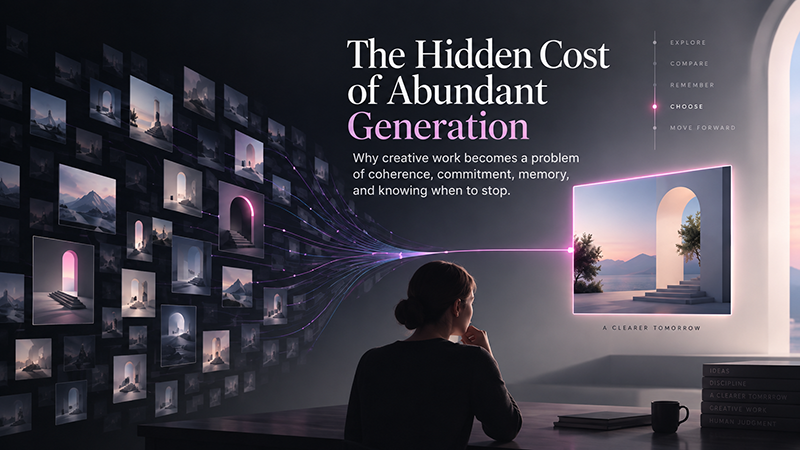
More Generation Makes Selection More Important
When output becomes cheap, filtering becomes expensive.
This is one of the most underestimated consequences of generative AI.
An agent can potentially create:
- ten homepage directions;
- six onboarding flows;
- twenty component variants;
- dozens of visual treatments;
- hundreds of campaign adaptations.
But someone still needs to decide:
- which solves the real problem;
- which fits the brand;
- which is easy to understand;
- which is technically realistic;
- which should be rejected;
- which is visually strong but strategically wrong.
This is why AI design agents may increase the value of editorial judgment.
The designer of the future may generate less manually while rejecting more intelligently.
Taste Is Becoming a Production Skill
“Taste” can sound vague or subjective.
In professional creative work, it is much more practical than that.
Taste is the accumulated ability to recognize why one decision is more appropriate than another.
It develops through:
- experience;
- references;
- practice;
- critique;
- cultural awareness;
- technical understanding;
- observation;
- repeated comparison.
When execution becomes easier, taste becomes more visible.
Give two designers the same AI agent and the same brief, and they can still produce very different results.
They will:
- choose different references;
- set different boundaries;
- notice different problems;
- reject different outputs;
- ask different questions;
- stop iterating at different moments.
AI does not remove taste from the process. It makes the consequences of taste easier to see.
Creative Direction Becomes More Important, Not Less
There is a temptation to assume that automation reduces the value of creative direction.
The opposite may happen.
A traditional creative director does not personally execute every production task.
They may not:
- resize every image;
- animate every transition;
- retouch every photo;
- build every presentation page;
- export every format.
Yet they remain responsible for whether the project communicates the intended idea.
As AI handles more execution, individual designers begin operating in a similar way.
The important questions become:
- What are we trying to communicate?
- Who is this for?
- What should the work feel like?
- Which decisions must remain consistent?
- Where should experimentation happen?
- What should never be automated?
- Which output deserves to move forward?
Those are directorial questions.
The Hidden Risk: Fast Mediocrity
The obvious risk of AI-generated design is bad design.
But bad design is often easy to reject.
The more dangerous problem is perfectly acceptable mediocrity produced at enormous speed.
The spacing is correct.
The interface looks clean.
The gradients are tasteful.
The typography is familiar.
The cards align.
The buttons are where everyone expects them.
Nothing is technically wrong.
Nothing is particularly memorable either.
When large numbers of teams work with similar models, default patterns, datasets, references, and interface conventions, acceptable design can converge rapidly.
Efficiency then becomes a threat to distinctiveness.
Agentic Design Can Make Everything Look More Similar
Agents are useful partly because they recognize patterns.
Design systems are useful partly because they standardize patterns.
Combine the two and consistency can improve dramatically.
But there is a point where consistency turns into sameness.
If an agent always chooses the safest familiar pattern, creative work may gradually converge around:
- predictable SaaS layouts;
- standard hero sections;
- familiar card grids;
- safe typography;
- generic illustrations;
- similar gradients;
- expected microinteractions.
The solution is not to avoid agents.
It is to recognize two different categories of creative work.
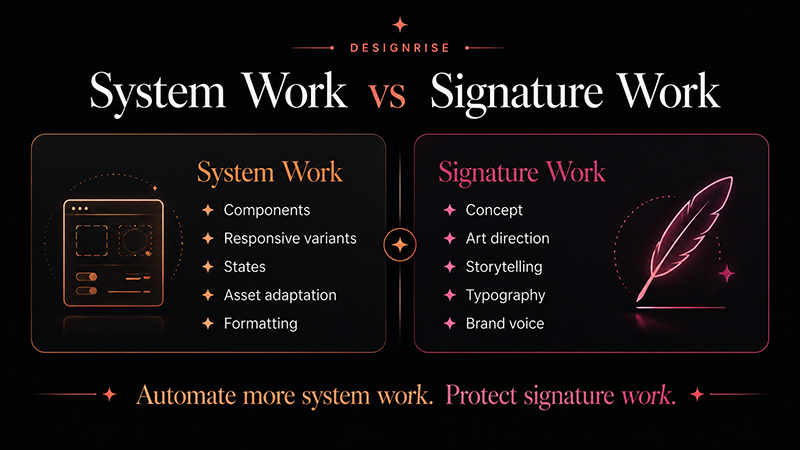
System work
Work that benefits from repeatability:
- components;
- responsive variants;
- production formatting;
- states;
- tokens;
- asset adaptation;
- consistency checks.
Signature work
Work that creates identity:
- concept;
- art direction;
- visual tension;
- brand voice;
- storytelling;
- unusual composition;
- distinctive typography;
- interaction personality.
Automate more system work. Protect signature work.
AI Agents Can Make Wrong Assumptions Look Professional
A dangerous AI output is not always obviously broken.
Sometimes it is beautifully executed and based on a false assumption.
An agent may:
- invent a feature that does not exist;
- remove content that is legally required;
- change an interaction that has an important technical reason;
- introduce a component that looks right but violates the system;
- simplify a flow by removing necessary information;
- create a visually convincing user state that cannot occur in the product.
This is one reason human review cannot be reduced to:
“Does it look good?”
The reviewer also needs to ask:
“Is it true?”
“Is it allowed?”
“Does it work?”
“Does it belong?”
The DesignRise Agentic Creative Workflow
AI agents become more useful when they operate inside an explicit process.
At DesignRise, we would structure that process around seven stages.
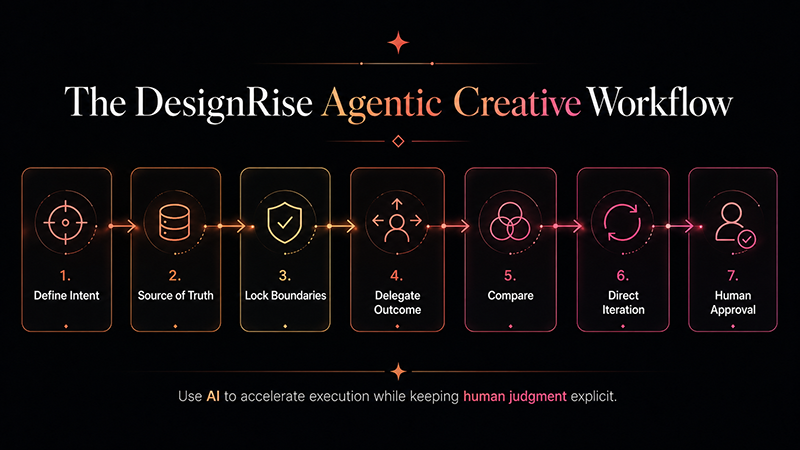
1. Define Intent
Start with the problem rather than the desired visual output.
Weak:
Redesign this page.
Stronger:
Reduce the effort required for a first-time visitor to understand what the product does and reach the primary action.
Intent gives the agent a reason for making changes.
2. Establish the Source of Truth
Identify the information the agent should trust.
This may include:
- the current component library;
- brand guidelines;
- approved content;
- product requirements;
- research findings;
- technical documentation;
- accessibility standards;
- approved references.
If two sources conflict, decide which one wins before delegating the work.
3. Lock Boundaries
Define what the agent is allowed to change and what must remain untouched.
For example:
- navigation cannot change;
- existing typefaces must remain;
- pricing content is fixed;
- approved components must be reused;
- the agent may change layout hierarchy;
- the agent may create additional visual variations.
4. Delegate a Bounded Outcome
Avoid “improve everything.”
Give the agent a useful but controlled unit of work.
Create two alternatives for this onboarding step that reduce the number of competing actions. Preserve the existing typography and component library. Do not change the navigation or required legal text.
5. Compare, Don’t Automatically Accept
The first AI output should be treated as a proposal.
Compare it against:
- the current version;
- the brief;
- user needs;
- the design system;
- technical constraints;
- brand identity.
6. Direct the Iteration
Useful feedback identifies the reason for a change.
Weak:
Make it better.
Stronger:
The hierarchy is clearer, but the layout now feels disconnected from the rest of the onboarding flow. Keep this information structure and restore the spacing rhythm and typography scale used in the previous steps.
7. Human Approval
The final decision remains explicit.
The agent can execute.
The agent can propose.
The agent can compare.
The agent can iterate.
It should not silently become the final creative authority.
The DesignRise Rule
Delegate execution. Never delegate judgment by accident.
A Practical Brief for an AI Design Agent
A useful agent brief does not need to be long, but it should contain the information that prevents unnecessary guessing.
OBJECTIVE
What outcome should improve?
USER
Who is the design for?
CONTEXT
What does the agent need to know about the project?
SOURCE OF TRUTH
Which files, systems, components, content, or research should it trust?
LOCKED ELEMENTS
What must not change?
FLEXIBLE ELEMENTS
Where can the agent explore?
DELIVERABLE
What should the agent produce?
SUCCESS CRITERIA
How will the human team decide whether the result is useful?
Example
Objective: Make plan selection easier for first-time users.
User: Small-business owners comparing plans for the first time.
Context: Users currently report that differences between Standard and Pro are difficult to understand.
Source of truth: Current pricing copy, component library, product requirements.
Locked: Prices, plan names, navigation, legal copy, brand typography.
Flexible: Hierarchy, card layout, comparison treatment, emphasis.
Deliverable: Two desktop alternatives and one mobile adaptation of the strongest direction.
Success: Plan differences should be understandable within a short visual scan without hiding important limitations.
This type of brief makes the agent easier to evaluate because everyone knows what problem it was supposed to solve.
The Biggest Failure Modes in Agentic Design
1. Context Drift
The agent begins with the correct rules but gradually introduces new assumptions across multiple iterations.
Fix: periodically restate or re-anchor critical constraints and compare against the source of truth.
2. Design-System Contamination
The agent creates local variants that look acceptable and are then accidentally treated as approved system patterns.
Fix: separate exploratory output from production components. Require explicit approval before new patterns enter the library.
3. Scope Creep
A task that started as “improve hierarchy” becomes a redesign of navigation, copy, interaction, visual identity, and structure.
Fix: define locked areas before the agent begins.
4. Automation Bias
People assume the AI output is correct because it is polished or because the system appears confident.
Fix: review against evidence, not visual polish.
5. Generic Convergence
The agent repeatedly chooses familiar patterns because they are statistically safe.
Fix: provide stronger brand references, signature rules, and deliberate creative constraints.
6. Uncontrolled Propagation
One incorrect AI decision is copied across multiple screens, formats, or assets.
Fix: approve the rule before scaling the rule.
7. Endless Generation
The team keeps requesting alternatives because generation is inexpensive.
Fix: define acceptance criteria before exploring variants.
Measure Agentic Design by Rework, Not by Number of Outputs
If teams adopt design agents, they need better metrics than “assets generated.”
Useful signals may include:
- time to first reviewable option;
- percentage of agent output accepted for further development;
- number of human revision cycles;
- design-system compliance;
- amount of downstream rework;
- number of errors introduced;
- time saved on repetitive adaptation;
- time gained for research, critique, and refinement;
- user outcome after implementation.
A team that produces twice as many screens but spends twice as long correcting them has not improved its workflow.
Agentic design succeeds when it reduces unnecessary work without reducing the quality of decisions.
What Happens to Junior Designers?
AI design agents create an uncomfortable but important question.
Junior designers have traditionally learned through production work.
Resize this.
Create these states.
Adapt this desktop layout to mobile.
Apply the design system.
Prepare the assets.
Build several versions.
Many of those tasks are exactly the type of structured work agents can accelerate.
This creates an educational problem.
A designer cannot develop judgment simply by skipping directly to creative direction.
Good judgment is often built through years of execution.
Junior development may need to change
Teams may need to deliberately create learning opportunities around:
- critique;
- design reconstruction;
- system analysis;
- research;
- supervised agent workflows;
- comparison of alternatives;
- explaining why a design decision works;
- manual practice where it develops foundational understanding.
The junior designer may perform less repetitive execution.
But they will need to understand the reasoning behind that execution earlier.
Designers Need to Learn How to Review AI Work
Knowing how to use an agent is only half the skill.
The other half is knowing how to review what it produces.
A professional review should go beyond aesthetics.
Did the agent solve the correct problem?
A beautiful solution to the wrong problem is still a failed solution.
Did it preserve the source of truth?
Check:
- content;
- components;
- tokens;
- business rules;
- navigation;
- required states.
Did it introduce hidden assumptions?
Look for features, states, content, behavior, or interactions that were never approved.
Did it simplify or merely remove?
Less content does not automatically mean less cognitive load.
Does it work across the complete flow?
An agent may improve one screen while weakening the screens around it.
Does it still look like us?
Design-system compliance is not enough if the final experience has lost the brand’s personality.
The New Skill Stack for Designers
Traditional design skills are not disappearing.
But several abilities become more valuable when AI performs more execution.
Problem Framing
Designers need to identify the actual problem before delegating work.
Art Direction
When generating alternatives becomes easy, establishing a coherent visual direction becomes more important.
Systems Thinking
Agents work more reliably when rules, components, relationships, and constraints are explicit.
Critique
“I don’t like it” is weak direction for both humans and AI.
A strong designer can explain what is wrong, why it matters, and what should change.
Context Management
Knowing which information to give an agent may become more valuable than writing increasingly complicated prompts.
Research
AI can produce plausible answers to problems users do not actually have.
Research remains the connection between the design and reality.
Brand Understanding
An agent may know the visual rules without understanding the deeper cultural or strategic reasons behind them.
Editorial Judgment
More output means more selection.
Knowing what to remove becomes a creative advantage.
Will AI Design Agents Replace Designers?
Some design work will certainly change.
Tasks involving repetitive adaptation, routine production, first-pass exploration, and pattern-based execution may require fewer manual hours.
But “designer” is not one operation.
Professional design connects:
- research;
- strategy;
- communication;
- behavior;
- hierarchy;
- visual language;
- systems;
- brand;
- technology;
- business;
- culture;
- judgment.
An agent can participate in many of these areas.
Participation is not the same as responsibility.
A more useful question is:
Which designers become more valuable when execution becomes cheaper?
Probably the designers who can connect these layers rather than simply operate one piece of software.
Access to AI Agents Will Not Be a Competitive Advantage for Long
At first, access to a powerful new AI tool can create an advantage.
That advantage rarely lasts.
If all major creative platforms develop capable agents, then saying:
We use AI.
will eventually mean very little.
The competitive advantage moves toward:
- better proprietary context;
- stronger design systems;
- better research;
- clearer brand rules;
- better internal knowledge;
- more distinctive references;
- stronger art direction;
- better human review;
- better taste.
Owning Photoshop never made someone a great designer.
Knowing Figma never guaranteed a great product.
Having access to an AI agent will not guarantee excellent creative work either.
From Software Operator to System Director
For decades, designers were partly defined by their ability to operate complicated creative software.
Shortcuts mattered.
Menus mattered.
Knowing exactly how to construct something efficiently mattered.
Those abilities will not disappear immediately.
But agentic systems can reduce how much professional identity depends on manually operating every step.
The designer increasingly becomes responsible for the system around the execution:
- What is the objective?
- What is the source of truth?
- What context does the AI have?
- What is it allowed to change?
- Which decisions require human approval?
- How will we evaluate the result?
- When should the system stop?
This is not less design.
It is design at a different level of abstraction.
How Design Teams Can Adopt AI Agents Without Losing Control
Teams do not need to automate an entire creative workflow at once.
In fact, starting small is usually safer.
Stage 1: Assistance
Use AI for:
- brainstorming;
- copy alternatives;
- research summaries;
- reference exploration;
- small production tasks.
Stage 2: Bounded Agent Tasks
Delegate controlled work such as:
- responsive adaptations;
- missing states;
- layout alternatives;
- design-system checks;
- campaign-format adaptations.
Stage 3: Connected Workflows
Allow agents to work across multiple related steps, but retain checkpoints where a human approves direction before the work expands.
Stage 4: Governed Agentic Systems
Only after teams understand the failure modes should agents receive broader context or permissions.
At this stage, teams need clear policies for:
- source-of-truth data;
- access permissions;
- private information;
- brand assets;
- approval;
- auditability;
- production handoff.
A Simple Governance Checklist for Creative Agents
- ☐ Is the objective clearly defined?
- ☐ Does the agent know which source is authoritative?
- ☐ Are locked and flexible elements identified?
- ☐ Is sensitive information protected?
- ☐ Are agent-created components separated from approved production components?
- ☐ Is there a human review point before work scales?
- ☐ Can the team identify which parts were AI-generated or AI-modified?
- ☐ Are major assumptions reviewed?
- ☐ Is there a clear approval owner?
- ☐ Can incorrect changes be reversed without damaging the source system?
The Future Will Be More Conversational — and More Structured
At first, these ideas sound contradictory.
AI interfaces are becoming more conversational.
Professional workflows will likely become more structured.
Both can be true.
Conversation makes it easier to express intent.
Structure makes it safer for AI to act on that intent.
A five-second generation can fail cheaply.
An agent working across a large design system can propagate one wrong assumption through dozens of files or components.
The larger the delegated task becomes, the more important it is to define:
- sources;
- permissions;
- constraints;
- checkpoints;
- approval criteria.
The future of agentic design therefore depends on two things at once:
Natural interaction + explicit systems.
The Designer Is Not Just “Human in the Loop”
The phrase “human in the loop” can make the person sound like a final approval button.
That description is too passive for strong creative work.
The designer should define the loop.
The designer determines:
- what the agent sees;
- which sources it trusts;
- what it is allowed to change;
- how success is evaluated;
- which decisions need review;
- where experimentation is welcome;
- when iteration stops;
- what deserves to ship.
That is not a minor role.
It is the architecture of the creative process.
What Comes Next for AI Design Agents?
The next important development is unlikely to be simply “better generation.”
More meaningful progress will come from agents understanding more persistent project context.
Imagine an agent that understands:
- an entire product rather than one screen;
- an entire brand rather than one prompt;
- the current design system;
- previous team decisions;
- the code implementation;
- research findings;
- customer feedback;
- what previous experiments failed and why.
The closer agents get to this kind of persistent context, the more useful they become.
But the risk grows too.
A tool that generates one bad image creates one bad image.
An agent with broad authority can spread one bad decision through an entire system.
That is why the future of creative AI is not only about automation.
It is also about creative governance.
AI Design Agents Will Change Creative Work — But Not the Need for Creative Judgment
The biggest change brought by AI design agents may not be what they create.
It may be what designers stop spending time on.
Less time manually reproducing predictable patterns.
Less time preparing endless routine variants.
Less time moving information between disconnected tools.
Potentially more time for:
- research;
- direction;
- critique;
- systems;
- experimentation;
- brand building;
- storytelling;
- decision-making.
But there is no guarantee that AI automatically creates this better future.
A poorly directed agent can simply produce mediocre work faster.
The opportunity is not to generate as much as possible.
It is to build a creative process where automation removes unnecessary execution without removing human intention.
The DesignRise Takeaway
The software is becoming more autonomous. That makes clear human direction more valuable, not less.
Frequently Asked Questions
What are AI design agents?
AI design agents are systems that can work toward broader creative or design goals through multiple connected actions. Unlike a simple generator, an agent can use project context, perform related tasks, respond to feedback, and continue working toward an outcome.
How are AI design agents different from generative AI tools?
A conventional generative tool usually performs one requested operation, such as generating an image or layout. An agent can potentially interpret a larger objective, use available context, complete several intermediate steps, and revise the result.
Are AI design agents already available?
Agentic capabilities are already appearing in major creative and design platforms. Figma has introduced a design agent that works directly on its canvas, Adobe is developing and integrating creative-agent workflows across Creative Cloud, and Google Stitch uses an agentic approach for interactive UI design and iteration.
Can AI design agents use a design system?
Increasingly, yes. Design-system components, tokens, rules, structured brand information, and project context can help agents produce output that is more consistent with an existing product or brand.
Will AI design agents replace UI and UX designers?
They are likely to automate parts of production, adaptation, and exploration, but professional product design also depends on research, strategy, user understanding, systems thinking, technical constraints, communication, and judgment. The role of designers is more likely to change than simply disappear.
What skills become more important for designers using AI agents?
Problem framing, art direction, critique, systems thinking, research, context management, brand understanding, and editorial judgment become especially valuable when AI can handle more of the mechanical execution.
What is the biggest risk of agentic design?
One major risk is polished but incorrect output. An AI agent can make hidden assumptions, propagate a weak design decision across multiple assets, or produce generic work that appears professional. Human review therefore needs to evaluate strategy, accuracy, system compliance, and user impact—not only visual quality.
Should every design task be delegated to an AI agent?
No. Agentic workflows are especially useful for bounded, repeatable, context-rich tasks. Strategic product decisions, sensitive user experiences, major brand work, unfamiliar cultural contexts, and final creative direction should retain stronger human involvement.
What is the DesignRise approach to AI design agents?
The DesignRise approach is to use AI agents to accelerate execution and exploration while keeping intent, context, constraints, critique, and final creative authority explicit. In short: delegate execution without accidentally delegating judgment.
Explore More DesignRise Resources
If you are building a broader AI-assisted creative process, continue with these DesignRise resources:
- How to Build a Consistent AI Video Workflow: From First Frame to Final Edit — a practical framework for keeping AI-generated video coherent from visual direction through final production.
- Top AI Tools for Motion Designers & Video Creators — explore tools that support modern motion and creative production workflows.
- DesignRise — explore more AI tools, creative workflows, design analysis, and practical resources for modern designers.
AI design agents are not the end of creative work. They are the beginning of a different division of creative work.
The systems can move faster.
The designer still has to decide where they should go.
Discover more from DesignRise
Subscribe to get the latest posts sent to your email.