








An AI video prompt guide can give you a useful formula, a list of camera terms and dozens of examples. But none of that matters much if you still cannot explain one simple thing:
What exactly should happen in the shot?
That is where good AI video prompting really begins.
The strongest prompts are rarely the ones packed with the most cinematic adjectives. They are the ones that give the model a clear sense of motion, camera behavior, timing, atmosphere and visual priority.
For designers, this distinction matters even more. You may already have the composition, color palette, product, character or campaign visual. What you need from AI is not another design. You need movement that supports the design you already created.
DESIGNRISE PRINCIPLE
Do not describe a mood when you can describe an action.
“Elegant and cinematic” leaves room for interpretation. “A narrow reflection slowly travels across the glass while the camera makes a subtle push-in” gives the model something it can actually direct.
The Four Layers of a Strong AI Video Prompt
You do not need a rigid formula for every generation. But when a prompt is not working, it helps to break the shot into four layers.
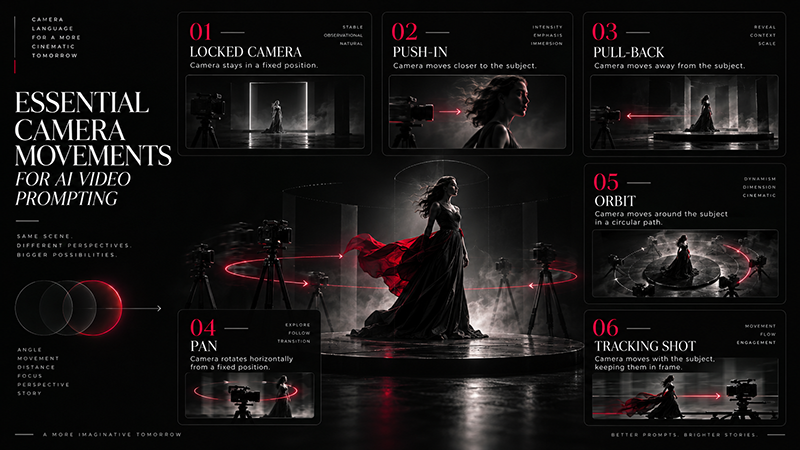
Subject Motion
What does the person, product, object or character actually do?
Environmental Motion
What moves around the subject—hair, smoke, water, fabric, clouds, particles, reflections or light?
Camera Motion
Does the camera stay locked, move closer, pull away, track the subject, orbit or pan across the scene?
Timing and Feel
Should the movement feel slow, subtle, energetic, abrupt, weightless, handheld or precisely controlled?
QUICK FORMULA
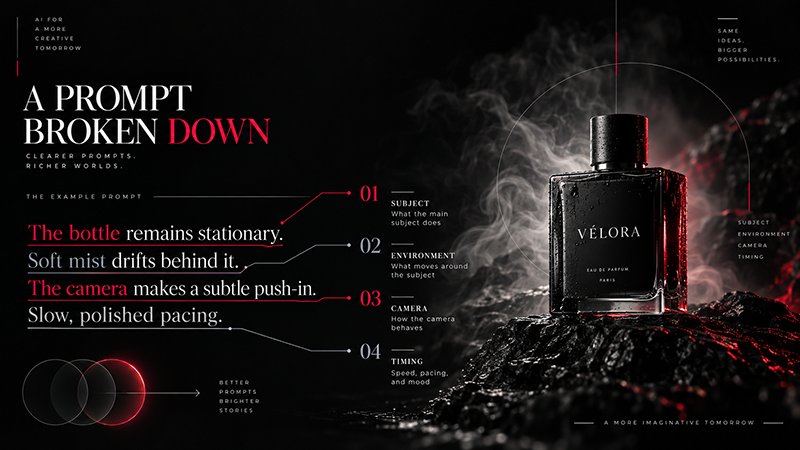
Subject action + environment movement + camera movement + timing
Start With Motion, Not Adjectives
One of the easiest mistakes to make is writing a prompt that sounds impressive but gives very little actual direction.
Consider this:
WEAK
“Luxury cinematic beauty advertisement, premium, dramatic, elegant, beautiful lighting.”
The words tell us how the creator wants the result to feel, but not what the viewer will actually see happen.
BETTER
“The perfume bottle remains stationary. A thin highlight slowly travels across the glass as soft mist moves behind it. The camera makes a controlled, very slow push-in.”
You can still add words such as luxury, cinematic or editorial, but they should support the physical direction rather than replace it.
How to Describe Subject Motion
Subject motion is the physical action performed by the main element of the shot.
For a person, that may be:
- slowly turning toward the camera;
- raising their eyes;
- walking forward;
- moving one hand;
- breathing naturally;
- turning away;
- slightly changing expression.
For a product:
- remaining perfectly stationary;
- rotating slowly;
- rising from the surface;
- opening;
- being surrounded by liquid or particles;
- revealing another layer or component.
PRO TIP
With people and precisely designed products, small movements are often easier to keep visually consistent than dramatic transformations.
Environmental Motion Makes the Shot Feel Alive
Sometimes the subject barely needs to move at all.
Movement in the surrounding scene can create enough life:
- fabric moving in a light breeze;
- steam rising from a cup;
- dust floating through a beam of light;
- water rippling around a product;
- clouds moving behind a building;
- reflections sliding across glass;
- leaves moving gently;
- hair responding naturally to wind.
This is particularly useful in product videos, because the product itself can remain stable while the environment creates visual richness.
Camera Movement: Learn These Terms First
You do not need to know every filmmaking term to write useful AI video prompts. A small vocabulary already gives you much more control.
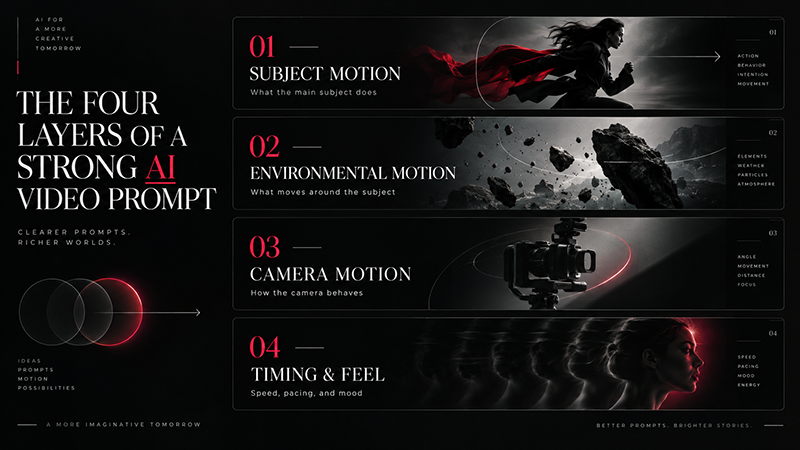
| Camera term | What it means | Good for |
|---|---|---|
| Locked camera | Camera stays still | Portraits, subtle animation, products |
| Push-in | Camera moves toward the subject | Hero shots, emotion, products |
| Pull-back | Camera moves away | Revealing environments |
| Pan | Camera view moves horizontally | Landscapes, interiors, architecture |
| Tilt | Camera view moves vertically | Tall subjects and reveals |
| Orbit | Camera moves around the subject | 3D objects and dramatic product shots |
| Tracking shot | Camera follows a moving subject | People, cars and action |
| Handheld | Natural imperfect camera motion | Lifestyle, documentary, realistic scenes |
DESIGNER’S SHORTCUT
If you do not know where to start, try a locked camera or a very slow push-in. They are often easier to control than a dramatic orbit or complex camera move.
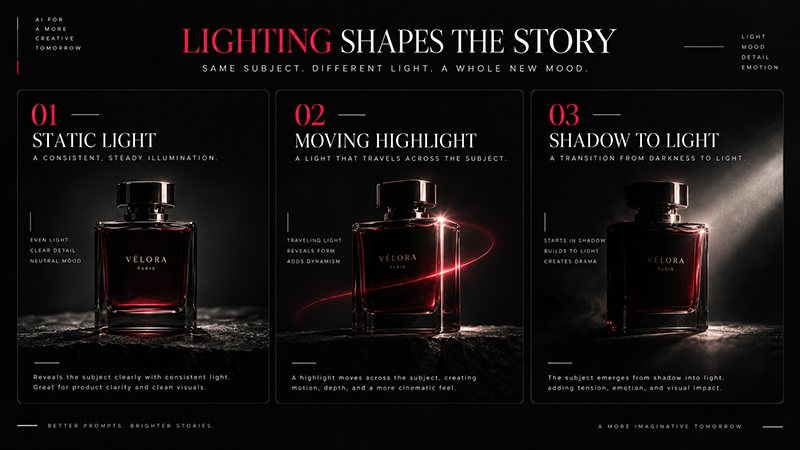
Lighting: Describe Change, Not Just Appearance
Lighting prompts are often used as static style descriptions:
“Soft cinematic lighting.”
That can help define an aesthetic, particularly in text-to-video generation.
But video gives you another possibility: lighting itself can move.
Try language such as:
- soft sunlight gradually enters the room;
- a narrow highlight moves across the glass;
- neon reflections slowly change across the wet pavement;
- the subject moves from shadow into warm light;
- light flickers subtly from an off-screen source;
- reflections shift naturally as the camera moves.
Speed Changes the Personality of the Same Shot
Consider the phrase:
“The woman turns toward the camera.”
Now compare:
Elegant: “The woman slowly turns toward the camera.”
Suspenseful: “The woman gradually turns toward the camera with restrained, deliberate movement.”
Energetic: “The woman quickly turns toward the camera as the handheld camera moves with her.”
The action is essentially the same. The timing changes the entire character of the shot.
AI Video Prompt Examples for Designers
Product Advertisement
“The skincare bottle remains stationary on the stone surface. A thin layer of mist drifts through the background while soft highlights slowly travel across the glass. The camera performs a subtle push-in. Slow, polished commercial pacing.”
Fashion Editorial
“The model slowly looks toward the camera. Her hair and lightweight fabric respond naturally to a gentle breeze. The camera remains mostly still with a subtle forward movement. Calm editorial pacing.”
Architecture
“The building remains unchanged as reflections slowly shift across the windows. Tree branches move gently in the wind and clouds travel across the sky. Smooth, controlled forward camera movement.”
Food and Beverage
“Steam rises naturally from the coffee. The surface of the drink moves subtly while morning light slowly changes across the table. The camera gently pushes toward the cup.”
Character Illustration
“The character breathes subtly and slowly raises her eyes. Loose hair strands move slightly. Small glowing particles drift through the scene. Locked camera with minimal movement.”
Do Not Try to Control Everything at Once
A common beginner instinct is to make the first prompt extremely detailed:
“The camera circles the perfume bottle while it rotates, petals fly through the air, mist fills the scene, liquid splashes upward, the background changes color, dramatic light flashes and the camera zooms toward the logo.”
There may be models capable of producing parts of that instruction. But you have also given the system a large number of opportunities to make a decision you do not like.
Start with the essential movement:
“The bottle remains stationary. Petals move gently around it as the camera slowly pushes forward.”
If that works, add another layer.
THE ITERATION RULE
Start simple → generate → identify one problem → change one variable → generate again.
Positive Instructions Are Usually More Useful
Many current generative video workflows respond more predictably when you describe the result you want rather than building the prompt around what you do not want.
“No camera movement. Don’t move the camera.”
“Locked camera. The camera remains perfectly still.”
This keeps the prompt focused on the desired visual behavior.
What Changes Between Text-to-Video and Image-to-Video Prompts?
| Image-to-Video | Text-to-Video | |
|---|---|---|
| Visual starting point | Already provided by the image | Must be described |
| Main prompt focus | Motion and progression | Appearance + scene + motion |
| Best for | Existing designs and visuals | Creating a scene from scratch |
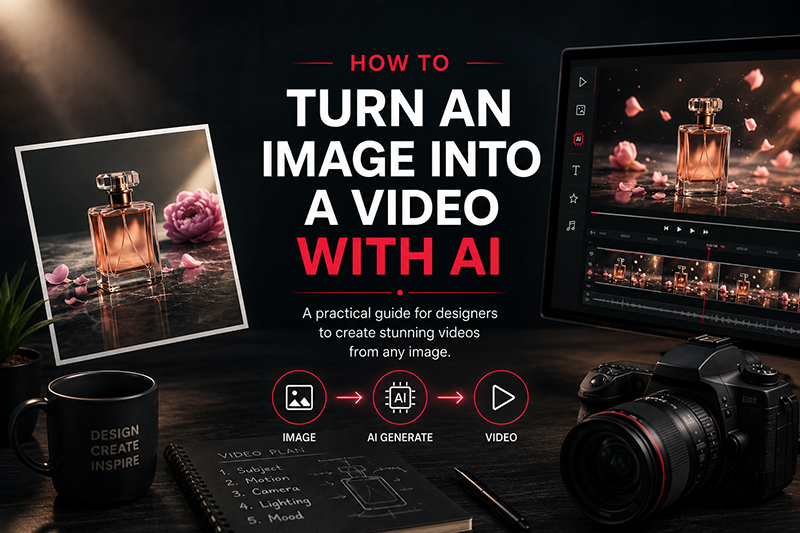
If you are working from an existing image, read our complete guide:
DESIGNRISE GUIDE
How to Turn an Image Into a Video With AI: A Practical Guide for Designers
Learn how to prepare the source image, plan movement and turn a static visual into a controlled AI-generated video.
A Simple Prompt Checklist Before You Generate
- What is the main action?
- What should remain still?
- Does anything move in the environment?
- Should the camera move?
- How fast should the movement feel?
- Is the prompt describing physical action or only mood?
- Have I added more actions than this shot actually needs?
The Prompt Is Not the Finished Video
A strong prompt can improve the generation, but professional creative work rarely ends at generation.
You may still need to:
- choose the strongest part of a clip;
- combine multiple shots;
- correct color;
- stabilize footage;
- restore typography or logos;
- add music and sound design;
- adjust pacing;
- create the final brand ending.
Prompting is creative direction. Editing is where that direction becomes a finished piece.
Explore More DesignRise Resources
Continue building a more useful AI creative workflow with these DesignRise guides:
Frequently Asked Questions
How long should an AI video prompt be?
There is no ideal word count. A short prompt with precise motion instructions can be more useful than a long paragraph containing unnecessary visual details. Start with the most important action and add detail only when you need more control.
What should an AI video prompt include?
A practical prompt can include subject motion, environmental motion, camera movement and timing. Text-to-video prompts may also need descriptions of the subject, environment, composition, lighting and style.
How do I stop the AI camera from moving?
Describe the desired camera behavior directly with phrases such as locked camera, static camera or the camera remains perfectly still. It also helps to give the model enough movement inside the scene so the shot does not rely on camera motion to create activity.
Why does my AI video ignore part of the prompt?
The prompt may contain too many competing actions or ambiguous instructions. Remove secondary details, identify the most important movement and refine the shot gradually.
Should I describe the image again in an image-to-video prompt?
Usually, the input image already provides the model with visual information such as composition, subject, lighting and style. In many image-to-video workflows, the prompt is more useful when it concentrates on how those existing elements should move.
Final Thoughts
A useful AI video prompt guide should not leave you with the impression that better results come from memorizing hundreds of magic words.
The more useful skill is learning to look at a still frame and imagine the next few seconds.
What moves first? What stays still? What happens in the background? Where does the camera go? How quickly does everything happen?
Once you can answer those questions clearly, writing the prompt becomes much easier.
DESIGNRISE
A good prompt describes movement. A strong creative direction explains why that movement belongs in the shot.
Discover more from DesignRise
Subscribe to get the latest posts sent to your email.