











Every week, another image generator, writing assistant, research platform, design feature, browser extension, or automation service promises to transform creative work.
Designers create accounts, test a few prompts, save the platform in a bookmarks folder—and often return to the same fragmented process they were using before.
The result is not always greater productivity.
It is often more tabs, more subscriptions, more notifications, more decisions, and less focus.
The designers benefiting most from artificial intelligence are not necessarily using the largest number of tools. They are building small, repeatable systems around specific parts of their work.
They know:
- what they want AI to handle;
- where human judgment still matters;
- which tool belongs at each stage;
- what information should move from one step to the next;
- and when to stop experimenting and start producing.
A good AI workflow for designers does not begin with the question:
Which AI tool should I try next?
It begins with a more useful question:
Where does my current design process become slow, repetitive, inconsistent, or unnecessarily complicated?
That shift—from collecting tools to designing systems—is what turns AI from an interesting experiment into a genuine professional advantage.
The AI Tool Overload Problem
The creative industry has entered a period of constant tool discovery.
A designer can now find AI products for almost every imaginable task:
- generating moodboards;
- summarizing client documents;
- creating user personas;
- writing website copy;
- producing images;
- removing backgrounds;
- expanding photos;
- generating wireframes;
- naming brands;
- analyzing competitors;
- organizing feedback;
- creating presentations;
- writing case studies;
- and automating project administration.
This sounds helpful. In theory, each platform removes a little work.
In practice, the growing number of choices can create a different type of workload.
Before beginning a task, the designer must decide which service to use. Then they need to remember where a project was saved, how the tool works, what subscription limits apply, and whether the output can be exported in the required format.
A process that should feel faster starts to feel scattered.
The Hidden Cost of Constantly Switching Tools
Switching between platforms has a cognitive cost.
Every change of environment requires the brain to reload context:
- What was the original brief?
- Which version is current?
- Where are the reference files?
- Which prompt produced the best result?
- Has the client approved this direction?
- Which platform contains the editable version?
Individually, these interruptions seem small. Across a full project, they create significant friction.
The problem becomes worse when different tools produce disconnected outputs. A research assistant generates notes in one format. An image generator creates visual directions in another. The design platform contains the final layouts, while feedback remains in email, chat messages, documents, and screenshots.
AI may accelerate individual tasks while making the overall project harder to manage.
That is why more AI tools do not automatically create a better design process.
A Tool Is Not a Workflow
An AI tool performs a task.
A workflow connects several tasks into a repeatable process.
That difference is essential.
Imagine a designer using an AI image generator to create ten visual concepts for a campaign. The results may be impressive, but that activity alone is not a workflow.
A workflow includes what happens before and after generation:
- The designer interprets the client brief.
- Key visual constraints are extracted.
- References are organized into defined directions.
- Prompts are created from those directions.
- Outputs are evaluated against agreed criteria.
- Selected concepts are refined.
- The strongest idea is adapted into a usable design system.
- Files are prepared for review and delivery.
The image generator is only one component inside that system.
Without the surrounding structure, the designer simply produces more material to review.
A Strong Workflow Creates Continuity
A useful AI design workflow creates a clear connection between each stage.
Research informs the creative direction.
The creative direction informs generation.
Generation informs refinement.
Refinement informs presentation.
Client feedback informs the next iteration.
Nothing exists as a random isolated experiment.
This continuity is what makes the workflow valuable. It reduces the need to repeat decisions, rebuild context, or explain the project again every time it moves into another tool.
Why Designers Keep Collecting Tools
Tool collecting is understandable.
Trying a new platform feels productive because something visible happens immediately. A new interface opens, a prompt is entered, and an output appears within seconds.
Improving a workflow feels slower.
It requires the designer to examine how they work, identify unnecessary steps, create templates, define naming conventions, document decisions, and sometimes remove tools they enjoy using.
One activity provides novelty.
The other provides long-term efficiency.
There is also a fear of falling behind. When social media is filled with new AI launches, designers may feel that every new platform is something they must understand.
But professional advantage rarely comes from knowing every tool.
It comes from knowing which tools are useful for a specific type of work and how to integrate them without reducing quality.
Where Designers Actually Lose Time
Before adding AI to a design process, it helps to identify where time is really being lost.
The most obvious task is not always the biggest problem.
A designer may assume that creating visuals takes the longest. After reviewing the full project, they may discover that more time is spent searching for information, preparing presentations, processing feedback, renaming files, rewriting copy, or recreating similar assets in multiple formats.
The best automation opportunities often appear around the creative work rather than inside it.
1. Rebuilding Context
Designers repeatedly explain the same project to different tools, teammates, or collaborators.
The brief is pasted into one platform. Brand information is entered into another. Audience details are rewritten for a third.
A better workflow creates a reusable project context containing:
- business information;
- target audience;
- brand personality;
- project objectives;
- technical requirements;
- visual restrictions;
- approved terminology;
- competitor references;
- and expected deliverables.
This becomes the foundation for every AI-assisted task.
2. Unstructured Research
Research can expand indefinitely.
Designers open dozens of tabs, save screenshots without labels, collect unrelated inspiration, and gradually lose sight of the original project goal.
AI can help summarize and categorize research, but only when the designer defines what they are looking for.
Useful research questions might include:
- What visual patterns dominate this market?
- Which conventions should the project follow?
- Which conventions could it challenge?
- What does the audience already recognize?
- Where are competitors visually similar?
- Which content requirements will influence the layout?
- What accessibility or technical constraints matter?
Without focused questions, faster research simply produces more information.
3. Starting From a Blank Page
The first stage of a project often consumes energy because every decision is still open.
AI is valuable here—not necessarily for producing the final answer, but for creating structured starting points.
It can help generate:
- alternative creative directions;
- early content hierarchies;
- moodboard descriptions;
- possible page structures;
- headline variations;
- user-flow options;
- naming territories;
- or questions that should be clarified with the client.
The designer still decides which direction is appropriate.
AI reduces blank-page friction, not creative responsibility.
4. Repetitive Production
Once a visual system is approved, many tasks become predictable.
A campaign may require the same idea to be adapted into:
- social media formats;
- website banners;
- presentation slides;
- display advertisements;
- email graphics;
- mobile layouts;
- and marketplace images.
Some of this work can be supported by templates, reusable components, structured prompts, batch processing, or automation.
The goal is not to generate every asset without review. It is to remove unnecessary manual repetition while preserving consistency.
5. Feedback Processing
Client feedback often arrives in fragmented form:
- emails;
- voice messages;
- comments;
- screenshots;
- meeting notes;
- and chat conversations.
The designer must translate this information into clear actions.
AI can help group feedback into categories such as:
- copy changes;
- visual changes;
- technical requests;
- unresolved questions;
- subjective preferences;
- and changes that affect the original scope.
However, the designer must still identify contradictions and decide which requests improve the project.
The Four-Part AI Workflow for Designers
A practical workflow can be organized into four connected stages:
Research → Creation → Refinement → Delivery
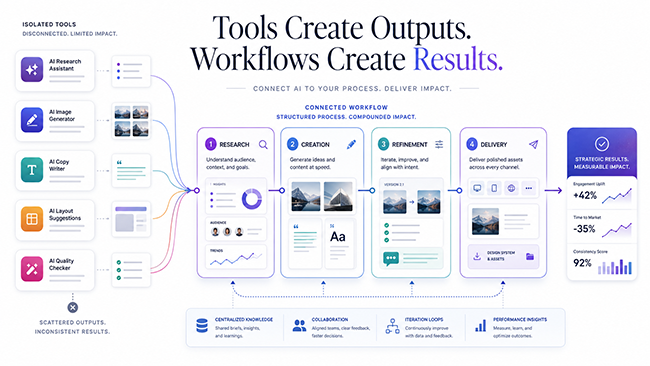
The exact tools may change. The structure remains useful.
Stage 1: Research
The purpose of AI-assisted research is not to replace investigation.
It is to make research easier to organize, compare, and convert into decisions.
Start With a Structured Brief
Before using any AI platform, convert the client brief into a clear project document.
Include:
- project goal;
- audience;
- required deliverables;
- timeline;
- brand characteristics;
- mandatory content;
- design constraints;
- success criteria;
- and unanswered questions.
A language model can help identify missing information, but the designer should verify every assumption.
For example, instead of asking:
Give me ideas for a fintech website.
Use a more structured request:
Analyze this brief and identify the information needed before creating a visual direction. Separate your response into audience questions, product questions, content questions, technical requirements, and brand-positioning questions.
The output becomes more useful because the request is tied to a decision.
Turn Research Into Design Criteria
Research is only valuable when it affects the work.
After collecting information, translate it into design criteria.
For example:
- The interface must feel trustworthy without looking traditional.
- The visual hierarchy must support users with limited technical knowledge.
- Product explanations should remain understandable on mobile screens.
- The design should differentiate the brand without ignoring familiar industry patterns.
- The color system must remain accessible across light and dark backgrounds.
These criteria create a filter for evaluating future ideas.
Without them, designers often choose concepts based on novelty rather than relevance.
Stage 2: Creation
Creation is where many designers begin using AI, but it should not be the first stage.
Generation becomes far more effective when the project already has clear constraints.
Generate Directions, Not Random Options
Instead of asking for dozens of unrelated concepts, define several creative territories.
A brand project might explore:
- precise and technical;
- human and approachable;
- bold and disruptive;
- calm and premium.
Each direction should include:
- emotional tone;
- typography characteristics;
- color behavior;
- image style;
- layout principles;
- motion ideas;
- and potential risks.
AI can assist with expanding these directions, but the designer should determine whether each one genuinely fits the brief.
Use Constraints to Improve Outputs
Creative limitations are not obstacles. They improve focus.
A useful prompt might specify:
- the communication goal;
- the intended audience;
- the medium;
- the brand tone;
- what must be included;
- what must be avoided;
- and how the output will be evaluated.
Instead of:
Create a modern landing page concept.
Try:
Propose three landing-page directions for a B2B cybersecurity platform targeting small companies. The design should communicate trust and clarity without using stereotypical hacker imagery, neon code, padlocks, or overly dark interfaces. Explain the content hierarchy and visual logic behind each direction.
The second request produces ideas that can support design thinking rather than simply imitate popular aesthetics.
Keep the Designer in the Decision Loop
AI-generated ideas should be treated as raw material.
The designer’s responsibility is to:
- reject weak concepts;
- combine useful elements;
- recognize clichés;
- correct inconsistencies;
- adapt ideas to the brand;
- and decide when exploration has gone far enough.
A tool can produce twenty options.
Professional judgment determines which one deserves attention.
Stage 3: Refinement
The first AI output is rarely the strongest output.
Refinement is where generic material becomes specific.
Evaluate Using Project Criteria
Do not ask whether an output “looks good.”
Ask whether it solves the project problem.
A useful evaluation checklist includes:
- Does it support the communication goal?
- Is it appropriate for the audience?
- Does it follow the brand strategy?
- Is the hierarchy clear?
- Is the concept distinguishable from competitors?
- Can the idea scale across required formats?
- Are there accessibility problems?
- Does it rely on visual clichés?
- Will it remain practical to produce?
This prevents polished but irrelevant concepts from moving forward.
Refine One Variable at a Time
When an output does not work, avoid changing everything at once.
Identify the problem:
- Is the composition too busy?
- Is the tone too playful?
- Is the hierarchy weak?
- Is the image style inconsistent?
- Is the copy too generic?
- Is the layout unsuitable for mobile?
- Is the concept visually attractive but strategically wrong?
Then refine the relevant variable.
This creates more control and makes it easier to understand why a new version performs better.
Create Reusable Prompt Frameworks
A strong workflow does not depend on remembering the perfect prompt.
Create reusable structures for recurring tasks.
- Context: What is the project?
- Objective: What must the output accomplish?
- Audience: Who is it for?
- Constraints: What must be included or avoided?
- Reference: What information should guide the output?
- Format: How should the response be structured?
- Evaluation: What defines a successful result?
This framework can be adapted for research, writing, visual exploration, UX analysis, presentations, and client communication.
Stage 4: Delivery
AI workflows should not stop when the visual work is approved.
Project delivery contains many repetitive tasks that can benefit from structure.
Prepare Client Presentations More Efficiently
A design presentation should explain the reasoning behind the work, not merely display screens.
AI can help organize presentation notes into a narrative:
- Project problem
- Audience insight
- Strategic direction
- Design principles
- Visual system
- Key applications
- Expected impact
- Next steps
The designer should rewrite the language so it sounds specific to the project and reflects their own reasoning.
Generic phrases such as “clean, modern, and user-friendly” do not explain a design decision.
Create Clear Handoff Documentation
AI can help produce a first draft of:
- brand guidelines;
- component descriptions;
- image-generation rules;
- content instructions;
- accessibility notes;
- naming conventions;
- export requirements;
- and asset libraries.
The designer then verifies that the documentation matches the actual system.
Build a Project Archive
At the end of a project, save:
- the final brief;
- approved creative direction;
- successful prompts;
- rejected approaches and reasons;
- client feedback;
- reusable components;
- production templates;
- and lessons for future work.
This archive makes the next similar project faster.
The greatest workflow improvement often comes not from a new tool, but from reusing what has already been learned.
A Practical Example: Designing a Landing Page
Consider a designer creating a landing page for a new software product.
Without a system, the process might look like this:
- read the brief;
- search for references;
- open several AI tools;
- generate random headlines;
- test visual styles;
- create a first layout;
- realize important content is missing;
- return to research;
- rebuild the structure;
- send a concept;
- receive scattered feedback;
- repeat the work.
A structured AI workflow for web design looks different.
Step 1: Brief Analysis
The designer uses AI to organize the brief into:
- product value;
- target customer;
- customer problems;
- primary conversion goal;
- required sections;
- possible objections;
- technical restrictions;
- and missing information.
The designer verifies the summary and sends unresolved questions to the client.
Step 2: Content Hierarchy
AI helps produce several possible content structures.
The designer compares them and selects the structure that best supports the user journey.
For example:
- Clear promise
- Product explanation
- Key benefits
- How it works
- Social proof
- Objection handling
- Final call to action
Step 3: Creative Directions
Three visual territories are developed based on the audience and positioning.
Each direction has a defined purpose rather than being a random style experiment.
Step 4: Wireframing
The designer creates the page structure using the approved content hierarchy.
AI may suggest alternative arrangements, but the final decisions consider scanning behavior, responsive layouts, content length, and conversion priorities.
Step 5: Visual Exploration
Image-generation or visual-reference tools support mood exploration.
The designer selects and refines the visual language rather than inserting unedited AI output into the final design.
Step 6: Review
The concept is evaluated against the criteria established during research.
Problems are corrected before client presentation.
Step 7: Feedback Organization
Client comments are summarized into actionable categories.
Contradictions and scope changes are flagged separately.
Step 8: Handoff
Final assets, component notes, content guidelines, and responsive behavior are documented clearly.
In this example, AI supports almost every stage.
But no single tool controls the process.
The workflow does.
What Designers Should Automate
Good automation removes low-value repetition.
It should give the designer more time for decisions that require context, taste, strategy, and communication.
Tasks that may be suitable for AI assistance include:
- organizing project briefs;
- summarizing research;
- extracting key points from documents;
- preparing interview questions;
- generating first-draft content structures;
- creating naming variations;
- formatting meeting notes;
- categorizing feedback;
- resizing or preparing repeated assets;
- drafting documentation;
- creating file descriptions;
- writing alternative text;
- preparing project summaries;
- and turning approved material into multiple content formats.
Automation is especially useful when the task has:
- a clear input;
- a predictable process;
- a recognizable output;
- and simple quality criteria.
What Designers Should Not Fully Automate
Not every slow task should be removed.
Some activities are valuable precisely because they require thought.
Designers should be careful about fully automating:
- strategic positioning;
- final concept selection;
- cultural interpretation;
- sensitive audience decisions;
- visual quality control;
- ethical judgment;
- accessibility review;
- client relationship management;
- originality assessment;
- and decisions that affect the meaning of the work.
AI can assist with these activities, but it should not become the unquestioned authority.
A workflow becomes dangerous when speed replaces evaluation.
How to Build a Focused AI Tool Stack
A useful AI stack does not need to be large.
For many designers, a small system is more effective than a collection of twenty platforms.
You may only need:
- one research and summarization tool;
- one general language assistant;
- one visual exploration or image-generation tool;
- one primary design platform;
- one project-management system;
- and one automation platform, if your work genuinely requires it.
The exact products are less important than the role each product plays.
Give Every Tool a Defined Job
Write down why each tool exists in your workflow.
For example:
- Research tool: gathers and summarizes relevant information.
- Language tool: structures briefs, explores copy, and organizes feedback.
- Visual tool: creates early references and concept material.
- Design platform: contains the actual project system.
- Automation tool: transfers predictable information between approved steps.
- Project hub: stores decisions, deadlines, feedback, and final files.
When two tools perform the same role, choose the one that integrates better with your process.
Evaluate Tools by Workflow Value
Do not evaluate a platform only by the quality of its demo outputs.
Ask:
- Does it reduce a real bottleneck?
- Can it work with my existing files?
- Does it support the formats I need?
- Can I reuse the output?
- Does it create additional cleanup?
- Is the result consistent?
- Can the process be repeated?
- Is the subscription justified by regular use?
- Does the platform protect the type of client information I handle?
- Will this tool still be useful after the initial excitement disappears?
The best tool is not always the most powerful.
It is the one that fits naturally into a repeatable process.
The One-Tool-Per-Problem Rule
A practical way to reduce overload is to assign one primary tool to each recurring problem.
For example:
- one place for research;
- one place for project notes;
- one place for client feedback;
- one primary design environment;
- one approved image-generation workflow;
- one archive for reusable prompts and templates.
This does not mean you can never test alternatives.
It means experiments should not constantly disrupt production.
New tools can be evaluated in a separate testing period. They should only enter the main workflow when they solve a clear problem better than the existing solution.
Build Templates Before Adding Automation
Automation works best after the process is already clear.
If the workflow is disorganized, automation simply makes the disorganization move faster.
Before connecting tools, create templates for:
- project briefs;
- research summaries;
- creative directions;
- prompt structures;
- feedback reports;
- design presentations;
- handoff documents;
- file naming;
- and project archives.
Templates reveal which information is consistent across projects.
Once that structure exists, automation becomes easier and safer.
AI Workflows for Design Teams
The challenge becomes more complex when several people are involved.
Individual designers can remember where information lives. Teams need shared systems.
A team workflow should define:
- which AI tools are approved;
- what client information may be entered;
- where prompts and outputs are stored;
- how generated material is reviewed;
- who is responsible for final decisions;
- how sources are verified;
- how copyright and licensing questions are handled;
- and which files represent the official version.
Without shared rules, each team member creates a separate personal process.
The result is inconsistency.
Create a Shared AI Playbook
A simple internal playbook can include:
- Approved tools and their purpose
- Data and privacy restrictions
- Prompt templates
- Review requirements
- Quality standards
- File-storage rules
- Examples of successful workflows
- Common mistakes
- Escalation rules for uncertain outputs
The goal is not to control every creative decision.
It is to prevent avoidable confusion.
Signs Your AI Workflow Is Not Working
A workflow needs adjustment when:
- you spend more time testing tools than completing projects;
- the same project information is entered repeatedly;
- outputs are stored across too many platforms;
- nobody knows which version is current;
- AI content requires extensive rewriting every time;
- generated visuals rarely fit the actual brief;
- subscriptions continue even though tools are not used;
- project quality varies significantly;
- client feedback becomes harder to track;
- or automation produces mistakes that must be corrected manually.
The clearest warning sign is simple:
AI has increased activity, but it has not improved outcomes.
A successful workflow should improve at least one meaningful area:
- speed;
- consistency;
- clarity;
- quality;
- profitability;
- or client experience.
If none of these improve, the workflow is not finished.
A Seven-Day AI Workflow Reset
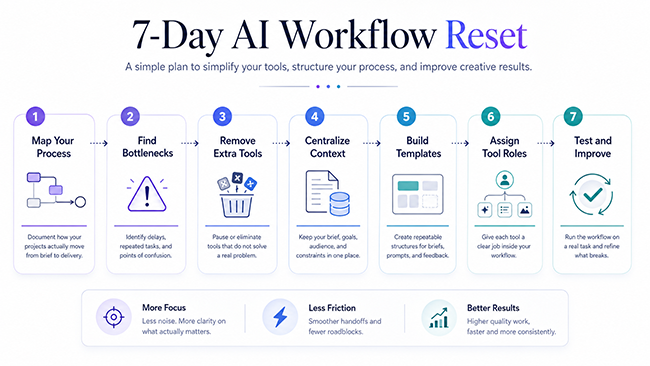
Designers who feel overwhelmed by AI tools do not need another platform.
They need a reset.
Day 1: Map Your Current Process
Write down every major step from receiving a brief to delivering the final files.
Do not describe the ideal process. Document what actually happens.
Day 2: Identify Bottlenecks
Mark the stages that create delays, repetition, confusion, or inconsistent results.
Day 3: Remove Unnecessary Tools
Cancel or pause tools that do not solve a recurring problem.
Move experimental platforms out of the main production workflow.
Day 4: Create a Central Project Context
Build one reusable document containing the key information that future tools and collaborators will need.
Day 5: Create Three Templates
Start with the templates that would save the most time, such as:
- brief analysis;
- creative direction;
- feedback summary.
Day 6: Assign One Tool to Each Role
Define where research, writing, visual exploration, design, feedback, and documentation should happen.
Day 7: Test the Workflow on a Real Task
Use the process for one small project.
Document where it succeeds and where information still becomes disconnected.
Do not aim for a perfect system immediately.
A useful workflow improves through repeated use.
The Competitive Advantage Is Not the Tool
Most popular AI tools are available to everyone.
Competitors can access the same platforms, use similar prompts, and generate similar-looking outputs.
Access is not a sustainable advantage.
The advantage comes from:
- asking better questions;
- building stronger project context;
- creating useful constraints;
- recognizing weak outputs;
- connecting research to decisions;
- developing reusable systems;
- preserving brand consistency;
- and knowing when AI should not be used.
Two designers can use the same tool and produce completely different results.
One may generate endless options.
The other may build a focused process that consistently turns information into effective design.
The difference is not the software.
It is the workflow around it.
Frequently Asked Questions
What Is an AI Workflow for Designers?
An AI workflow for designers is a structured process that connects AI-assisted tasks with research, creative development, refinement, feedback, and delivery. Instead of using AI tools independently, the designer defines how information and decisions move from one stage to another.
How Many AI Tools Does a Designer Need?
There is no universal number. Many designers can build an effective workflow with a small set of tools covering research, language, visual exploration, design production, project management, and automation. Each tool should solve a clear recurring problem.
Can AI Automate the Entire Design Process?
AI can support many parts of the design process, but complete automation is rarely appropriate for professional work. Strategy, creative judgment, cultural awareness, accessibility, client communication, and final quality control still require human responsibility.
How Can Designers Avoid AI Tool Overload?
Assign one primary tool to each recurring task, remove overlapping subscriptions, create reusable templates, keep project information in a central location, and test new platforms separately from active client work.
What Should Designers Automate First?
Start with repetitive, predictable tasks that do not require major creative judgment. Examples include organizing briefs, summarizing meeting notes, formatting research, categorizing feedback, drafting documentation, and adapting approved content into repeated formats.
Do Better Prompts Create a Better AI Workflow?
Better prompts help, but prompts alone do not create a workflow. A strong workflow also requires clear project context, defined stages, evaluation criteria, reusable templates, file organization, and human review.
How Do You Know Whether an AI Workflow Is Successful?
A successful workflow should create a measurable improvement in speed, quality, consistency, clarity, profitability, or client experience. If AI creates more activity without improving outcomes, the process needs to be revised.
Final Thoughts
Designers do not need to reject new AI tools.
They simply need to stop treating every new platform as a missing piece of their professional process.
The most valuable question is not:
What else can this tool generate?
It is:
Where does this tool belong in my workflow, and what problem does it solve?
A focused system gives every tool a purpose.
It protects the designer from constant context switching. It creates consistency across projects. It makes useful ideas easier to repeat and weak ideas easier to reject.
Most importantly, it keeps the designer in control.
AI can accelerate research, remove repetitive work, expand creative exploration, and improve delivery. But it becomes genuinely valuable only when it operates inside a process built around clear decisions.
At DesignRise, we examine not only what new AI tools can do, but how designers can turn them into practical, repeatable systems.
Because the future of creative work will not belong to the person with the longest tool list.
It will belong to the designer who knows how to build the better workflow.
Explore More DesignRise Resources
Best AI Browsers in 2026: 10 Tools That Research, Summarize and Automate the Web
- AI Workflows for Designers in 2026: Tools, Systems & Real Use Cases
- Explore more AI tools, practical workflows, and design resources on
DesignRise.
Discover more from DesignRise
Subscribe to get the latest posts sent to your email.