Then the third shot arrives and something feels wrong.
The character has almost the same face, but the jaw is narrower. The hair is slightly shorter. The eyes seem lighter. The jacket has changed fabric. Earrings disappear. The character still looks plausible — just not like exactly the same person.
That small break is enough to weaken an entire sequence.
For single-shot AI video, visual quality is usually the main challenge. For multi-shot work, another challenge becomes just as important: continuity.
If a protagonist appears across an ad, music video, short film, fashion campaign, social series, or branded story, the audience needs to believe that the person in shot six is the same person they met in shot one.
That requires more than repeating a name or copying the same prompt.
It requires a character system.
The DesignRise principle: Treat the character as a production asset, not as a description you rewrite for every shot.
This guide goes beyond the usual advice to “use a reference image.” You will learn how to define a canonical identity, build shot-aware references, separate permanent traits from temporary styling, predict high-risk shots, reduce reference drift, review continuity systematically, and repair a sequence without rebuilding everything.
Quick Answer: How Do You Keep the Same Character in AI Video?
For reliable AI video character consistency, use a workflow rather than a single prompt:
Approve one canonical character identity.
Build a small reference pack with the angles and framings your story actually needs.
Separate permanent identity from wardrobe, expression, and scene-specific styling.
Create or approve important still frames before adding motion.
Match the reference angle to the shot whenever possible.
Change as few major variables as possible in one generation.
Use the same approved references instead of chaining from increasingly imperfect outputs.
Review adjacent shots side by side before moving forward.
Regenerate only the element or shot that drifted instead of rebuilding the whole sequence.
The goal is not pixel-perfect duplication.
The goal is recognition without interruption: the viewer should never stop and wonder whether the person has changed.
Why Character Consistency Breaks in AI Video
In traditional filmmaking, the same actor remains physically present across shots.
AI generation works differently.
Each new generation may reconstruct the person from a combination of:
text instructions;
reference images;
first or last frames;
previous outputs;
style controls;
camera instructions;
the model’s own learned priors.
If the next shot requires visual information that your references do not clearly provide, the model must infer that information.
Inference is where drift begins.
A front portrait does not fully describe a profile.
A close-up does not fully describe body proportions.
A neutral face does not tell the model exactly how that person looks while laughing.
A shoulder-up image does not explain the back of a coat.
A daylight reference does not fully predict how the same face should read under hard neon light.
The more information the model has to invent, the greater the continuity risk.
The Five Types of Character Drift
Character inconsistency is easier to fix when you first identify what kind of drift is happening.
1. Identity Drift
The face itself changes:
jaw width;
eye shape;
nose structure;
cheekbones;
mouth;
skin tone;
apparent age.
2. Styling Drift
The person still looks similar, but details change:
hair length;
parting;
makeup;
jewelry;
glasses;
wardrobe;
fabric;
logos or trims.
3. Body Drift
Full-body continuity changes:
height impression;
shoulder width;
build;
leg proportions;
posture.
4. Performance Drift
The face may be correct, but the character feels like a different person because their behavior changes unexpectedly:
gesture style;
walking energy;
facial intensity;
posture;
movement speed.
5. Context-Induced Drift
The character changes because the shot changes too aggressively:
new angle;
new lighting;
new environment;
new wardrobe;
new emotion;
new camera motion;
new body action — all at once.
These categories matter because the fix is different for each one.
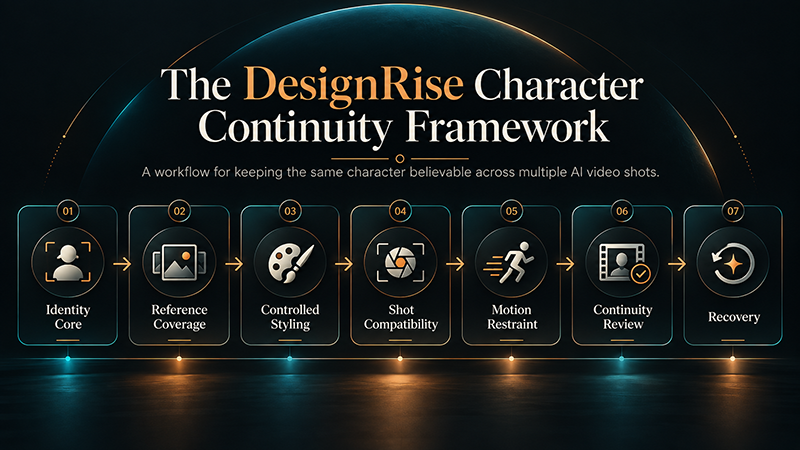
The DesignRise Character Continuity Framework
We use seven layers to keep recurring AI characters stable across a sequence.
Identity Core — define what makes the character recognizable.
Reference Coverage — provide enough visual information for required angles and framings.
Controlled Styling — separate permanent identity from temporary wardrobe, makeup, and scene styling.
Shot Compatibility — make sure the reference set actually supports the planned shot.
Motion Restraint — avoid changing too many variables simultaneously.
Continuity Review — judge the character across adjacent shots, not clip by clip.
Recovery — repair drift from the strongest approved source instead of letting errors compound.
The framework is deliberately production-oriented.
You are not trying to find one “magic prompt.”
You are reducing the number of identity decisions the model is allowed to remake.
Step 1: Create a Canonical Character Before You Build the Story
Do not design the character and the final film at the same time.
First decide who the character is.
Create one approved canonical character image — the version against which later generations will be judged.
Your canonical reference should establish:
face structure;
approximate age;
skin tone;
eye appearance;
hair color, length, and texture;
general body type if relevant;
visual realism or illustration style.
The canonical image does not need dramatic art direction.
In fact, a neutral image can be more useful because it provides cleaner identity information.
Runway’s current Gen-4 References guidance recommends high-quality character images with natural, even lighting and a neutral expression when creators want flexible reuse across scenes. Runway Gen-4 References documentation.
Step 2: Define the Identity Core
Write down the traits that should remain stable even when the environment, clothing, or emotion changes.
This should be short.
Do not write a novel.
Example identity core
Maya: woman in her late 20s, warm olive skin, oval face, strong dark eyebrows, deep brown eyes, straight medium-width nose, softly defined jaw, shoulder-length dark brown wavy hair with a center part.
This is different from a shot prompt.
The identity core describes the person.
A shot prompt describes what happens to the person.
Keeping those two jobs separate reduces accidental redesign.
Step 3: Build a Mini Character Bible
A useful character bible is not a giant document. For most short AI video projects, one page is enough.
Category
Locked
Flexible
Face
Structure, age range, eye color, skin tone
Expression
Hair
Length, base color, texture
Natural movement, minor styling
Body
General build, proportions
Pose, action
Wardrobe
Details within the same story look
Approved outfit changes between scenes
Accessories
Signature pieces if identity-critical
Scene props
Performance
General energy and posture
Emotion and scene-specific behavior
Now the production team — even if the “team” is one person — knows which changes are intentional and which are errors.
Step 4: Build a Reference Pack Based on the Shot List
One beautiful portrait is not a complete character reference system.
If the film needs different angles, distances, and body positions, your references should cover those needs.
Runway calls neutral character images used across different angles and framing character plates, and specifically recommends using the shot-planning list to decide which plates are needed. Runway’s longer-form filmmaking guide.
A practical reference pack may include:
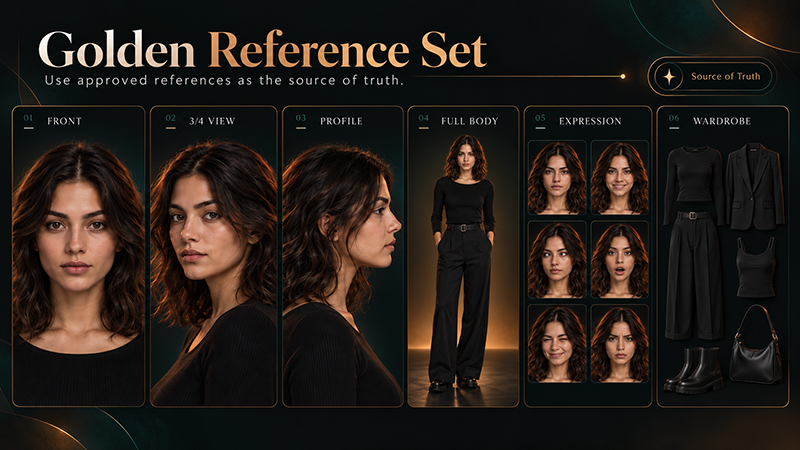
front close-up;
three-quarter close-up;
left profile;
right profile;
medium shot;
full-body front;
full-body three-quarter;
one neutral wardrobe reference for each approved look.
You do not need every possible angle.
Create the angles your storyboard requires.
DesignRise rule: Build references from the shot list — not the other way around.
What Makes a Strong Character Reference?
A reference image should communicate identity clearly.
Prefer:
visible facial landmarks;
natural or controlled lighting;
clean hair silhouette;
minimal motion blur;
moderate or neutral expression;
limited obstruction from hands, glasses, or props;
enough resolution to preserve facial structure.
Use caution with:
extreme wide-angle distortion;
deep shadow hiding facial structure;
hair covering both eyes;
strong colored light changing apparent skin tone;
heavy beauty filters;
very distant characters;
extreme expressions;
references where the same person already looks inconsistent.
A glamorous reference is not always the most informative reference.
Step 5: Use Multiple References Only When They Add Different Information
More reference images do not automatically produce more consistency.
The images need to agree with each other.
Useful combinations
Face + full body
The face reference carries identity; the full-body reference contributes proportions and styling.
Front + profile
Useful when a shot reveals side structure.
Character + wardrobe
Useful when the tool allows different visual references to contribute separate information.
Character + product or prop
Useful when both recurring person and recurring object matter.
Runway’s Gen-4 References currently supports up to three reference images in one generation. Google’s Veo 3.1 documentation also supports up to three reference images of a person, character, or product to help preserve subject appearance. Google Veo 3.1 reference-image documentation.
Avoid contradictory references
Do not combine images where the supposedly same person has:
different apparent age;
different hairlines;
different hair color;
incompatible face proportions;
different illustration/realism levels;
strong lens distortion in only one reference.
Reference agreement is more important than reference quantity.
Step 6: Separate Identity From Styling
Character identity and styling should not be treated as the same thing.
If every canonical reference shows the person in one distinctive red coat, a model may begin to treat that coat as part of who the person is.
Then changing the wardrobe can introduce more identity drift than expected.
Think in layers:
Identity: the person.
Hair and makeup: partly permanent, partly scene-dependent.
Wardrobe: the approved story look.
Accessories: either signature identity elements or scene props.
Environment: completely separate from identity.
This separation is especially useful for fashion films, ads, music videos, and narratives where one person appears in multiple looks.
Step 7: Score the Shot Before You Generate It
Some shots are naturally more dangerous for identity than others.
Before generating, score the shot by how much new information the model needs to invent.
Variable
Low Risk
Medium Risk
High Risk
Angle
Same / slight change
Front to 3/4
Front to profile/back
Framing
Same distance
Close-up to medium
Close-up to extreme wide/full body
Expression
Neutral / slight smile
Strong smile / concern
Crying / screaming / extreme emotion
Body Action
Still / breathing
Walking / turning
Running / fighting / complex choreography
Camera
Locked / subtle push
Tracking / moderate pan
Large orbit / rapid perspective change
Lighting
Similar
New time of day
Strong colored / high-contrast transformation
A high-risk shot is not forbidden.
It simply needs stronger references, more staged preparation, or more controlled motion.
The DesignRise Identity Change Budget
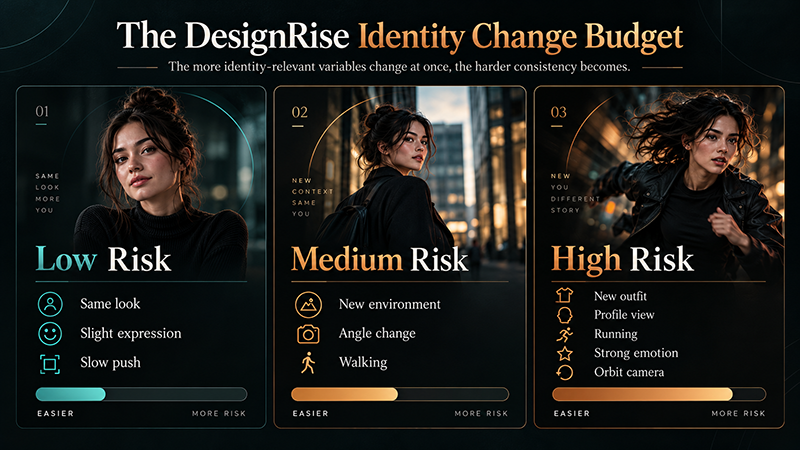
Think of every shot as having a limited identity change budget.
If you change one major variable, identity may remain stable.
If you change six major variables at once, the model must reconstruct too much.
Low-risk example
Same outfit. Same environment. Same framing. Slight smile. Slow push-in.
Medium-risk example
Same character. New environment. Three-quarter angle. Moderate walking motion.
High-risk example
New outfit. Night lighting. Full profile. Running. Wind. Extreme emotion. Fast orbiting camera.
Do not use the same front-facing portrait blindly for every shot.
If the new shot is a profile, use a profile reference.
If it is full body, give the model full-body information.
If the camera sees the back of the character, prepare the back of the wardrobe and hairstyle before production.
This seems obvious, but it solves a major source of drift: asking the model to invent hidden geometry from a flattering portrait that never contained it.
Why Profiles Are a Character Consistency Stress Test
A front image cannot fully explain:
nose projection;
forehead slope;
chin position;
jaw contour;
ear placement;
back-of-head shape.
That is why a person can look convincing from the front and suddenly become a different person in profile.
If your sequence includes strong side angles, create those references early — before you invest in final shots.
Step 10: Stop Rewriting the Character in Every Prompt
If your visual references already establish identity, do not keep redesigning the face with new adjectives.
For example, this kind of prompt can fight the reference:
Beautiful young woman, sharp jawline, perfect symmetrical face, high cheekbones, elegant green eyes, long luxurious hair…
Each adjective gives the model permission to reinterpret the person.
Once identity is approved, prompts should focus more on:
A Golden Reference Set keeps approved face angles, full-body views, expressions, and wardrobe as the source of truth for AI video character consistency.
Do Not Let Reference Drift Compound
Reference drift happens when a slightly inaccurate output becomes the input for the next generation.
Example:
Shot 1: accurate.
Shot 2: 95% accurate.
You use Shot 2 as the next identity reference.
Shot 3: 90% accurate.
You use Shot 3 again.
After several generations, the person may be noticeably different.
When possible, branch new shots from approved golden references rather than from a chain of progressively modified outputs.
DesignRise rule: New shots should inherit identity from the strongest approved source, not from the most recent generation.
Step 17: Use a Shot-Level Continuity Log
A simple continuity log becomes valuable once a project grows beyond a few clips.
Shot
Reference
Look
Expression
Motion
Risk
Status
01
Face 3Q + body
Look 01
Neutral
Slow push
Low
Approved
02
Profile left
Look 01
Concerned
Head turn
Medium
Review hair
This makes continuity a visible production decision rather than something you remember informally.
The Blink Test: A Fast Way to Detect Identity Drift
Place representative frames from two adjacent shots side by side.
Look at one.
Then the other.
Switch quickly between them.
Do not inspect the nose or hair first.
Ask:
Does my brain immediately read this as the same person?
If the answer is “almost,” investigate.
Human perception often notices identity mismatch before you can explain which exact feature changed.
The DesignRise Character Consistency Scorecard
Area
Pass
Warning
Fail
Face
Clearly same identity
Minor feature drift
Looks like another person
Age
Stable
Slight shift
Noticeably younger / older
Hair
Color and structure preserved
Minor styling variation
Length / style changes
Body
Same proportions
Small scale change
Different build
Wardrobe
Details preserved
Minor fabric drift
Garment redesigned
Accessories
Correct
Small shape drift
Disappear / transform
Performance
Feels like same character
Energy slightly off
Behavior feels unrelated
When the Character Drifts: Use This Repair Order
Do not immediately rewrite the entire prompt or rebuild the entire sequence.
If the face changes:
Return to the strongest approved face reference.
Use a reference closer to the target camera angle.
Reduce head rotation or perspective change.
Reduce simultaneous camera movement.
Rebuild the still frame first if necessary.
If the hair changes:
Check whether the reference clearly shows length and parting.
Use the stable hair description again.
Reduce strong wind or extreme movement.
Check whether lighting is creating an apparent color shift.
If wardrobe changes:
Use a dedicated costume reference.
Reduce body motion while the outfit is being stabilized.
Protect signature details such as buttons, seams, trim, or jewelry.
If body proportions change:
Add or strengthen full-body references.
Match reference perspective to the shot.
Simplify body action.
Avoid large lens/perspective changes.
If everything changes:
The generation probably exceeded the identity change budget.
Break the shot into smaller controlled steps.
Current Character-Consistency Controls in Major AI Video Workflows
Platform capabilities change quickly, so the safest approach is to verify the current documentation before committing to a long production.
Platform
Useful Continuity Control
What It Helps With
Runway Gen-4 References
Up to three image references; reusable tagged references; character plates recommended for wider coverage
Character identity across scenes, lighting, locations, and treatments
Google Veo 3.1
Up to three reference images of a person, character, or product
Preserving subject appearance in generated video
Adobe Firefly Video
First and last keyframes; composition and motion reference options in supported workflows
Controlling shot structure, start/end states, framing, and motion continuity
The tools differ, but the production logic is consistent: give the model stronger visual anchors, reduce ambiguity, and control how much changes at once.
How to Build Consistent Characters in Runway
Runway’s current Gen-4 References workflow is useful because the reference can become a reusable asset rather than a one-off image.
Runway states that Gen-4 References can generate consistent characters across different lighting conditions, locations, and treatments, and it supports up to three references per generation. It also recommends neutral, evenly lit character references for flexible reuse. Official documentation.
A practical Runway workflow
Create or upload the canonical character.
Save the strongest references with clear tags.
Generate the additional profile/full-body plates needed by the storyboard.
Create each important shot as a still image with the correct angle and wardrobe.
Approve identity before motion generation.
Animate the approved frame.
Compare output against the golden references.
Regenerate only shots that fail continuity.
For longer sequences, this is stronger than repeatedly writing “same woman” and hoping the model interprets the phrase identically every time.
How Reference Images Help in Google Veo 3.1
Google’s current Veo 3.1 API documentation allows up to three reference images to guide a generated video and specifically says references can depict a person, character, or product to preserve the subject’s appearance. Google Veo documentation.
That makes Veo relevant to the same reference-first production model:
lock the subject visually;
choose references that agree;
give the video prompt the action and shot direction;
review the result against the canonical character.
Do not interpret reference support as a guarantee of perfect identity.
Angle changes, strong motion, occlusion, lighting, and complex interactions can still create drift.
Where Adobe Firefly Fits Into a Continuity Workflow
Adobe Firefly Video offers first- and last-frame control, camera motion options, and composition-reference workflows. Adobe’s current documentation explains that first and last keyframes act as fixed visual points that guide how a generated video starts and ends. Adobe Firefly documentation.
These controls are useful for continuity even when the main identity-locking work happens earlier in the image/reference stage.
A practical approach is:
create an identity-consistent still;
use it as the opening frame;
define a compatible end state when needed;
control the camera and edit rather than asking the model to redesign the person.
How to Keep Multiple AI Characters Consistent
Two characters are not simply twice as difficult.
They introduce interaction.
Now the system must preserve:
Character A;
Character B;
their different faces;
their different body proportions;
their wardrobes;
their spatial positions;
their eye lines;
their interaction;
occlusion when they cross or touch.
Safer multi-character workflow
Build approved reference sets for each character separately.
Create a stable still containing both characters.
Approve both identities before animation.
Begin with simple interaction.
Keep camera motion restrained.
Increase performance complexity gradually.
Runway’s current multi-character guidance follows a similar pattern: create the characters separately, then use Gen-4 Image References to build the shared scene before generating the performance. Runway multi-character workflow.
Occlusion Is a Hidden Consistency Problem
Character identity becomes harder to preserve when important features disappear behind something else.
Examples:
hand passes in front of face;
character turns behind another person;
hair covers facial landmarks;
face moves into deep shadow;
character exits and re-enters frame;
large prop blocks the body.
When the subject reappears, the model may need to reconstruct the hidden area again.
For critical continuity shots, reduce unnecessary occlusion or make sure your references clearly explain the hidden geometry.
Dialogue and Lip Movement Add Another Layer of Risk
Speech changes the face continuously.
The mouth opens.
Cheeks move.
The jaw changes shape.
Teeth appear.
Expressions shift.
If dialogue matters, review identity not only at the beginning and end of the clip but also at expressive frames in the middle.
For longer dialogue scenes, separate concerns:
lock the visual identity;
lock the shot;
then add or generate performance;
review lip movement and identity separately.
Character Consistency Is Not the Same as Style Consistency
A sequence can have a perfectly consistent color palette while the protagonist’s face changes.
Or the character can remain recognizable while the cinematic style drifts.
Review these as separate systems.
Identity consistency asks:
Is this still the same person?
Style consistency asks:
Does this still belong to the same visual world?
Performance consistency asks:
Does this still feel like the same character?
Strong AI video needs all three when narrative continuity matters.
When Perfect Character Consistency Is Not Necessary
Not every project deserves maximum continuity effort.
You may accept more variation when:
the character appears once;
shots are extremely short;
the style is abstract;
faces are small or distant;
the character is masked;
identity transformation is intentional;
the project is conceptual rather than narrative.
Production discipline should match the audience’s ability to notice the problem.
When Character Consistency Needs to Be Strict
Use stronger controls for:
recurring protagonists;
brand mascots;
AI influencers;
fashion campaigns with one hero model;
commercial advertising;
music videos with a recognizable performer;
narrative films;
series and episodic content;
dialogue scenes;
client work where the approved likeness is part of the brief.
A Practical End-to-End Character Consistency Workflow
1. Approve the identity
Create one canonical hero character.
2. Write the identity core
Define stable traits in one short production description.
3. Build the shot list
Know which angles and framings the story requires.
4. Build only the necessary character plates
Front, three-quarter, profile, full body, or back view where needed.
5. Create wardrobe references
Separate costume continuity from facial identity.
6. Establish the golden reference set
Only approved assets become future identity sources.
7. Create each important shot as a still
Approve face, body, costume, environment, and framing before animation.
8. Score shot risk
Identify where angle, emotion, action, lighting, and camera increase drift risk.
9. Animate with controlled motion
Do not ask for more simultaneous change than the shot requires.
10. Run the blink test
Compare representative frames with neighboring shots.
11. Log continuity issues
Record what drifted rather than regenerating blindly.
12. Repair from the source of truth
Return to golden references instead of continuing from compromised frames.
13. Review the complete edit
Watch the film without stopping. The character should feel continuous even as the world around them changes.
The DesignRise Character Consistency Checklist
☐ One canonical character identity has been approved.
☐ Permanent identity traits are documented separately from styling.
☐ The shot list exists before the reference pack is finalized.
☐ Character plates cover the important camera angles.
☐ Full-body references exist if body continuity matters.
☐ Hair color, length, texture, and parting are defined.
☐ Hero wardrobe is documented from every required angle.
☐ Signature accessories are identified.
☐ Important emotional states have been tested.
☐ High-risk shots have stronger reference support.
☐ Complex camera and character motion are not combined unnecessarily.
☐ Golden references are used as the identity source of truth.
☐ Weak outputs are not reused as future identity anchors.
☐ Adjacent shots are reviewed side by side.
☐ Identity, style, and performance continuity are reviewed separately.
☐ Multi-character shots are stabilized as stills before complex animation.
☐ Final shots pass the blink test.
Common Character Consistency Mistakes
Mistake 1: Believing a longer prompt will lock identity
Text can describe traits. It cannot fully replace visual identity information.
Mistake 2: Using one portrait for every possible camera angle
A reference cannot show information it does not contain.
Mistake 3: Paraphrasing identity differently in every shot
Once identity is approved, stop creatively rewriting the character.
Mistake 4: Choosing the most beautiful clip instead of the most consistent clip
A cinematic shot is not useful if the lead suddenly looks like someone else.
Mistake 5: Letting weak outputs become future references
Small errors compound.
Mistake 6: Ignoring body and wardrobe continuity
Recognition is bigger than the face.
Mistake 7: Testing difficult angles too late
Profiles, full-body action, extreme emotions, and multi-character interaction should be tested before final production.
Mistake 8: Fixing everything in post
Editing can hide small continuity issues. It cannot reliably turn two different-looking people into one coherent protagonist.
Why Character Consistency Changes the Entire AI Video Workflow
At first, continuity can feel restrictive.
It is actually the opposite.
A strong identity system makes experimentation safer.
Once the character is stable, you can explore:
new environments;
new lighting;
new camera angles;
new emotions;
new genres;
new wardrobe;
new visual treatments.
without rebuilding the protagonist every time.
Structure protects creative freedom.
Frequently Asked Questions
How do you keep characters consistent in AI video?
Use an approved canonical reference, build additional character plates for the angles and framings your story requires, keep permanent identity separate from wardrobe and expression, create important still frames before animation, and compare every generated shot against a small golden reference set.
Why does the same AI character change between shots?
Each generation may reconstruct the person from incomplete information. New angles, expressions, lighting, body movement, camera motion, and wardrobe increase how much the model must infer, which can change facial or body details.
Is one reference image enough?
It can be enough for simple shots with limited angle changes. Multi-shot narratives usually benefit from additional views such as three-quarter, profile, and full-body references because one image cannot fully describe hidden geometry.
How many character reference images should I create?
Create the references your storyboard needs rather than chasing a fixed number. A practical core set often includes front, three-quarter, profile, and full-body views, but simpler projects may need fewer.
Why does my AI character look different in profile?
A front-facing reference does not completely describe nose projection, forehead slope, jaw contour, ear position, chin shape, or the back of the head. A dedicated profile reference gives the model that missing information.
Why does my character become older or younger?
Lighting, expression, skin texture, prompt wording, camera angle, and model reconstruction can all change perceived age. Treat age consistency as its own review criterion.
Should I use the previous shot as the next reference?
Only if the previous shot is an approved identity match. Otherwise, small errors can compound. For important characters, keep returning to a golden reference set instead of chaining from increasingly modified outputs.
Can Runway keep characters consistent?
Runway’s Gen-4 References is designed to reuse character information across different scenes, lighting conditions, locations, and treatments, and it currently supports up to three references per generation. Runway also recommends character plates for broader angle coverage.
Can Google Veo use character references?
Yes. Google’s current Veo 3.1 documentation supports up to three reference images of a person, character, or product to guide the subject’s appearance in generated video.
Do I need perfect consistency in every project?
No. The required precision depends on how recognizable and recurring the subject is. A recurring protagonist or commercial model needs stronger continuity than a distant background character in a two-second shot.
Final Thoughts
Consistent AI characters are not created by writing “same person” over and over.
They are built through controlled visual information.
Define the character once.
Create the references the story actually needs.
Separate permanent identity from temporary styling.
Test dangerous angles before production.
Keep the motion budget under control.
Review shots against approved sources.
And never allow a small continuity error to quietly become the reference for the next scene.
AI video models will continue to improve.
But even better models benefit from better direction.
The DesignRise Takeaway
Build the character once. Then make every shot prove that it is still the same character.