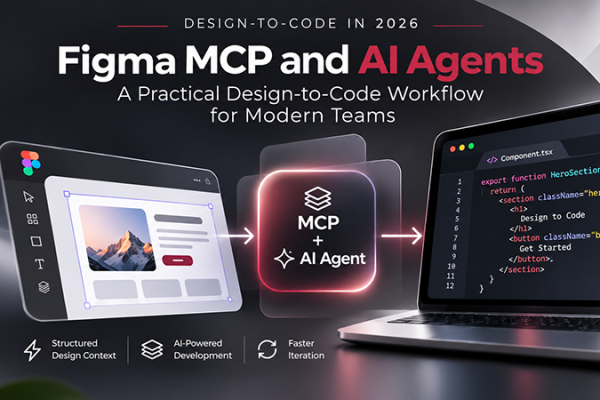







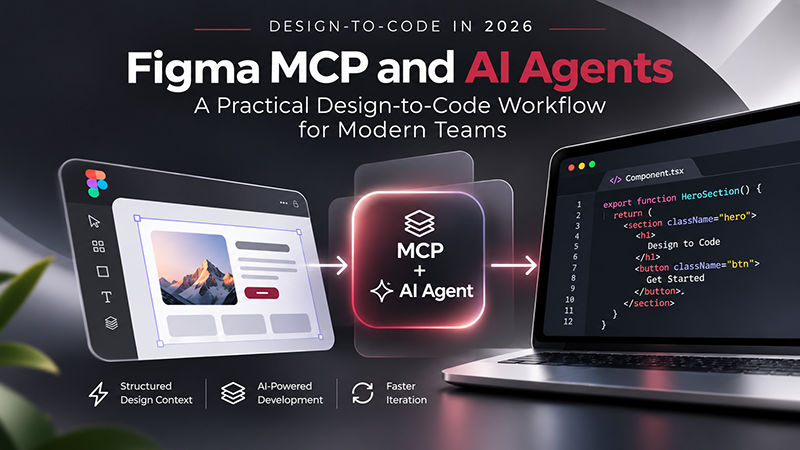
The design-to-code workflow is changing faster in 2026 than it has in years. The old handoff model was mostly one-directional: designers prepared files in Figma, developers inspected measurements and components, and implementation happened separately in code. AI coding agents are now changing that relationship.
With the Figma MCP server, AI agents can read structured design context from Figma—including components, variables, layout data, and design-system information—and use that context while generating code. With Code Connect, teams can map Figma components to their real production components, reducing the amount of guessing an agent has to do. And with newer code-to-canvas workflows, work can increasingly move in both directions: from Figma to code and from running interfaces back into editable Figma layers.
That does not mean design-to-code is now a one-click process. Figma itself is explicit about this: MCP provides context, while the AI agent still writes the implementation. The quality of the result depends on the structure of the Figma file, the quality of the codebase, the design system, the connected components, and the instructions given to the agent.
This DesignRise guide explains how the design-to-code workflow in 2026 actually works, where Figma MCP and Code Connect fit, what AI agents can and cannot automate, and how designers and developers can build a workflow that produces cleaner code without turning design decisions into guesswork.
Explore More DesignRise Workflow Guides:
- Design System Handoffs That Survive the Agency Leaving
- Stop Chasing Website Content: A Better Client Handoff Process
- AI Design Agents: How They’re Changing Creative Workflows
- How AI Changed the Way I Start a Branding Project
What Changed in Design-to-Code in 2026?
For years, “design-to-code” usually meant one of three things:
- copying CSS values from a design inspector;
- using a plugin to export rough frontend code;
- asking an AI model to recreate a screenshot.
All three approaches can be useful, but they share the same weakness: they often understand appearance better than intent.
A screenshot can show that a button is blue. It cannot reliably explain that the button is the primary action component from a design system, that it uses a specific spacing token, that its disabled state already exists in the codebase, or that the mobile version should switch to full width below a breakpoint.
The important shift in 2026 is that AI coding agents can increasingly work with structured design context instead of relying only on pixels.
The Figma MCP server can expose information such as:
- frames and layers;
- components and component properties;
- variables and design tokens;
- auto layout behavior;
- layout relationships;
- design-system context;
- linked code components through Code Connect;
- annotations and developer resources.
This changes the question from “Can AI copy this screen?” to “Can AI understand enough of our product system to implement this screen using the way our team actually builds software?”
The 2026 Design-to-Code Stack at a Glance
What Is the Figma MCP Server?
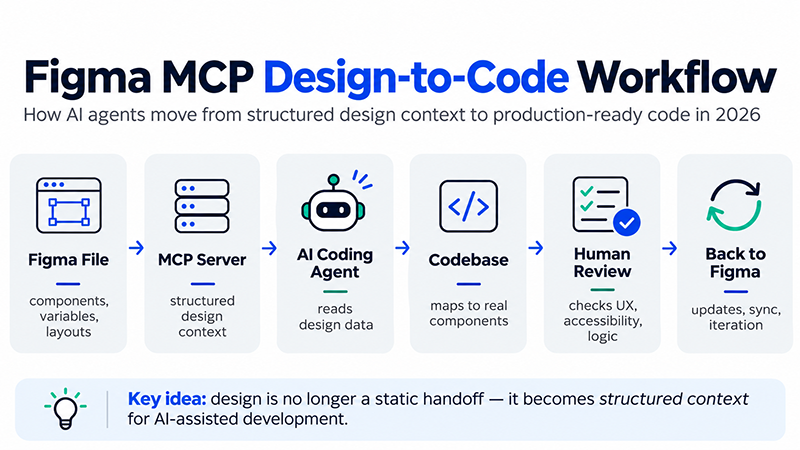
MCP stands for Model Context Protocol. In practical terms, an MCP server gives an AI agent a standardized way to interact with another system and retrieve relevant context from it.
The Figma MCP server connects supported AI agents to Figma. Instead of asking an agent to infer a UI from a screenshot, the agent can request structured information from the actual design file.
This distinction matters.
The MCP server does not magically generate production code on its own. It gives the agent better information. The agent is still responsible for writing the code, adapting it to the project, following framework conventions, and deciding how the implementation should fit into the existing repository.
Figma’s documentation currently describes MCP as a way for agents to:
- read components, variables, frames, and layout information;
- retrieve design context for implementation;
- work with Code Connect mappings;
- use design-system rules more accurately;
- create or update native Figma content through supported write-to-canvas workflows.
That makes MCP less like a “code export button” and more like a structured conversation between design, code, and an AI agent.
Figma MCP vs. the AI Agent: Who Does What?
This is one of the most important distinctions in the new workflow.
Figma MCP provides context.
The AI agent performs the implementation.
The MCP server can tell the agent that a selected frame contains a design-system button, uses specific variables, follows auto layout, and maps to a code component. The agent then decides how to use that information in React, Vue, SwiftUI, plain HTML/CSS, or another target environment.
Figma’s current design-context tooling defaults to React and Tailwind for some generation workflows, but developers can request other frameworks and implementation approaches.
This means two teams can select the same Figma frame and still get very different results because their:
- codebases are different;
- component libraries are different;
- prompts are different;
- design systems are different;
- agent instructions are different;
- quality standards are different.
DesignRise perspective: AI does not remove the need for a design system. It makes a weak design system more visible and a strong one more valuable.
What Is Code Connect?
Code Connect is the bridge between design components in Figma and the real components developers use in production.
Without that bridge, an agent may look at a button in Figma and generate a new button component that merely resembles it.
With Code Connect, the agent can receive context that points toward the team’s existing implementation instead.
For example, your Figma file may contain:
Button / Primary / Large
Your codebase may already contain:
<Button variant=”primary” size=”lg”>
Code Connect helps associate those two concepts so the agent has less reason to invent another version.
This becomes especially important in mature products where duplicating existing components creates technical debt quickly.
Why Code Connect Matters More in an AI Workflow
Before AI coding agents became common, Code Connect mainly helped developers find the correct implementation details while inspecting designs.
In an agentic workflow, the mapping becomes machine-readable context.
Figma can provide an agent with component-specific information such as:
- component properties and variants;
- the corresponding implementation in the codebase;
- example usage;
- custom team instructions;
- accessibility requirements;
- framework-specific guidance;
- edge cases and conventions.
That last part is especially valuable. Code Connect can include custom instructions for MCP so teams can document how a component should actually be used rather than assuming the agent will infer the correct pattern.
For example:
- Always provide an accessible label for icon-only buttons.
- Use the existing Link component for navigation, not a raw anchor wrapper.
- Never use the destructive button variant for reversible actions.
- Use semantic heading levels even if the visual typography differs.
This is where design documentation starts becoming executable context rather than static documentation that developers may or may not read.
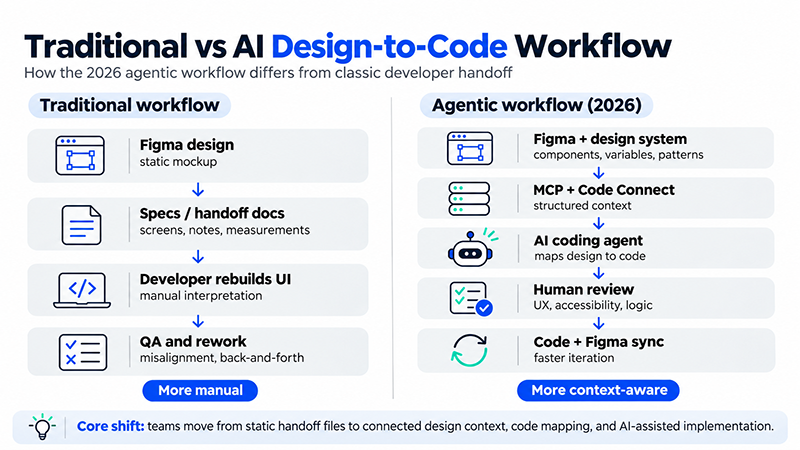
Traditional Handoff vs. Agentic Design-to-Code Workflow
A Practical Design-to-Code Workflow for 2026
1. Start With a Structured Figma File
The fastest way to get bad AI-generated frontend code is to start with a chaotic design file.
AI agents benefit from the same design-system discipline that helps human developers:
- use components for repeating UI;
- use variables for spacing, color, radius, and typography;
- use clear layer and component names;
- use auto layout instead of manual positioning where appropriate;
- define component properties and variants;
- annotate behavior that is difficult to infer visually;
- attach developer resources when relevant.
Figma’s current guidance specifically recommends these practices for better code generation through MCP.
A layer named Frame 1268 tells an agent almost nothing. A layer named PricingCard or CheckoutSummary carries intent.
2. Connect the Design System to Production Code
If a product already has a component library, connect high-value components with Code Connect before expecting AI to generate clean production code.
Start with the components that appear everywhere:
- buttons;
- inputs;
- links;
- cards;
- navigation;
- modals;
- form controls;
- typography primitives.
You do not need to map every edge-case component on day one. Connecting the core primitives creates much more value than trying to document the entire system at once.
This is closely related to a problem DesignRise has covered before: a design system is only useful when ownership survives the people who originally built it. If your system is already drifting between Figma and production, read Design System Handoffs That Survive the Agency Leaving before adding an AI layer on top of it.
3. Select the Smallest Useful Design Scope
Do not begin by asking an agent to implement an entire product from a giant Figma page.
Start with a bounded piece of UI:
- a pricing card;
- a settings panel;
- a checkout step;
- a dashboard section;
- a navigation component;
- a single responsive page.
Smaller scopes make it easier to inspect whether the agent reused the right components and interpreted the design correctly.
4. Ask for Implementation, Not Pixel Copying
A weak prompt asks:
“Recreate this Figma screen.”
A stronger prompt gives implementation context:
“Implement this selected Figma frame in our existing React application. Reuse components from our UI library, preserve responsive behavior, use existing tokens instead of hardcoded values, and do not create a new component when an equivalent already exists.”
The difference is important. The goal is not to reproduce pixels at any cost. The goal is to implement the design inside the architecture of the product.
5. Let the Agent Inspect the Existing Codebase
Design context alone is only half of the problem.
The agent also needs to understand:
- project structure;
- framework conventions;
- existing reusable components;
- routing;
- state management;
- styling approach;
- tests;
- accessibility utilities;
- existing API boundaries.
Otherwise, even visually accurate code may not belong in the application.
6. Generate the First Implementation
Once the agent has both Figma context and repository context, it can produce an initial implementation.
This is where the workflow becomes much faster than traditional handoff—but only if the design system is strong enough to constrain the output.
The first pass should be treated as a draft, not a merge-ready result.
7. Review the Result Against Product Behavior
Visual similarity is not enough.
Review:
- responsive behavior;
- keyboard navigation;
- focus states;
- semantic HTML;
- screen-reader labels;
- loading states;
- empty states;
- error states;
- long content;
- localization;
- real data;
- performance;
- existing tests.
A static Figma frame cannot show every runtime condition. That gap still requires human product thinking.
8. Iterate in Code and Canvas
One of the most interesting changes in 2026 is that the workflow no longer has to stop after design becomes code.
Figma and OpenAI demonstrated code-to-canvas workflows where a running interface can move back into Figma as editable design layers. This makes it possible to explore a working implementation visually, refine it with the broader team, and then carry those decisions back toward code.
That creates a loop:
Design → Context → Code → Running UI → Canvas → Review → Updated Code
This is fundamentally different from the old idea of “handoff,” where design work ended and development work began.
Code-to-Canvas: Why the Direction Is Reversing
In February 2026, OpenAI and Figma announced a deeper Codex integration built around the Figma MCP server. The workflow allows teams to bring real, running interfaces into Figma, refine them on the canvas, and move decisions back toward implementation.
That matters because product development rarely moves cleanly in one direction.
A developer may discover that a layout does not behave well with real data. A designer may want to evaluate a coded interaction alongside alternative visual directions. A PM may need to review an implementation without reading code. A design system team may need to capture a useful code-first component back into the library.
The canvas becomes less of a static specification and more of a shared decision space.
You can read OpenAI’s official overview of the Codex and Figma code-to-design workflow.
How Figma Files Should Change for AI-Generated Code
AI-ready design is not about adding special “AI layers.” It is about making intent legible.
Use Components, Not Repeated Copies
If six cards are visually identical but built as six unrelated groups, an agent has less evidence that they should become one reusable component.
Use Variables Instead of Hardcoded Values
Variables make color, spacing, typography, and radius decisions explicit. This helps an agent use tokens rather than inventing arbitrary values.
Name Layers for Meaning
ProductImage, CheckoutTotal, and PrimaryCTA provide more semantic context than Rectangle 44 or Group 12.
Use Auto Layout
Auto layout communicates relationships between elements and often maps more naturally to responsive frontend layouts than manually positioned frames.
Document Non-Visual Behavior
Some product rules cannot be inferred from a screenshot. Add annotations or developer resources for interaction, validation, content rules, and edge cases.
Connect Components to Code
Figma explicitly describes Code Connect as one of the strongest ways to help an agent reuse real production components instead of guessing.
Why Screenshot-to-Code Is No Longer Enough
Screenshot-to-code remains useful for prototypes, visual experiments, and rebuilding simple interfaces. But it has a fundamental limitation: screenshots flatten structure into pixels.
They do not reliably communicate:
- whether two visually similar elements are the same component;
- which token produced a color;
- how spacing scales across breakpoints;
- which states already exist;
- which components are deprecated;
- how accessibility should behave;
- which implementation already exists in the repository.
Structured design context does not solve every problem, but it gives the agent a much better starting point.
Where AI Agents Still Need Human Review
The most dangerous version of design-to-code is not bad-looking code. It is code that looks correct while making incorrect product assumptions.
Accessibility
An agent may reproduce the visual hierarchy without producing the correct semantic hierarchy. Designers and developers still need to verify labels, keyboard behavior, focus management, contrast, motion, and assistive-technology support.
Responsive Behavior
A desktop frame does not define every breakpoint. Teams need explicit decisions about wrapping, stacking, truncation, navigation changes, and content priority.
Real Content
Perfect placeholder text hides many layout problems. Test long names, missing images, translated text, error messages, and real production data.
Interaction Logic
Hover, loading, disabled, success, failure, and permission states may not all exist in the design file.
Product Judgment
An AI agent can implement the wrong idea very efficiently. Human teams still need to decide whether the interaction should exist at all.
Design Systems Become AI Infrastructure
Design systems used to be discussed mainly as a way to make human teams faster and more consistent.
In an AI-assisted workflow, they become machine-readable product infrastructure.
A well-maintained design system can tell an agent:
- which components are approved;
- which variants exist;
- which tokens should be used;
- which accessibility rules apply;
- which component maps to which code implementation;
- which patterns should not be invented again.
This is why teams with mature design systems may get disproportionate value from AI coding agents.
For a deeper look at ownership, tokens, documentation, and long-term system health, see DesignRise’s guide to design system handoffs.
AI Skills: The Missing Layer Between Tools and Workflow
Figma now also describes skills as reusable instructions that help agents combine MCP tools in a recommended order for specific tasks.
A skill does not give the MCP server a new capability. It teaches the agent how to use existing capabilities more reliably.
Examples include workflows for:
- translating designs into production-ready code;
- connecting components through Code Connect;
- generating design-system rules aligned to a codebase;
- reading and updating Figma Specs.
This signals a broader change in AI workflows: teams are moving from one-off prompting toward reusable operating instructions.
That idea connects directly with the larger shift described in DesignRise’s guide to AI design agents: the useful unit of AI work is increasingly not one prompt, but a repeatable process with context, rules, checkpoints, and ownership.
Example Prompt for a Figma-to-Code Agent
A practical prompt might look like this:
Implement the selected Figma frame in the existing application. Reuse components from our current UI library and Code Connect mappings wherever available. Use existing design tokens instead of hardcoded colors or spacing values. Preserve the intended responsive behavior and semantic HTML. Do not create duplicate components if an equivalent already exists. After implementation, run the relevant tests and summarize any design details that could not be inferred from the Figma context.
This prompt is useful because it does not ask the agent merely to reproduce an image. It gives architectural constraints and asks the agent to expose uncertainty.
A Better Review Checklist for AI-Generated UI
Common Design-to-Code Mistakes in 2026
1. Treating MCP as a Code Generator
MCP provides structured context. The coding agent still performs implementation work.
2. Connecting AI to a Messy Design System
Automation does not remove inconsistency. It can reproduce it faster.
3. Ignoring Existing Code Components
If the agent creates a second Button, Modal, Card, and Input system, visual accuracy has created technical debt rather than productivity.
4. Asking for an Entire Product at Once
Large scopes are harder to review and make it more difficult to identify where context was misunderstood.
5. Reviewing Only Screenshots
A UI can look correct while failing keyboard navigation, responsive behavior, or data edge cases.
6. Hardcoding Design Values
If the codebase already has tokens, use them. Repeated hardcoded values create drift between design and production.
7. Assuming the Agent Knows Team Conventions
If a rule matters, provide it through Code Connect instructions, repository guidance, skills, or prompts.
8. Removing Human Approval
AI can accelerate implementation. Product quality still needs accountable human review.
When Figma MCP Is Most Useful
Figma MCP becomes particularly valuable when:
- the team already has a real component library;
- design tokens are actively used;
- the product has many repeated UI patterns;
- developers use AI coding agents regularly;
- the design system and codebase need to stay synchronized;
- implementation speed matters but consistency cannot be sacrificed.
When a Simpler Workflow May Be Better
Not every project needs an agentic design-to-code pipeline.
A small marketing page, experimental prototype, or one-off visual concept may be faster to implement manually or with a lightweight AI workflow.
The infrastructure pays off most when there is something worth reusing: components, tokens, patterns, repository conventions, and repeated product work.
DesignRise principle: use the smallest workflow that preserves quality. AI infrastructure is useful when it removes repeated friction—not when it adds another layer of process for its own sake.
What This Means for Designers
Designers do not need to become full-time frontend engineers, but design decisions increasingly need to survive contact with code.
That makes several skills more valuable:
- component thinking;
- responsive behavior;
- design tokens;
- accessibility;
- clear naming;
- documentation;
- system ownership;
- basic understanding of code constraints.
The role shifts slightly from “deliver the perfect frame” toward “define a system that can be interpreted correctly by humans and machines.”
What This Means for Developers
Developers gain faster access to design intent, but they also become responsible for shaping the environment in which agents operate.
That includes:
- maintaining reusable components;
- keeping Code Connect mappings current;
- documenting implementation conventions;
- reviewing generated code;
- protecting accessibility and performance;
- making repository structure understandable to agents.
In other words, “AI-ready codebase” increasingly means “well-structured codebase.”
What This Means for Agencies and Client Handoffs
Agentic workflows also change what a good handoff looks like.
If an agency leaves behind only Figma files and screenshots, the client receives visual assets but not necessarily the system that made them maintainable.
A stronger handoff increasingly includes:
- published design libraries;
- clean variables and token naming;
- component ownership;
- Code Connect mappings where appropriate;
- repository conventions;
- documentation for agent instructions;
- clear approval and governance rules.
This follows the same principle behind DesignRise’s existing handoff guides: moving files is not the same as transferring ownership. If client inputs are the bottleneck before development begins, see Stop Chasing Website Content: A Better Client Handoff Process.
DesignRise’s Recommended 2026 Workflow
For most product teams, a practical sequence looks like this:
- Design the system, not just the screen.
- Structure Figma with components, variables, auto layout, and clear naming.
- Connect core design components to real code through Code Connect.
- Give the agent access to both design context and repository context.
- Implement one bounded feature or screen at a time.
- Review behavior, accessibility, states, and architecture—not only visual similarity.
- Use code-to-canvas workflows when implementation discoveries need design review.
- Feed approved decisions back into the design system.
This keeps AI in the role where it is strongest: accelerating translation and repetitive implementation while humans remain responsible for product intent and quality.
Frequently Asked Questions About Figma MCP and Design-to-Code
What is Figma MCP?
Figma MCP is a Model Context Protocol server that lets supported AI agents access structured information from Figma and, in supported workflows, write native content back to the Figma canvas.
Does Figma MCP automatically turn designs into production code?
No. Figma MCP provides design context. The connected AI coding agent generates and edits the actual code.
What is Code Connect?
Code Connect links Figma design components to the corresponding components in a production codebase, giving developers and AI agents more accurate implementation context.
Why is Code Connect useful for AI agents?
It reduces guessing. Instead of creating a new component that visually resembles the design, the agent can receive references to the team’s existing implementation and usage patterns.
Can Figma MCP read design variables?
Yes. Figma’s current MCP documentation describes access to variables, components, layout data, and other structured design information.
Can AI agents write back to Figma?
Yes, supported write-to-canvas workflows can create or update native Figma content. Availability depends on the Figma plan, seat, client, and current product support.
Can Codex work with Figma?
Yes. OpenAI and Figma announced a Codex-to-Figma integration in February 2026 using the Figma MCP server, supporting workflows that move between running interfaces, editable Figma designs, and code.
Does Figma MCP replace developers?
No. It can reduce repetitive translation work, but implementation still requires decisions about architecture, product behavior, accessibility, performance, testing, and maintainability.
Does Figma MCP replace design handoff?
It changes handoff rather than eliminating it. Context can move more directly between design and code, but teams still need ownership, documented rules, review, and approval.
What makes a Figma file better for AI-generated code?
Reusable components, variables, clear layer names, auto layout, Code Connect mappings, annotations, and developer resources all make intent easier for an agent to understand.
Should every team use an agentic design-to-code workflow?
No. It is most valuable when a team has repeated product work, a component library, design tokens, and enough ongoing implementation to justify the setup.
Final Thoughts
The biggest change in the design-to-code workflow in 2026 is not that AI can suddenly create frontend code. AI could already generate frontend code.
The important change is context.
Figma MCP gives agents a structured view of the design. Code Connect can point those agents toward the components teams actually use. AI coding tools can combine that design context with the codebase. Code-to-canvas workflows can then bring implementation back into a collaborative design space.
The result is a workflow that is becoming less linear:
Design is no longer simply handed to development. Design and code increasingly become two representations of the same evolving product system.
That does not make designers or developers less important. It raises the value of the decisions they make before automation begins.
Clean systems, clear component ownership, meaningful tokens, accessibility rules, strong documentation, and human review become more important because AI can now act on those decisions much faster.
At DesignRise, we see the strongest AI workflow as one that reduces translation work without reducing judgment. The goal is not to generate more code. The goal is to preserve design intent while moving from idea to implementation with less friction.
For more practical guides on AI-assisted design, product workflows, handoffs, and modern creative systems, explore Design Workflow on DesignRise.
Official References
- Figma Developer Docs — Figma MCP Server
- Figma Developer Docs — Code Connect Integration
- Figma Developer Docs — Structure Your Figma File for Better Code
- OpenAI — Codex and Figma Code-to-Design Workflow
Discover more from DesignRise
Subscribe to get the latest posts sent to your email.