



Free brochure mockups help designers turn flat print layouts into realistic presentations that show folds, page thickness, perspective, shadows, covers, spreads, and the physical proportions of a finished brochure.
A brochure is designed to be held, opened, folded, and viewed from different angles. That means a flat rectangle on a screen cannot always communicate how the finished piece will feel.
A realistic PSD mockup can help you present:
- Corporate brochures.
- Product brochures.
- Travel leaflets.
- Restaurant menus.
- Real estate brochures.
- Company profiles.
- Event programs.
- Service guides.
- Marketing materials.
- Portfolio projects.
- Bi-fold brochures.
- Tri-fold brochures.
- Z-fold publications.
This DesignRise collection includes 22 free brochure mockups PSD and brochure design templates in A4, A5, square, landscape, bi-fold, tri-fold, and multi-page formats.
Several resources use Photoshop Smart Objects or smart layers for easier artwork replacement. Editing options, software requirements, resolution, download conditions, and licensing vary between creators, so always review the original resource page before using a file commercially.
Licensing note: “free” does not automatically mean unrestricted use. Some resources may require attribution, account registration, or have separate personal and commercial terms.
Explore More DesignRise Resources:
Why Use Brochure Mockups?
A brochure contains more than attractive typography and images. Its physical structure affects the design.
Designers need to consider:
- Folds.
- Page proportions.
- Margins.
- Bleed.
- Reading order.
- Front and back covers.
- Panel hierarchy.
- Photography.
- Typography.
A mockup helps place those decisions into a realistic context before the brochure is printed.
They Help Clients Understand the Final Product
Not every client can easily imagine a folded brochure from a flat print file.
A realistic mockup can show how the piece may look when opened, folded, held, or placed on a surface.
They Improve Portfolio Presentations
A well-chosen mockup can make an editorial or print-design case study easier to understand without distracting from the layout itself.
Brochure Formats at a Glance
22 Free Brochure Mockups & PSD Templates
1. Clean A4 Brochure Mockup

Best for: company profiles, reports, product brochures, real estate, portfolios, and corporate presentations.
This clean A4 mockup keeps the environment understated, allowing typography, photography, and page layout to remain the focus.
It is particularly useful for professional designs that do not need an elaborate lifestyle scene.
2. A5 Leaflet Mockup

Best for: events, promotions, restaurant information, services, local businesses, and compact marketing materials.
A5 provides less space than A4, making hierarchy especially important.
Use clear:
- Headlines.
- Short paragraphs.
- Contact information.
- Calls to action.
3. Free Brochure Mockup

Best for: corporate brochures, promotional publications, portfolios, marketing, and client presentations.
This general-purpose brochure scene can work across a wide variety of projects without imposing a very strong visual style.
4. Hand Holding Square Brochure & Catalog Mockup

Best for: portfolios, fashion, architecture, product brochures, creative publications, and editorial design.
The hands provide immediate scale, helping the viewer understand the actual proportions of the printed piece.
Use Square Formats for Strong Visual Layouts
Square brochures can work particularly well when photography and art direction are more important than fitting large amounts of technical information onto each page.
5. Modern Tri-Fold Brochure Design Template

Best for: agencies, services, corporate information, promotions, tourism, and business presentations.
This item is closer to an editable brochure design template than a photographic mockup.
That makes it useful for developing the actual tri-fold layout before placing the final artwork into a presentation mockup.
6. Sunny Scene With A4 Brochure Mockup

Best for: lifestyle brands, interior design, fashion, wellness, architecture, portfolios, and creative publications.
The light-and-shadow environment adds more atmosphere than a plain studio mockup while still keeping the brochure easy to see.
7. A4 Landscape Brochure Mockup

Best for: architecture, real estate, photography, furniture, automotive, travel, and portfolios.
The wider format is useful for panoramic photography, room interiors, maps, floor plans, and side-by-side imagery.
Do Not Treat Landscape as Rotated Portrait
Use the horizontal proportions deliberately. Build grids that take advantage of the additional width.
8. Tri-Fold Brochure Mockup PSD

Best for: tourism, restaurants, service businesses, events, corporate information, and promotional materials.
This tri-fold format is useful for testing how three connected panels work together when the brochure is opened.
Plan the Fold Sequence
The reader should understand which panel is:
- The front cover.
- The back.
- The first reveal.
- The internal information area.
9. Floating A4 Brochure Mockup

Best for: modern branding, agencies, portfolios, corporate publications, fashion, and editorial design.
A floating presentation can create a cleaner promotional image than a realistic tabletop scene.
Use it when you want visual movement without adding unnecessary props.
10. Tri-Fold Brochure Template

Best for: business brochures, company profiles, agencies, professional services, and corporate marketing.
This resource is an editable brochure template rather than only a scene for presentation.
A free GraphicPear account is currently required for the free download, so check the source page before starting the project.
11. Z-Fold Brochure PSD Mockup

Best for: travel, maps, event guides, services, restaurants, product information, and exhibitions.
Z-fold brochures create a natural visual sequence because each panel can reveal a new part of the information.
Use the Panels as Steps
For example:
- Introduction.
- Main service.
- Benefits.
- Pricing.
- Contact.
12. A4 Brochure Mockup

Best for: annual reports, product brochures, corporate publications, portfolios, real estate, and marketing.
This floating A4 scene works well for clean professional presentations and supports both A4 and similar publication proportions.
13. A4 Tri-Fold Brochure Mockup

Best for: menus, price lists, events, tourism, company services, and promotional material.
The top-view format helps designers compare both sides of the brochure and evaluate how the individual panels align across the folds.
14. Smart Brochure Mockup

Best for: portfolio work, agencies, editorial layouts, corporate brochures, and presentation images.
The source project uses editable smart layers, making it useful for designers who want realistic perspective while retaining easy artwork replacement.
15. Brochure Mockup With Cover & Back Cover

Best for: client presentations, cover design, company profiles, booklets, marketing publications, and portfolios.
This resource is particularly useful when both the front and back cover matter to the presentation.
Remember the Back Cover
It often contains:
- Contact details.
- Website.
- Address.
- Social information.
- Short call to action.
16. Square Tri-Fold Brochure Mockup
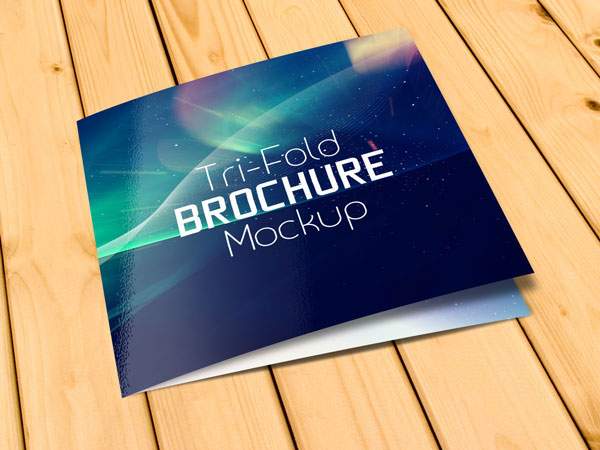
Best for: hospitality, fashion, luxury services, creative studios, events, and premium marketing.
The square format gives the familiar tri-fold structure a less conventional appearance.
17. Tri-Fold Brochure PSD Mockup

Best for: product information, services, restaurant menus, travel, company presentations, and events.
This layered PSD uses Smart Object editing and is suitable for presenting the front cover and folded brochure structure.
18. A4 Brochure PSD Mockup

Best for: reports, catalogs, company profiles, editorial design, product brochures, and marketing materials.
The standard A4 proportions make this one of the most flexible resources in the collection.
19. PSD Tri-Fold Mockup Template

Best for: corporate brochures, tourism, hospitality, service companies, menus, and promotional material.
This Pixeden PSD includes a Smart Object workflow for replacing the sample brochure artwork.
20. PSD Bi-Fold Brochure Mockup

Best for: company profiles, services, portfolios, product introductions, and corporate print design.
This bi-fold scene provides front-and-back views for presenting the publication as a complete object.
21. Tri-Fold Brochure PSD Template

Best for: promotional brochures, corporate information, events, local businesses, and services.
This is an older editable tri-fold design resource rather than a contemporary photographic mockup.
It can still be useful as a starting point, but customize the design thoroughly instead of treating the sample layout as finished client work.
22. Brochure Template PSD
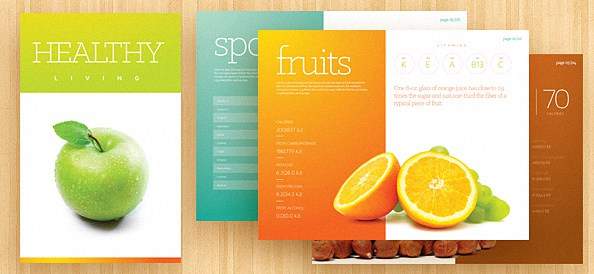
Best for: brochure layout experiments, marketing, corporate information, print practice, and presentation concepts.
This resource is another older PSD brochure template rather than a pure mockup, so use it as a structural starting point and adapt the typography, colors, imagery, and hierarchy to your own project.
How to Choose the Right Brochure Mockup
Match the Actual Format
If the finished brochure is A5, avoid presenting it as an oversized A4 publication.
Likewise, do not force a landscape layout into a portrait mockup simply because the scene looks attractive.
Match the Fold
Choose a mockup that reflects the intended production:
- Bi-fold.
- Tri-fold.
- Z-fold.
- Flat leaflet.
- Bound brochure.
Match the Context
A clean studio presentation may suit a corporate report, while a more atmospheric mockup could work better for fashion, travel, hospitality, or lifestyle branding.
How to Design a Better Brochure
Start With the Information Structure
Before choosing fonts or photographs, determine:
- What the brochure needs to communicate.
- What the reader should see first.
- What information belongs together.
- What action the reader should take.
Create a Strong Visual Hierarchy
Use clear differences between:
- Main headings.
- Subheadings.
- Body text.
- Captions.
- Calls to action.
Use Consistent Spacing
Margins and whitespace can make a brochure feel significantly more professional without adding any extra visual effects.
Tri-Fold Brochure Design Tips
Tri-fold brochures are compact but can be surprisingly difficult to design well.
Know Which Panel Folds Inside
The physical fold can affect panel dimensions and artwork placement.
Use the Cover for One Main Message
Avoid trying to summarize every service on the front panel.
Create a Natural Reading Sequence
The interior should guide the reader rather than presenting six unrelated rectangles.
Bi-Fold Brochure Design Tips
Bi-fold designs generally provide larger panels and can support stronger photography or longer editorial content.
Use the Full Spread
When appropriate, allow photography or graphic elements to move across both pages.
Respect the Center Fold
Avoid placing critical text directly through the fold area.
Brochure Typography Tips
Prioritize Readability
A brochure is meant to communicate information.
Decorative typography should not prevent the reader from understanding:
- Services.
- Products.
- Prices.
- Contact information.
Limit the Number of Typefaces
A small, well-defined type system is usually easier to control throughout multiple panels.
Check Physical Size
Text that looks comfortable at 200% zoom may be much too small once printed.
How to Use Brochure Mockups in a Portfolio
Show Flat Artwork Too
Mockups provide context, but flat spreads allow viewers to evaluate the actual design clearly.
Choose Different Views
A useful sequence might include:
- Cover.
- Open brochure.
- Detail view.
- Flat spread.
Avoid Repetition
Ten nearly identical perspective mockups rarely add more value than three carefully selected views.
Brochure Mockup Workflow in Photoshop
- Open the PSD.
- Review the layer structure.
- Locate the editable Smart Object or smart layer.
- Open the artwork layer.
- Insert your brochure design.
- Save the Smart Object.
- Return to the main PSD.
- Repeat for additional panels or pages.
- Adjust background options if supported.
- Check alignment and folds.
- Export the final image.
Common Brochure Mockup Mistakes
1. Using the Wrong Format
The mockup should match the brochure’s real proportions.
2. Stretching the Artwork
Do not distort the layout to make it fit an unrelated mockup.
3. Ignoring Fold Lines
Text and important imagery can disappear into physical folds.
4. Making Body Text Too Small
Always evaluate typography at intended print scale.
5. Showing Only Mockups
Include clean layouts in the portfolio as well.
6. Using Too Many Decorative Fonts
Brochures often contain enough information already.
7. Choosing the Scene Instead of the Format
Accuracy is more important than a dramatic background.
8. Ignoring Real Print Requirements
A Photoshop mockup does not replace bleed, color-profile, or printer checks.
9. Using Broken Resource Links
Resource collections should be reviewed periodically because older design sites and download pages can disappear or move.
10. Assuming Every Free Resource Has the Same License
Always review the current terms on the original website.
Brochure Mockup Licensing Checklist
- Is the resource still available?
- Is personal use permitted?
- Is commercial use permitted?
- Is attribution required?
- Is registration required?
- Can it be used for client presentations?
- Can the resulting image appear in advertising?
- Can the PSD be modified?
- Can the source file be redistributed?
- Can it be included in templates or products for resale?
Frequently Asked Questions About Free Brochure Mockups
What are brochure mockups?
Brochure mockups are presentation templates that place brochure artwork into realistic folded, open, closed, floating, hand-held, or studio scenes.
What are free brochure mockups used for?
Free brochure mockups are used for client presentations, portfolios, print previews, branding case studies, company profiles, menus, catalogs, travel brochures, and marketing projects.
What is the difference between a brochure mockup and brochure template?
A brochure template provides a starting layout for designing the actual content. A mockup takes completed artwork and presents it in a realistic physical context.
What is a tri-fold brochure?
A tri-fold brochure divides a sheet into three sections, creating multiple panels when folded.
What is a bi-fold brochure?
A bi-fold brochure folds the sheet once, usually creating four primary pages or panels.
What is a Z-fold brochure?
A Z-fold brochure uses alternating folds so the sheet opens in a zigzag shape.
Do all brochure PSD mockups use Smart Objects?
No. Many do, but the exact editing method depends on the creator.
Can free brochure mockups be used commercially?
Only when the individual resource license permits your intended commercial use.
Should I show flat brochure layouts too?
Yes. Flat artwork shows the actual design clearly, while the mockup demonstrates realistic context.
How many brochure mockups should I use in a portfolio?
A few carefully selected views are usually enough. Choose scenes that demonstrate different aspects of the project rather than repeating the same angle.
Final Thoughts
The best free brochure mockups help designers communicate how a print layout behaves as a real physical object.
A clean A4 mockup works well for corporate publications. A landscape brochure provides additional room for photography. Tri-fold and Z-fold mockups help explain complex panel relationships, while hand-held and floating scenes can add scale and visual movement.
Choose the resource based on the actual project rather than the most dramatic preview.
Match the dimensions. Match the fold. Check the reading order. Keep text readable. Show flat artwork alongside realistic scenes.
And periodically check external resource links, because older free mockups can move or disappear.
A strong brochure mockup should clarify the design — not hide it behind presentation effects.
For more brochure, catalog, stationery, packaging, and branding resources, continue exploring DesignRise.
Отличные мокапы.
Удачи!