


The right texture can transform an ordinary holiday graphic into something that feels warm, atmospheric, tactile, and unmistakably seasonal.
A soft field of Christmas bokeh can turn a simple greeting card into an elegant festive composition. Gold glitter can add luxury to typography and packaging. Snow and ice textures can create depth in winter artwork, while candy stripes, stars, ribbons, tinsel, and ornaments can instantly establish a more playful Christmas mood.
This collection brings together 40 free Christmas textures for Photoshop, holiday graphics, greeting cards, posters, social media designs, digital scrapbooking, invitations, backgrounds, typography, packaging concepts, and seasonal creative projects.
Instead of treating the resources as interchangeable decorative backgrounds, this guide organizes them into five practical groups:
- Bokeh, glitter, and festive light textures.
- Candy cane and striped Christmas textures.
- Stars and sparkling backgrounds.
- Snow, ice, and winter textures.
- Ornaments, ribbons, tinsel, foil, and decorative holiday textures.
You will also find practical advice on using Christmas textures with Photoshop blending modes, masks, typography, photography, and color adjustments — so they become part of the composition rather than simply sitting behind it.
Licensing note: these textures are hosted by different photographers, stock artists, and resource websites. Availability and usage rights may change. Always review the original source page before using an asset in client work, commercial products, merchandise, templates, advertising, or other paid projects.
Explore More DesignRise Resources:
How Christmas Textures Improve Holiday Design
Seasonal design often depends less on one obvious Christmas symbol and more on atmosphere.
You do not necessarily need to place Santa Claus, a Christmas tree, snowflakes, gifts, bells, and ornaments into the same layout. A carefully chosen texture can create enough context by itself.
Bokeh Creates Light and Atmosphere
Blurred Christmas lights are useful when you need a festive background that remains soft enough for typography or product photography.
Glitter Adds Celebration
Gold, silver, and colored glitter can give headlines, invitations, packaging, and social graphics a more luxurious or celebratory finish.
Snow Creates Depth
Winter textures can work as backgrounds, overlays, atmospheric effects, or subtle surface treatments.
Patterns Create Instant Seasonal Recognition
Red-and-white stripes, stars, wrapping-paper motifs, and ornaments are particularly effective for packaging, cards, patterns, and children’s holiday designs.
Choose the Texture Based on the Project
Christmas Bokeh, Glitter & Festive Light Textures
These first textures are useful when you want atmosphere without filling the composition with literal Christmas illustrations.
1. Red Christmas Texture

Best for: greeting cards, Christmas posters, invitations, seasonal social graphics, and typography.
Red immediately establishes a traditional festive mood. Use this texture behind cream, white, gold, or deep green typography for a classic Christmas palette.
2. Christmas Bokeh Texture

Best for: elegant cards, holiday photography, product promotions, invitations, and social campaigns.
Bokeh is particularly useful because it creates light and depth while remaining abstract enough for text to sit over it.
Keep the Headline Away From the Brightest Circles
Place typography over a calmer area or darken the background slightly behind the text.
3. Glitter Texture

Best for: holiday lettering, luxury invitations, packaging, cards, promotional banners, and festive typography.
Glitter is strongest when used selectively. Try masking it inside a headline, star, number, ornament, or border rather than making the entire composition sparkle equally.
4. Season of Winter Texture

Best for: winter posters, editorial graphics, cards, photography overlays, and atmospheric backgrounds.
This type of seasonal texture is useful when you want a quieter winter atmosphere rather than an overtly decorative Christmas pattern.
5. Glittery Stars Texture

Best for: magical children’s graphics, New Year cards, holiday invitations, and festive backgrounds.
The stars already create a strong decorative rhythm. Pair them with relatively simple typography rather than adding multiple competing motifs.
6. Green Star Christmas Texture

Best for: traditional holiday graphics, gift tags, cards, festive branding, and scrapbook layouts.
Green provides an alternative to the red-heavy palettes often used for Christmas. Combine it with ivory, pale gold, or white to keep the design fresh.
7. Christmas Lights Texture

Best for: holiday photography, event promotions, Christmas parties, social graphics, and seasonal advertising.
Try placing the light texture above a photograph and experimenting with Screen or Lighten blending modes for a more integrated effect.
8. Golden Christmas Texture

Best for: premium invitations, New Year graphics, packaging, luxury branding, and elegant greeting cards.
Gold becomes more sophisticated when paired with deep black, burgundy, forest green, navy, or warm cream rather than several other metallic effects.
9. Golden Christmas Texture with Stars and Sequins

Best for: party invitations, New Year’s Eve graphics, festive typography, and glamorous holiday promotions.
Because this background already contains multiple reflective details, avoid adding additional glitter unless the intentionally extravagant look is part of the concept.
10. Green Christmas Grunge Texture

Best for: vintage Christmas graphics, scrapbook layouts, posters, handmade-style cards, and retro seasonal design.
The grunge treatment already provides age and texture, so keep overlaid typography relatively clean for contrast.
11. Bokeh Pack Texture

Best for: portraits, Christmas photography, festive backgrounds, banner design, and atmospheric overlays.
A texture pack gives you more flexibility than one fixed background. Try different bokeh density and size depending on how much negative space the design needs.
12. Vintage Christmas Bokeh Squares

Best for: retro holiday cards, nostalgic graphics, scrapbooking, and vintage-inspired social content.
This is particularly useful when a project needs both festive light and an aged photographic character.
Christmas Candy Cane & Stripe Textures
Striped textures communicate Christmas quickly and work particularly well in playful packaging, children’s graphics, patterns, and typography.
13. Candy Cane Fine Stripe Texture

Best for: wrapping-paper concepts, children’s designs, holiday packaging, cards, labels, and patterns.
Fine stripes can become visually intense at small scale. Use them in controlled areas or behind large solid shapes.
14. Candy Cane Texture
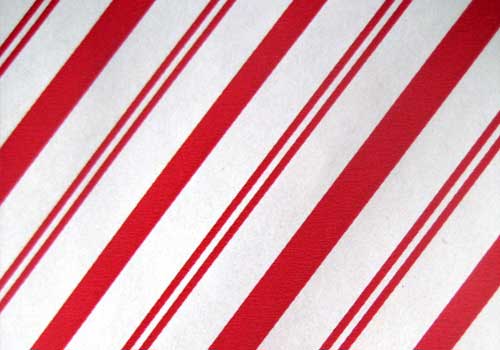
Best for: festive lettering, candy packaging concepts, kids graphics, party invitations, and holiday social posts.
Pair the red-and-white direction with one darker supporting color such as deep green or burgundy to give the composition more depth.
15. Grunge Christmas Stripe Texture

Best for: vintage posters, handmade cards, retro packaging, scrapbook graphics, and distressed typography.
The worn surface makes the stripe pattern feel less digitally perfect, which can work well for nostalgic or handmade visual directions.
Christmas Star Textures & Sparkling Backgrounds
16. Christmas Stars Texture

Best for: holiday cards, fantasy graphics, invitations, winter posters, and children’s artwork.
Stars can act as a background pattern or atmospheric overlay. Reduce opacity when they begin competing with the main message.
17. Christmas Stars on Red Background

Best for: traditional festive cards, promotional banners, event graphics, and gift-related designs.
This texture already combines the pattern and traditional Christmas color palette, making it a quick option for simple seasonal layouts.
18. Christmas Stars Background Texture

Best for: invitations, greeting cards, Christmas banners, digital scrapbooking, and typography.
Try using a soft gradient mask so stars gradually disappear near the headline instead of covering the entire canvas equally.
19. Green Stars Christmas Texture

Best for: green-and-gold Christmas themes, traditional holiday design, cards, invitations, and patterns.
Add cream or white typography for clarity, or introduce muted gold accents for a more premium result.
20. Christmas Star Textures Pack
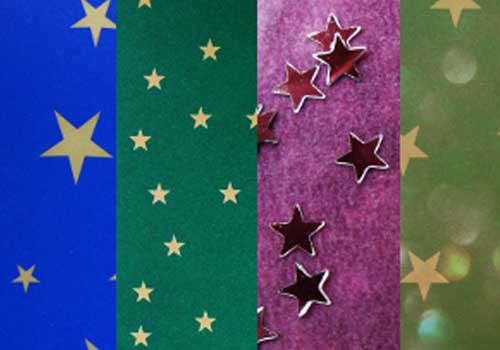
Best for: multi-post social campaigns, greeting-card series, scrapbook pages, and coordinated festive graphics.
A pack is particularly useful when you need several different backgrounds that still feel visually connected.
Christmas Snow, Ice & Winter Textures
Snow and ice textures are some of the most versatile resources in the collection because they can be used both as complete backgrounds and as subtle atmospheric overlays.
21. Glitter Snowflake Texture

Best for: magical winter graphics, children’s illustration, New Year cards, invitations, and snow-themed typography.
Because snowflakes contain intricate detail, allow enough empty space around important text.
22. Swirling Blue Snow Texture

Best for: fantasy winter scenes, icy posters, seasonal backgrounds, Christmas artwork, and atmospheric photo manipulation.
The directional movement can help lead the eye through a composition. Position key subjects where the swirl naturally supports them.
23. Blue Winter Texture

Best for: elegant winter campaigns, photography, posters, cards, and minimal holiday graphics.
Blue winter textures provide an excellent alternative to traditional red-and-green Christmas palettes.
24. High-Resolution Ice Texture

Best for: frozen typography, winter posters, product backgrounds, photo manipulation, and icy visual effects.
Ice works particularly well as a clipping mask inside text or as a subtle overlay on blue, gray, and white compositions.
25. Red Snowflake Background

Best for: traditional greeting cards, promotional graphics, holiday banners, and festive social content.
The combination of snowflakes and red color provides immediate seasonal recognition, so additional decoration can remain minimal.
Christmas Ornament, Foil, Ribbon & Decoration Textures
26. Christmas Gold Texture

Best for: luxury cards, festive packaging, invitations, New Year’s Eve design, and premium typography.
Use gold as a focal material rather than pairing it with several equally reflective surfaces.
27. Christmas Foil Texture

Best for: metallic text effects, wrapping concepts, packaging, greeting cards, and festive branding.
Foil textures work particularly well clipped inside large typography or simple geometric shapes.
28. Season of Winter Decorative Texture

Best for: winter cards, seasonal photo treatments, scrapbook compositions, and nostalgic holiday graphics.
Use a texture like this to establish mood before adding more explicit Christmas imagery.
29. Red and Green Leafy Christmas Texture

Best for: botanical holiday design, wrapping concepts, traditional cards, invitations, and festive branding.
This texture can support a more natural Christmas direction when paired with kraft paper, cream, muted gold, or dark green.
30. White Christmas Tinsel Texture

Best for: snowy minimalist graphics, silver-and-white Christmas themes, backgrounds, and festive overlays.
White seasonal textures can create a cleaner aesthetic than traditional red and green, especially for beauty, fashion, and premium holiday campaigns.
31. Christmas Red Ribbons & Pearls

Best for: invitations, gift-inspired layouts, beauty promotions, elegant cards, and romantic holiday design.
The decorative detail already suggests gift wrapping, so keep headlines and logos relatively simple.
32. Christmas Gift Floral Texture

Best for: gift wrap concepts, stationery, greeting cards, packaging, and decorative patterns.
Floral Christmas motifs can create a softer alternative to snowflakes and geometric ornaments.
33. Christmas Red & Gold Texture

Best for: luxury festive campaigns, invitations, greeting cards, packaging concepts, and New Year graphics.
Red and gold is already a strong combination. Add neutral cream, white, or dark burgundy rather than introducing several additional accent colors.
34. Decorative Christmas Texture

Best for: quick holiday backgrounds, cards, seasonal web graphics, banners, and digital scrapbooking.
Use it as a base and build hierarchy with typography, rather than adding another equally detailed decorative layer.
35. Green Christmas Tinsel Texture

Best for: classic holiday graphics, event invitations, festive borders, seasonal backgrounds, and playful compositions.
Tinsel is visually busy, so it works well around the edge of a composition while the center remains cleaner.
36. Christmas Texture with Green Ornaments

Best for: Christmas-tree themes, greeting cards, invitations, holiday advertising, and seasonal product presentations.
Ornament photography provides an immediate festive setting and can work particularly well behind short greeting messages.
37. Christmas Wallpaper Texture

Best for: desktop wallpapers, website hero graphics, digital cards, festive banners, and social backgrounds.
A full decorative wallpaper is useful when you need one finished seasonal surface rather than an overlay.
38. Christmas Textures Pack

Best for: multi-image campaigns, scrapbook layouts, holiday card series, and designers who need several coordinated options.
Texture packs are most useful when you select one consistent direction instead of mixing every included surface into one composition.
39. 3 Merry Christmas Textures
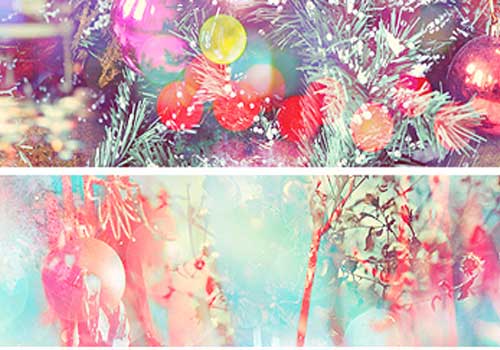
Best for: cards, social media sets, holiday announcements, invitations, and digital scrapbooking.
A small coordinated set is convenient when several campaign posts need variety without losing the same overall holiday mood.
40. Christmas Bokeh Lights Texture

Best for: photography, elegant cards, festive social media, event announcements, and holiday product graphics.
This final bokeh option is useful when the project needs obvious festive light without introducing illustrated ornaments or patterns.
How to Use Christmas Textures in Photoshop
1. Place the Texture Above Your Artwork
Import the texture into the Photoshop document and position it above the photograph, color layer, or background you want to affect.
2. Try Different Blend Modes
Useful options include:
- Screen for bright lights and snow.
- Lighten for bokeh and glowing effects.
- Multiply for darker paper, grunge, and printed textures.
- Soft Light for subtle surface integration.
- Overlay for stronger contrast and texture.
There is no universal best mode. It depends on the source texture and artwork below it.
3. Reduce Opacity
A texture often works better at 15–60% opacity than at full strength.
4. Use Layer Masks
Remove texture selectively from:
- Faces.
- Logos.
- Small typography.
- Products.
- Important visual details.
5. Adjust the Color
Hue/Saturation, Curves, Levels, Gradient Map, and Color Balance can help one texture fit a completely different holiday palette.
How to Create Depth With Snow & Bokeh Overlays
A common mistake is using one texture layer at one size.
Create a Background Layer
Use smaller, softer particles at lower contrast.
Create a Midground Layer
Add slightly larger snow or bokeh.
Create a Foreground Layer
Use only a few large, blurred particles.
The combination creates the illusion that the atmosphere exists at several distances from the camera.
How to Use Christmas Textures With Typography
Clip the Texture Inside the Text
Gold foil, glitter, ice, stars, and snow can become text fills rather than full backgrounds.
Keep the Typeface Relatively Bold
Extremely thin letters may not show enough texture to make the effect visible.
Add a Clean Supporting Font
If the main headline is glittered or textured, keep supporting information simple.
Five Christmas Texture Workflows
1. Elegant Greeting Card
- Use a dark green or burgundy background.
- Add subtle gold bokeh.
- Place cream or gold typography.
- Mask the brightest lights away from the message.
- Add one small decorative detail.
2. Kids Christmas Poster
- Start with candy stripes.
- Add large playful lettering.
- Use stars or snowflakes as secondary details.
- Keep the palette limited to three or four main colors.
3. Luxury New Year Graphic
- Use black, navy, or deep burgundy.
- Add gold glitter or foil.
- Use one large number or headline.
- Keep everything else restrained.
4. Winter Photography Edit
- Add a snow overlay.
- Use Screen or Lighten.
- Mask snow away from important facial detail.
- Add a larger blurred foreground layer.
- Cool the overall color temperature slightly if appropriate.
5. Christmas Social Media Series
- Select three related textures.
- Use one consistent type system.
- Repeat the same red, green, gold, or winter color palette.
- Change the texture while preserving the layout logic.
How to Keep Christmas Design From Looking Overdecorated
Christmas graphics can become cluttered unusually quickly because so many recognizable motifs are available.
Choose One Main Festive Signal
For example:
- Bokeh.
- Snow.
- Candy stripes.
- Gold foil.
- Ornaments.
Add One Supporting Signal
If you already use a strong red-and-white stripe, subtle snow may be enough.
Leave Negative Space
Empty areas help typography and products remain visible.
Do Not Add Texture to Every Layer
A textured background, textured headline, textured border, and textured photograph can make the design difficult to read.
Christmas Color Palettes That Work With These Textures
Classic
Red + forest green + cream + gold.
Winter
Navy + icy blue + white + silver.
Luxury
Black + champagne gold + warm white.
Natural
Deep green + kraft brown + cream + muted red.
Playful
Bright red + peppermint pink + turquoise + white.
Modern
Burgundy + blush + off-white + dark charcoal.
Common Christmas Texture Mistakes
1. Using Too Many Textures at Once
One strong texture can create more atmosphere than five competing effects.
2. Leaving Every Texture at 100% Opacity
Subtle integration often looks more professional.
3. Covering Faces With Snow
Use layer masks to protect important details.
4. Making Everything Glow
Light only feels bright when darker areas exist around it.
5. Combining Every Christmas Color
Choose a deliberate palette rather than automatically using red, green, blue, gold, and silver together.
6. Using Texture Instead of Hierarchy
A decorative background cannot fix weak typography or composition.
7. Adding Grain to Already Busy Textures
Evaluate the original material before adding additional surface effects.
8. Ignoring Image Resolution
A small texture may work for social media but become visibly pixelated in a large poster or print project.
9. Forgetting the Final Crop
Always evaluate the texture at the actual aspect ratio of the finished design.
10. Assuming Free Means Commercially Licensed
Check the original usage terms before commercial work.
Christmas Texture Licensing Checklist
- Is commercial use allowed?
- Is attribution required?
- Can the texture be modified?
- Can it be used in client work?
- Can resulting artwork be sold?
- Is merchandise use permitted?
- Can it be included in templates?
- Is redistribution of the original texture prohibited?
Keep the original source URL and licensing information with your project archive whenever possible.
Frequently Asked Questions About Christmas Textures
What are Christmas textures?
Christmas textures are photographs, backgrounds, patterns, or digital surfaces featuring visual elements associated with Christmas and winter, including bokeh lights, glitter, snow, stars, candy stripes, foil, ornaments, tinsel, and seasonal colors.
What can free Christmas textures be used for?
Free Christmas textures can be used for greeting cards, posters, social graphics, invitations, photo editing, seasonal advertising, packaging concepts, digital scrapbooking, websites, typography, and holiday artwork.
How do I add a Christmas texture in Photoshop?
Place the texture on a new layer above the artwork, experiment with blending modes such as Screen, Multiply, Soft Light, or Overlay, adjust opacity, and use a layer mask to control where the texture appears.
What blending mode is best for snow?
Screen and Lighten are useful starting points for textures containing bright snow on a dark background, but the best option depends on the actual image.
What blending mode is best for grunge textures?
Multiply, Soft Light, and Overlay are common starting points depending on whether you want darker surface detail or additional contrast.
Can I change the color of a Christmas texture?
Yes. Photoshop adjustments such as Hue/Saturation, Gradient Map, Color Balance, Curves, and Solid Color layers can help recolor textures.
Can Christmas textures be used with text?
Yes. You can use them behind typography or clip glitter, foil, snow, or other textures directly inside large letters.
Are all Christmas textures in this collection free for commercial use?
No universal licensing claim should be made. Each resource comes from a different creator or source website, so commercial-use permissions should be checked individually.
Can these textures be used for New Year designs too?
Yes. Gold glitter, bokeh, stars, foil, lights, snow, and metallic textures are particularly adaptable for New Year’s Eve and winter celebration graphics.
Do I need Photoshop to use them?
Not necessarily. Standard image textures may work in other design and photo-editing software that supports image layers, masks, opacity, and blending modes.
Final Thoughts
The best free Christmas textures are not necessarily the busiest or most obviously festive backgrounds.
A soft bokeh overlay can create a stronger Christmas mood than ten different ornaments. A subtle snow texture can make a photograph feel wintry without hiding the subject. Gold foil can turn one simple word into the focal point of a luxury New Year design, while candy stripes can establish a playful holiday direction before any illustrations are added.
The important part is deciding what role the texture should play.
Should it create atmosphere? Add physical surface? Introduce seasonal color? Frame typography? Create depth? Become the main pattern?
Once you know the answer, choose one texture that supports that purpose and integrate it carefully.
Reduce the opacity. Mask important areas. Adjust the color. Let some parts of the design stay clean. Use contrast between textured and untextured surfaces.
A good Christmas texture makes the artwork look festive. A great one becomes part of the visual idea without drawing attention away from the message.
For more free textures, Photoshop resources, mockups, fonts, brushes, and creative design collections, continue exploring DesignRise.
Discover more from DesignRise
Subscribe to get the latest posts sent to your email.