











Free floral brushes for Photoshop can transform an empty layout into a polished botanical composition in minutes. They are useful for far more than simply stamping a flower into the corner of an image. With the right scale, color, layer style, and masking technique, floral brushes can become elegant frames, watercolor backgrounds, vintage ornaments, packaging details, social media accents, textile-inspired patterns, wedding stationery, editorial illustrations, and atmospheric elements for digital art.
This collection brings together 30 free flower and botanical brush resources in a wide range of styles. You will find individual flowers, floral arrangements, decorative corners, swirling ornaments, watercolor blooms, fantasy roses, lotus flowers, cornflowers, oriental motifs, and more expressive botanical shapes.
The resources are especially useful for graphic designers, photographers, illustrators, social media creators, stationery designers, and artists who want to add natural detail without drawing every petal and leaf manually. They can also help during early concept development when you need to test several compositions before creating custom botanical artwork.
However, downloading a large collection does not automatically improve a design. Floral brushes can easily make a composition feel outdated, crowded, or overly decorative when every available shape is used at once. The strongest results usually come from selecting one visual style, controlling the hierarchy, and treating each brush impression as raw material that can be edited rather than as a finished decoration.
This guide explains how to select, install, organize, and use free Photoshop floral brushes more professionally. Each resource includes a practical description of the projects it may suit, while the later sections cover composition, color, licensing, quality control, and common mistakes.
Some resources in this collection were originally shared through older community pages. Availability and license terms may have changed over time. Always open the original source page and confirm whether a brush can be used in personal, client, commercial, print-on-demand, or resale-related projects.
Explore More DesignRise Resources:
- High-Resolution Polygonal Textures for Your Artwork
- Moons and Stars Free Photoshop Brush Set
- Music Brushes Collection for Adobe Photoshop
- Awesome Free Photoshop Brush Sets
Why Floral Brushes Are Still Useful in Modern Design
Botanical imagery moves through trends, but it never fully disappears. Flowers can communicate softness, growth, romance, craft, freshness, celebration, beauty, seasonality, and natural quality. The same brush can feel completely different depending on how it is treated.
A detailed rose placed over aged paper may create a vintage label. The same rose in white over a black background may feel dramatic and editorial. A watercolor bloom in muted peach may suit wedding stationery, while a saturated floral silhouette can become part of a bold beauty campaign.
Projects That Can Benefit From Floral Brushes
- Branding: boutique logos, monograms, submarks, and supporting brand patterns.
- Packaging: cosmetics, candles, tea, stationery, handmade goods, and lifestyle products.
- Wedding design: invitations, menus, seating plans, save-the-date cards, and social announcements.
- Editorial design: magazine covers, article openers, posters, and artistic typography.
- Social media: quote cards, promotional stories, seasonal campaigns, and launch graphics.
- Photography: portrait overlays, fine-art compositions, album covers, and decorative framing.
- Surface design: repeated patterns for fabric, wallpaper, wrapping paper, or digital backgrounds.
- Digital art: fantasy scenes, mixed-media illustrations, collages, and atmospheric details.
How to Choose the Right Floral Brush Set
Floral brushes vary significantly in visual language. Some resemble clean botanical stamps, while others have rough watercolor edges or decorative curls. Choosing a brush only because the preview looks attractive can create problems later if its line weight, resolution, or mood does not fit the project.
Match the Brush Style to the Project
Check Resolution Before Committing
Brushes made from small source images may look acceptable in a web graphic but become visibly pixelated in a poster or large print. Test the brush at the final document size before building the entire composition around it.
Review the Edges
Zoom in and check whether the brush edge is clean, intentionally textured, or surrounded by unwanted artifacts. Rough edges are not automatically bad. They simply need to match the intended visual style.
Consider How Much Customization Is Possible
A single-color Photoshop brush can be recolored easily, but a complex realistic flower may still require masking, painting, texture overlays, and tonal adjustments to feel unique. Select brushes that leave room for your own art direction.
How to Install Floral Brushes in Photoshop
Most Photoshop brush collections are distributed as .ABR files. Installation usually takes less than a minute.
Method 1: Import Through the Brushes Panel
- Download and unzip the brush package if necessary.
- Open Adobe Photoshop.
- Choose Window → Brushes.
- Open the panel menu in the upper-right corner.
- Select Import Brushes.
- Choose the downloaded .ABR file.
- The new brush group should appear inside the Brushes panel.
Method 2: Open the ABR File Directly
On many systems, double-clicking the .ABR file while Photoshop is installed will import the brush set automatically. Open the Brushes panel afterward to confirm that the collection has appeared.
Create a Backup
Keep the original ZIP or ABR files in a clearly named folder outside Photoshop. Organize them by category and include a text document or screenshot showing the original source and license. This makes it easier to reinstall brushes later or verify usage rights for client work.
30 Free Floral Brushes for Photoshop
The collection below contains a mixture of individual flowers, decorative arrangements, corners, swirls, watercolor elements, and stylized botanical brushes. Click the linked title of each resource to open its original download page.
1. Flower Brushes by Man Upstairs
Best for: botanical collages, decorative posters, natural backgrounds, and layered floral compositions.
This collection offers a versatile starting point for designers who need recognizable flower shapes without committing to one highly decorative style. Use individual impressions as focal points or combine several flowers into a custom arrangement.

2. Floral Corners Photoshop Brush Set
Best for: invitations, certificates, menu cards, social posts, and decorative framing.
Corner brushes are useful when a design needs botanical detail without placing decoration around the entire border. Try positioning one corner diagonally opposite another, then reduce opacity so the frame supports rather than dominates the content.

3. Six Stunning Floral Brushes
Best for: expressive layouts, romantic graphics, photo overlays, and floral focal points.
This smaller collection is useful when you want a few strong botanical elements instead of a large library of similar stamps. Test the brushes at different scales and use masks to reveal only the most attractive areas.

4. Beautiful Floral Brushes
Best for: stationery, elegant typography, beauty graphics, and decorative compositions.
These floral shapes can be used as delicate accents around a heading or developed into a fuller background. Try using a single muted color rather than several competing floral shades for a more contemporary result.

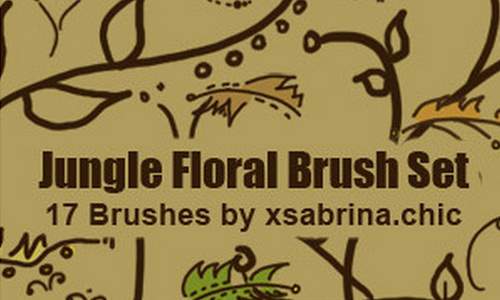
5. Jungle Floral Brushes
Best for: tropical campaigns, summer graphics, botanical packaging, and energetic backgrounds.
Jungle-inspired floral forms work well when a design needs more density and movement than a traditional rose arrangement. Combine them with saturated greens, deep shadows, or high-contrast typography for a stronger tropical direction.
6. Flowers Brushes Vol. 2
Best for: general botanical design, decorative overlays, card design, and mixed-media artwork.
This set can function as a general-purpose floral resource. Apply each brush to its own layer so the individual flowers can be rotated, recolored, masked, and repositioned independently.

7. Three Photoshop Flower Brushes
Best for: minimal floral layouts, individual accents, portrait overlays, and simple stationery.
A compact set can be more useful than a large collection when visual consistency matters. Use one flower repeatedly with variations in size, angle, and opacity to build a controlled composition.

8. Floral Swirls Brushes
Best for: vintage typography, decorative dividers, ornamental frames, and elegant packaging.
Floral swirls are particularly effective around headlines and monograms. Avoid placing identical swirls symmetrically unless the project intentionally needs a formal, classical appearance.

9. Floral Bursts Brushes for Photoshop and GIMP
Best for: circular arrangements, energetic floral graphics, poster backgrounds, and focal decorations.
Floral burst shapes naturally direct attention toward their center. Place text, a product, or a portrait near that visual center, but keep enough contrast so the decorative details do not reduce readability.

10. Floral Decorations Brush Pack
Best for: ornamental typography, invitations, vintage labels, and decorative branding assets.
This set is useful when the flowers need to behave more like graphic ornaments than realistic botanical illustrations. Keep the decoration in one tonal family for a more cohesive composition.

11. High-Resolution Floral Brushes
Best for: larger print layouts, detailed scrapbooking, posters, and high-resolution botanical artwork.
High-resolution brushes provide more flexibility when a project needs to move beyond small web graphics. Since this is an older external resource, confirm that the page and download remain available before planning a project around it.

12. 18 Watercolor Floral Brushes
Best for: invitations, greeting cards, soft branding, romantic artwork, and watercolor compositions.
Watercolor brushes work best when color and opacity are built gradually. Combine several impressions on separate layers and use subtle blending to avoid a repeated stamped appearance.

13. Artistic Floral Brushes
Best for: expressive posters, layered artwork, editorial design, and artistic photo compositions.
These brushes can help create a less literal and more illustrative floral treatment. Try combining them with painted textures, grain, or typography rather than relying on clean white backgrounds alone.

14. Floral Brushes by Soul-DJ
Best for: general floral compositions, decorative backgrounds, digital collages, and stationery design.
This collection can be used as a flexible foundation for building custom floral arrangements. Vary the visual weight by combining one large flower with several smaller supporting elements.

15. Floral Swirl Brushes by Aka-Joe
Best for: decorative lettering, frames, labels, certificates, and vintage-inspired graphics.
The curls and extended lines in floral swirl brushes can help connect otherwise separate parts of a layout. Use them to lead the viewer from a headline toward a product or secondary message.

16. Floral Brushes by XXMurderDollXX
Best for: dark floral artwork, alternative graphics, decorative overlays, and expressive compositions.
This resource may suit projects that need a more dramatic floral mood. Test the brushes over dark backgrounds and experiment with pale, metallic, or desaturated color treatments.

17. Floral Brushes Set by Solenero73
Best for: ornamental compositions, classic floral artwork, and decorative print or digital layouts.
Use this set to build structured floral designs with a central focal point. Applying the brushes in one color first makes it easier to judge the composition before adding gradients or effects.

18. Flower Brush Set by Gvalkyrie
Best for: individual floral accents, pattern experiments, card designs, and botanical collages.
Individual flower brushes offer more compositional freedom than prebuilt arrangements. Rotate each impression and vary its scale to create an arrangement that feels designed rather than repeated.

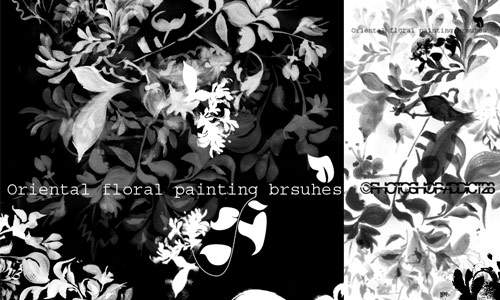
19. Traditional Oriental Flower Brushes
Best for: heritage-inspired artwork, decorative stationery, illustrative posters, and traditional botanical themes.
Use culturally specific visual references with care and context. These brushes may suit traditional or historical design directions, but they should not be added to an unrelated project merely as exotic decoration.
20. Single Flowers Set 2
Best for: custom arrangements, repeated patterns, minimal designs, and isolated floral details.
A set of single flowers is useful when you want complete control over the composition. Use guides or a loose grid when creating patterns, but introduce enough variation to prevent the result from feeling mechanical.

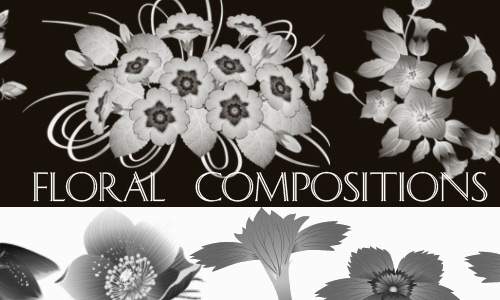
21. Floral Compositions Photoshop Brushes
Best for: invitations, poster corners, packaging, title decoration, and complete floral arrangements.
Precomposed floral arrangements are helpful when a deadline is short. To make the result more distinctive, mask portions of the original arrangement and combine them with manually placed flowers.
22. Shiny Flowers Set 7
Best for: fantasy graphics, luminous artwork, event posters, and decorative digital compositions.
Shiny floral effects are strongest when their glow matches the scene’s light direction. Place the flowers on separate layers and adjust blending modes instead of applying one identical glow to every element.

23. Single Flowers Photoshop Brushes
Best for: custom bouquets, botanical borders, patterns, and isolated decorative elements.
This set provides flexible components for designers who prefer to build arrangements manually. Start with a strong silhouette before spending time on detailed color and texture treatments.

24. Fantasy Rose Photoshop Brush
Best for: fantasy art, romantic posters, album covers, digital collages, and dramatic floral focal points.
A fantasy rose can become the central visual element of a composition. Build the surrounding typography and lighting around it rather than treating it as a small decorative afterthought.

25. Blue Cornflower Brush
Best for: delicate botanical graphics, summer stationery, nature-inspired branding, and floral illustrations.
Cornflowers can bring a lighter and less formal character than roses. Experiment with soft blue, violet, neutral, or monochrome treatments depending on the project’s visual tone.

26. Lotus Brushes for Photoshop
Best for: wellness design, meditation graphics, spa branding, water-inspired art, and elegant botanical layouts.
Lotus imagery has strong symbolic associations, so use it when the concept genuinely supports the meaning. Minimal layouts and calm palettes often allow the flower shape to remain the focus.

27. Aquarelle Flowers Brushes
Best for: watercolor invitations, artistic backgrounds, greeting cards, and expressive floral branding.
Aquarelle brushes are ideal for designs that need visible pigment variation and organic edges. Avoid sharpening them excessively, as the softness is part of the intended character.

28. Satin Flowers Photoshop Brushes
Best for: elegant invitations, fashion graphics, luxury accents, and luminous floral artwork.
The satin-like visual treatment may suit projects that need softness and polish. Pair the brushes with controlled highlights and restrained gradients to prevent the final result from looking overly glossy.

29. Fantasy Floral Photoshop Brushes
Best for: surreal artwork, fantasy posters, mixed-media compositions, and atmospheric decorative design.
Fantasy floral brushes are useful when realism is not the main goal. Combine them with light effects, mist, painted textures, or abstract shapes to create a more immersive composition.

30. Floral Brushes by Hawksmont
Best for: ornamental layouts, vintage artwork, botanical backgrounds, and decorative typography.
This final resource provides another versatile floral direction for designers who want to compare several botanical styles. Import only the brushes you genuinely plan to use so the Photoshop library remains manageable.

How to Use Floral Brushes Without Making a Design Look Generic
Build the Composition in Black First
Apply the brushes in one dark color before experimenting with gradients, textures, and effects. This reveals whether the basic composition works. If the silhouette is weak, additional styling will not solve the underlying problem.
Use One Brush Per Layer
Placing each impression on a separate layer gives you control over scale, opacity, masking, color, blending, and position. It also makes it easier to remove unnecessary decoration later.
Vary Scale and Rotation
Repeated stamps become obvious when every flower has the same orientation and size. Create visual hierarchy with one or two dominant flowers, several medium elements, and a small number of supporting details.
Mask Instead of Erasing
Layer masks let you hide parts of a flower without permanently removing them. This is useful when a botanical element needs to pass behind typography, packaging, or a photographed subject.
Recolor With Adjustment Layers
Use Solid Color fills, Gradient Maps, Hue/Saturation, or Selective Color adjustment layers to create a controlled palette. This is more flexible than painting every brush impression manually.
Add Texture After the Structure Works
Paper grain, paint, foil, ink, and print effects can make floral designs more distinctive, but they should come after composition and hierarchy have been resolved.
Five Practical Floral Brush Workflows
1. Wedding Invitation
- Choose one watercolor or elegant floral set.
- Build two asymmetrical corner arrangements.
- Keep the central area clear for the names and event details.
- Use a refined serif or calligraphy font for the headline.
- Reduce floral saturation so the text remains dominant.
- Test the design at its actual print size.
2. Beauty Product Packaging
- Select one botanical silhouette that supports the product story.
- Create a monochrome version before applying color.
- Place the design on a packaging mockup.
- Check whether ingredients, volume, and legal text remain readable.
- Rebuild important floral details as vectors if production requires them.
3. Editorial Poster
- Choose a strong flower or floral burst as the visual anchor.
- Crop it dramatically rather than showing the entire brush impression.
- Use large typography that overlaps the botanical image.
- Create depth with masks and controlled transparency.
- Add grain or print texture during final finishing.
4. Social Media Campaign
- Create one master composition in the primary campaign format.
- Keep flowers on independent layers.
- Adapt the composition for stories, square posts, and banners.
- Move floral details away from platform interface elements.
- Check readability on a phone before publishing.
5. Seamless Floral Pattern
- Choose several individual flower brushes from one visual family.
- Build a balanced tile with variation in scale and rotation.
- Use Photoshop’s pattern preview tools to inspect repetition.
- Remove obvious empty areas and repeated clusters.
- Test the pattern at small and large scales.
Common Mistakes When Using Floral Photoshop Brushes
1. Using Too Many Flower Styles
Mixing watercolor roses, sharp vector ornaments, realistic petals, and glowing fantasy flowers in one layout usually creates visual confusion. Choose one primary style and add contrast through scale or color instead.
2. Covering Every Empty Area
Negative space is part of the design. Empty areas help typography breathe and make decorative elements feel intentional.
3. Ignoring Resolution
A low-resolution brush can become blurry or pixelated in print. Test the largest required size before approving the layout.
4. Leaving Every Brush Impression Unedited
Downloaded brushes are starting materials. Mask, crop, rotate, distort, recolor, and combine them so the final composition does not look like a default stamp.
5. Applying Heavy Effects to Every Flower
Strong shadows, glows, gradients, and bevels can quickly make botanical design feel dated. Use effects only when they support the project’s visual direction.
6. Forgetting About Typography
Floral decoration should support the message. If the viewer notices the flowers but cannot read the title, event details, or product name, the hierarchy has failed.
7. Ignoring the License
Some brushes are free only for personal use. Confirm commercial rights before using them in client work, packaging, merchandise, print-on-demand products, or assets intended for resale.
Licensing and Quality Checklist
Before using any downloaded brush in a professional project, save the following information:
- The original source URL.
- The creator’s name or username.
- The date the resource was downloaded.
- A screenshot or copy of the license.
- Whether commercial use is allowed.
- Whether attribution is required.
- Whether the brush may be used in logos or merchandise.
- Whether the original ABR file may be redistributed.
Using a brush inside a finished flattened design is different from repackaging or reselling the brush file itself. Free creative resources generally should not be redistributed as standalone assets unless the license explicitly permits it.
Frequently Asked Questions About Floral Brushes for Photoshop
What are floral Photoshop brushes?
Floral Photoshop brushes are reusable brush presets created from flowers, leaves, botanical illustrations, ornaments, or painted textures. They are commonly distributed as .ABR files and can be stamped, painted, resized, recolored, and layered inside Photoshop.
Can floral brushes be used for commercial projects?
Commercial usage depends on the license supplied by the original creator. Some sets allow commercial work, while others are limited to personal projects or require attribution.
Can Photoshop brushes be recolored?
Yes. Brush impressions use the selected foreground color. They can also be recolored with layer styles, clipping masks, adjustment layers, Gradient Maps, or Solid Color fills.
How do I make floral brushes look less repetitive?
Change the scale, rotation, opacity, color, and visible portion of each impression. Place stamps on separate layers and combine them with masks, painted details, and textures.
Are old Photoshop brushes compatible with current versions?
Many older .ABR files still import successfully, but compatibility is not guaranteed. Some old download pages may also be unavailable. Test every resource before beginning a time-sensitive project.
Can floral brushes be used to create logos?
They can support early logo exploration or decorative submarks, but check the license carefully. A heavily used public brush may also reduce distinctiveness. Professional logos often require custom drawing or significant modification.
Are Photoshop brushes suitable for large-format printing?
Only when the source resolution is high enough for the intended size. Test the brush at final dimensions and print resolution before approving the design.
Final Thoughts
This new collection of free floral brushes for Photoshop gives designers a broad range of botanical resources, from individual flowers and watercolor blooms to ornamental corners, fantasy roses, traditional motifs, and complete floral compositions.
The most valuable approach is not downloading all 30 sets and placing them into one enormous Photoshop folder. Choose the resources that match your actual projects. Keep the original source and license information. Test resolution. Organize the brushes by style. Delete or archive the sets you do not use.
When working on a real design, begin with composition and hierarchy. Use floral brushes to support the message, not to fill every available space. Recolor them, mask them, crop them, combine them, and add your own texture or drawing so the result feels intentionally art-directed.
A floral brush becomes valuable when it saves time without making the design feel borrowed, repetitive, or generic.
For more Photoshop brush collections, free textures, typography resources, and practical creative tools, continue exploring DesignRise.
Thanks for sharing this cool collection of floral brushes! 😉
Great collection! Thank you!