






Free Photoshop actions and styles can dramatically speed up creative work by automating repetitive edits or applying complex visual effects without rebuilding them manually every time.
Photoshop actions are particularly useful for photographers, graphic designers, digital artists, social media creators, and anyone who regularly applies the same sequence of adjustments to multiple images.
Text effects and layer styles serve a slightly different purpose. Instead of processing an entire photograph, they can transform typography, logos, headlines, and graphic elements into watercolor, glitter, retro, distortion, metallic, or other stylized designs.
This DesignRise collection brings together 17 free Photoshop actions and styles, including:
- Photo actions.
- Retro effects.
- HDR actions.
- Dreamy photo effects.
- Halftone effects.
- Vintage effects.
- Watercolor typography.
- Glitter text effects.
- Distorted typography.
- Retro text styles.
- Large action bundles.
Some resources are Photoshop Actions in ATN format, while others are layered PSD text effects or Photoshop styles. Check the individual source page before downloading so you know exactly which file type and Photoshop version the resource requires.
Licensing note: free download availability does not automatically mean unrestricted commercial use. Always review the current license on the original resource page before using an action, style, or effect in commercial work.
Explore More DesignRise Resources:
- Free One-Page PSD and HTML Website Templates
- Geometric Patterns for Designers
- Vintage and Retro Photoshop Brushes
Photoshop Actions vs Styles vs Text Effects
17 Best Free Photoshop Actions and Styles
1. Cloud Photoshop Action

Best for: portraits, fantasy photography, posters, conceptual artwork, album covers, and atmospheric compositions.
This action creates a cloud-like visual treatment that can give an ordinary photograph a more dramatic or surreal atmosphere.
Use It Selectively
Strong atmospheric effects work best when they support the subject rather than completely obscure it.
2. Aquarelle Text Effect

Type: PSD text and logo effect.
Best for: typography, logos, posters, invitations, packaging, editorial design, and artistic branding.
The watercolor aesthetic can soften typography and make digital lettering feel more handmade.
This type of effect is particularly useful when a project needs something more organic than clean vector typography.
3. Indie Camera Photoshop Actions

Best for: lifestyle photography, portraits, travel, editorial imagery, social media, and retro-inspired photo editing.
Camera-inspired color actions can help create a more consistent mood across several photographs without manually repeating the same adjustment process.
Adjust the Final Result
Actions should normally be treated as a starting point rather than a mandatory final look.
After running an action, review:
- Contrast.
- Skin tones.
- Highlights.
- Shadows.
- Color balance.
4. Free Halftone Effect Resources
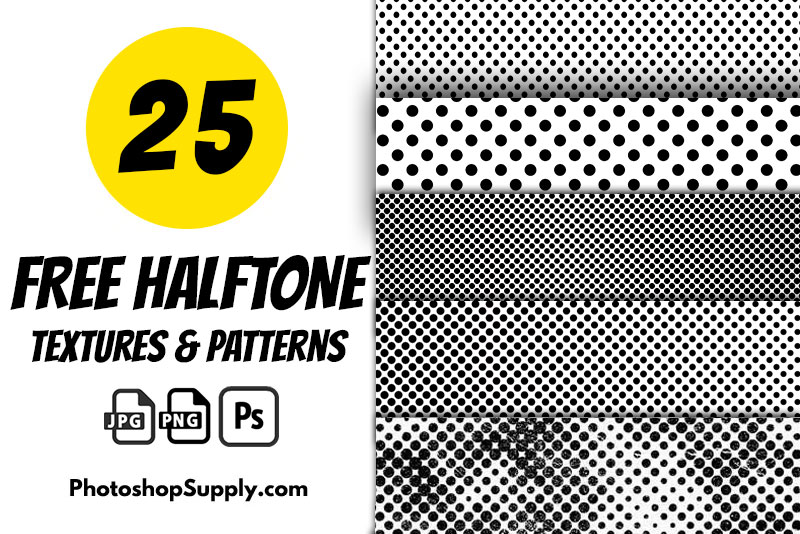
Best for: posters, comic graphics, vintage printing, editorial design, album artwork, streetwear, and retro branding.
The Halftone Press resource previously featured in this article is no longer a straightforward free download, so it has been replaced with a current free halftone resource.
Halftone patterns can reproduce the visual character of old printing methods by breaking images or tones into visible dots.
Great for Print-Inspired Graphics
Try combining halftone effects with:
- Bold typography.
- Limited color palettes.
- Paper textures.
- Grain.
- Retro illustrations.
5. Glitter Yellow Text Effect

Type: text effect.
Best for: event graphics, fashion, beauty, celebrations, social posts, advertising, and decorative typography.
Glitter effects can create a high-impact headline quickly, especially when used against relatively simple backgrounds.
Avoid Applying Glitter Everywhere
Highly decorative text works best as a focal point rather than on every line of typography.
6. Vintage Photo Effects PSD

Type: layered PSD photo effect.
Best for: portraits, travel photos, nostalgic branding, editorial imagery, album art, and retro campaigns.
The original GraphicsFuel page has become less reliable to access, so this version links to the same GraphicsFuel project on Dribbble.
A vintage effect can introduce warmer tones, faded contrast, and an older photographic character without permanently editing the original image.
7. Light and Bokeh Photo Effects

Best for: portraits, wedding photography, night photography, festive graphics, beauty, lifestyle images, and promotional artwork.
This is the same GraphicsFuel Light & Bokeh project from the original collection, now linked through its creator’s Dribbble presence.
Keep Bokeh Behind the Subject
Light effects should usually support the composition rather than cover important facial details or typography.
8. Color Distortion Text Effect

Type: PSD text effect.
Best for: music artwork, gaming graphics, posters, social media, festival branding, experimental typography, and digital art.
Distorted color effects work especially well when a project needs a digital, glitch-inspired, or intentionally imperfect aesthetic.
9. Retro Prime Photoshop Action
Best for: vintage photography, editorial work, posters, social media, lifestyle photos, and nostalgic campaigns.
This resource offers a quick way to explore retro photographic treatments without manually rebuilding every adjustment.
Watch Skin Tones
Retro color grading can work beautifully on landscapes or editorial photography but may require extra adjustment when applied to portraits.
10. 380+ Professional Photoshop Actions Bundle

Best for: photographers who want a large collection of editing options in one download.
The bundle previously appeared in this article as “100+ Free Pro Photoshop Actions.” The current version has expanded considerably, so the title has been updated rather than leaving outdated information.
A large action pack can be convenient, but avoid applying different effects randomly to every photograph.
Create a Consistent Visual Direction
Choose a small group of complementary actions for each project rather than treating hundreds of options as separate styles that all need to be used.
11. Dose Text Effect PSD

Type: PSD text effect.
Best for: titles, advertising, posters, logos, packaging, event graphics, and creative typography.
The original GraphicsFuel resource is now linked through a current MockupTree listing of the same effect.
This type of PSD lets designers create a more dimensional headline without manually building the layer treatment from scratch.
12. Retro PSD Text Styles

Best for: synthwave graphics, 1980s aesthetics, party posters, album artwork, gaming graphics, titles, and retro branding.
This listing preserves the GraphicsFuel retro text-style resource while using an accessible current source page.
Retro Effects Need the Right Typography
The effect alone cannot create a convincing retro design.
Combine it with:
- Appropriate display fonts.
- Strong color palettes.
- Period-inspired layouts.
- Simple supporting graphics.
13. Haze Dreamy Photoshop Actions

Best for: portraits, weddings, lifestyle photography, soft editorial imagery, fashion, and romantic photo treatments.
Dreamy actions can soften contrast and introduce a lighter atmospheric mood.
They are particularly useful when a collection of images needs a consistent emotional direction.
14. Fantasy Inspired Photoshop Action
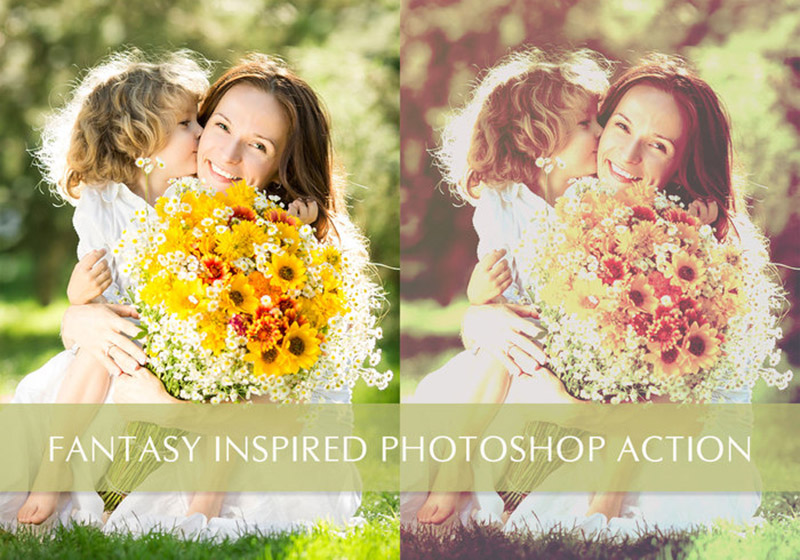
Best for: fantasy portraits, creative photography, conceptual art, colorful imagery, and experimental compositions.
The very old DeviantArt Fantasy action previously included in this collection is no longer a dependable resource link, so this edition uses a currently available fantasy-inspired Photoshop action instead.
Fantasy effects can work particularly well when the original photography already has interesting lighting, wardrobe, or environment.
15. Moody Photoshop Actions

Best for: portraits, travel, weddings, architecture, food photography, fashion, lifestyle, and editorial images.
This Creative Tacos resource is now linked through the creator’s Behance project rather than depending only on an older article URL.
Moody Does Not Mean Underexposed
A darker or warmer color grade should still preserve important image detail.
Review the shadows after applying the effect and reduce its strength when necessary.
16. HDR Photoshop Actions

Best for: landscapes, architecture, interiors, city photography, outdoor photography, and highly detailed scenes.
HDR effects increase the visual emphasis on tonal range and detail, but aggressive processing can quickly make an image appear unnatural.
Reduce the Effect When Necessary
If halos, extreme local contrast, or unnatural saturation become distracting, lower the intensity or adjust the generated layers.
17. Free HDR Photoshop Action
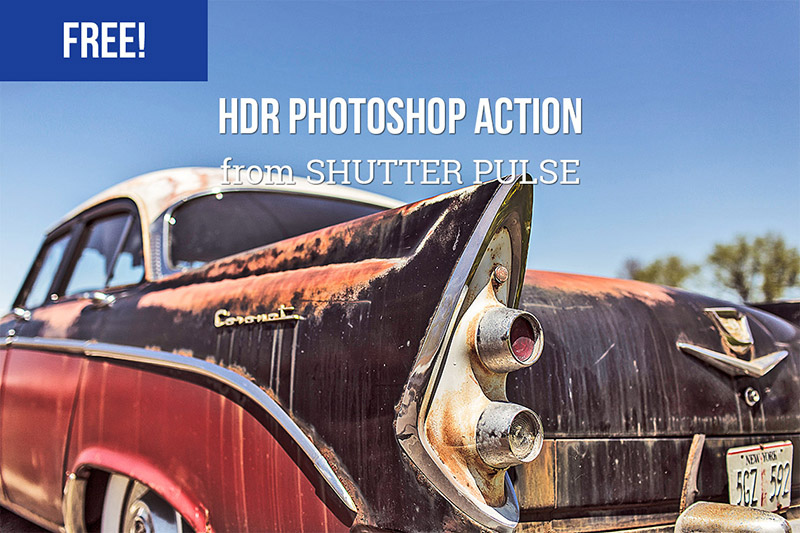
Best for: landscapes, buildings, travel photography, dramatic outdoor scenes, and experimental photo processing.
The older HDR resource previously linked from this article could no longer be reliably confirmed, so it has been replaced with an active free HDR action from ShutterPulse.
Having two different HDR options can be useful because different actions produce noticeably different interpretations of the same source photograph.
Why Use Photoshop Actions?
An action records a sequence of Photoshop commands and then replays those commands automatically.
This can be useful for repetitive processes such as:
- Color grading.
- Contrast adjustments.
- Sharpening.
- Photo effects.
- Resizing workflows.
- Creative transformations.
The main advantage is not simply creating dramatic effects. Actions can also help create consistency and reduce the amount of repetitive manual work.
Why Use Photoshop Text Effects and Styles?
Text effects are useful when typography needs to become a major visual element rather than simply communicate information.
They can be used for:
- Poster headlines.
- Logos.
- Social media graphics.
- Album covers.
- Packaging.
- Gaming graphics.
- Event promotions.
- YouTube thumbnails.
Use Decorative Effects on Display Text
Complex styles are usually more appropriate for large headlines than paragraphs or body copy.
How to Install Photoshop Actions
- Download and extract the resource.
- Locate the ATN file.
- Open Adobe Photoshop.
- Open the Actions panel.
- Use the panel menu to load the action.
- Select the appropriate action.
- Follow any preparation instructions from the creator.
- Run the action.
- Review the generated layers and adjustments.
How to Use PSD Text Effects
- Open the PSD in Photoshop.
- Locate the editable text or Smart Object layer.
- Open that layer.
- Replace the sample text with your own.
- Save the editable layer.
- Return to the main PSD.
- Adjust colors or supporting effects if needed.
- Export the final design.
How to Get Better Results From Photoshop Actions
Start With a Good Source Image
An action cannot completely compensate for:
- Severe blur.
- Bad focus.
- Extreme compression.
- Very low resolution.
- Poor exposure.
Read the Creator’s Instructions
Some actions expect:
- A specific Photoshop version.
- RGB color mode.
- A minimum image size.
- A flattened image.
- A named layer.
- A selection or mask.
Adjust the Generated Layers
Professional use of an action rarely means pressing Play and accepting everything exactly as generated.
Reduce opacity, modify masks, adjust colors, or disable unnecessary layers when needed.
Photoshop Actions for Photography
For photo editing, actions can be particularly useful for establishing a repeatable visual direction across an entire shoot.
Examples include:
- Wedding photography.
- Portrait sessions.
- Food photography.
- Travel series.
- Fashion campaigns.
- Editorial shoots.
The key is consistency. Applying radically different effects to every photo can make a collection feel disconnected.
Photoshop Actions for Graphic Designers
Designers can use actions and PSD effects for:
- Poster treatments.
- Typography.
- Album artwork.
- Social media campaigns.
- Editorial graphics.
- Brand presentations.
Retro, distortion, watercolor, halftone, and fantasy effects are especially useful when a project intentionally calls for a strong visual treatment.
Common Photoshop Action Mistakes
1. Expecting the Same Result on Every Image
Lighting, exposure, color, and subject matter affect the final appearance.
2. Applying Actions Without Reading Instructions
Some actions require specific image preparation.
3. Using Too Many Effects
Combining several dramatic actions can quickly make an image visually confusing.
4. Ignoring Skin Tones
Always check portraits after applying aggressive color grading.
5. Overusing HDR
Extreme detail and local contrast can make images appear artificial.
6. Treating Text Effects as Readable Body Typography
Decorative effects are better suited to headlines and display text.
7. Keeping Old Paid Resources in a Free Collection
Design resources can change from free to paid over time, so old articles need periodic review.
8. Keeping Broken Download Links
If an original page disappears, look for the creator’s current page or a reputable listing of the same resource.
9. Assuming Free Means Commercial Use
Download price and licensing rights are separate issues.
10. Applying an Effect at 100% Strength Automatically
Subtle adjustments often produce a more professional result.
Photoshop Actions and Styles Licensing Checklist
- Is the download currently free?
- Is personal use allowed?
- Is commercial use allowed?
- Is attribution required?
- Can the resource be used in client projects?
- Can the finished image appear in advertising?
- Can the action or PSD be modified?
- Can the source file be redistributed?
- Are there restrictions on resale products?
Frequently Asked Questions About Free Photoshop Actions and Styles
What are Photoshop actions?
Photoshop actions are recorded sequences of editing commands that can be replayed to automate a particular workflow or visual effect.
What are Photoshop styles?
Photoshop layer styles apply combinations of visual properties such as shadows, strokes, gradients, glows, and bevels to layers.
What are Photoshop text effects?
Text-effect PSDs are editable Photoshop files designed to transform text or logos into specific visual styles.
What are free Photoshop actions and styles used for?
Free Photoshop actions and styles can speed up photo editing, typography design, creative effects, posters, social content, branding, and other Photoshop workflows.
Are Photoshop actions one-click effects?
Many can be started with one action command, but professional results may still require adjustments afterward.
Can I edit the result after running an action?
Often yes. Many actions create editable adjustment layers, masks, effects, and groups.
Can Photoshop actions work on every image?
Results vary. Image size, exposure, color, Photoshop version, and source quality can all influence the outcome.
Can I use Photoshop actions commercially?
Only if the license of the individual resource permits your intended commercial use.
Do text effects work with any font?
Many allow you to replace the sample text, but the final appearance can change significantly depending on the font’s weight, width, and shape.
Should I keep old Photoshop actions?
Older actions can still be useful, but compatibility should be checked when moving to newer Photoshop versions.
Final Thoughts
The best free Photoshop actions and styles are not simply shortcuts for adding dramatic effects. They can also help designers and photographers build more efficient, repeatable workflows.
Photo actions can create consistent moods across an image collection. HDR and vintage actions provide starting points for photographic editing. Halftone treatments work well for print-inspired design, while watercolor, glitter, distortion, and retro text effects can transform typography into the visual focus of a project.
Choose resources according to the project rather than the intensity of the preview image.
Start with quality source material. Read the instructions. Review generated layers. Reduce effects when necessary. Check compatibility and licensing before using downloaded resources professionally.
A good Photoshop action should save time while still leaving the designer in control of the final result.
For more free Photoshop resources, mockups, brushes, fonts, textures, and design inspiration, continue exploring DesignRise.