
From AI Tools to AI Workflows
There’s a weird thing happening in design right now.
Everyone talks about AI tools. Almost nobody talks about workflows.
And honestly, that’s the reason many designers still feel overwhelmed instead of productive.
Having access to AI does not automatically make work faster. In some cases, it actually makes people slower because they keep jumping between tools, generating random ideas, rewriting prompts, and endlessly tweaking outputs that should have taken 20 minutes.
The designers who are truly winning in 2026 are not using the most AI tools.
They’re using the best AI design workflows.
That’s the difference.
A workflow removes friction. A random collection of tools creates more of it.
This article breaks down the real AI workflows designers are using right now to save time, reduce repetitive work, and handle larger creative workloads without burning out.
What Is an AI Design Workflow?
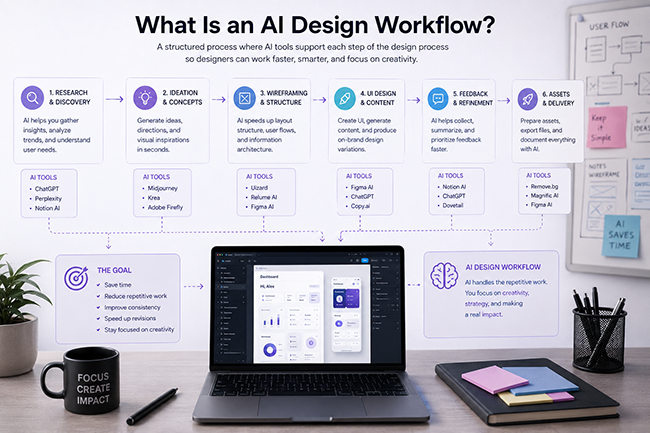
An AI design workflow is a repeatable system where AI handles repetitive or technical tasks while the designer focuses on creative direction, problem-solving, and final decisions.
A strong workflow should:
- reduce manual work
- speed up production
- improve consistency
- eliminate repetitive tasks
- make revisions easier
The important part is this:
AI should support your thinking — not replace it.
Because the moment you let AI fully drive the creative process, the work starts looking generic fast.
And the internet already has enough generic design.
Why AI Workflows Matter More Than AI Tools

Most “Top 100 AI Tools” articles are honestly useless in real-world design work.
No serious designer wants to open 17 tabs just to finish one landing page.
The real goal is building systems that feel natural.
The best workflows are usually simple:
- fewer tools
- fewer clicks
- fewer repetitive tasks
- faster execution
That’s where the actual time savings happen.
Not in endlessly testing every new AI startup that appears on Product Hunt.
Workflow #1 — AI Landing Page Design Workflow
This is probably the most common modern workflow right now.
Especially for freelancers, startups, and agencies working with fast-moving clients.
Step 1: Break Down the Client Brief
Most designers skip this part too quickly.
Instead of immediately opening Figma, experienced designers first organize the project direction using AI.
Tools commonly used:
Typical prompts include:
- identifying target audience
- defining page structure
- extracting pain points
- generating content hierarchy
- creating CTA variations
This alone can save hours of messy revisions later.
Because bad structure destroys good design.
Not the other way around.
Step 2: Generate Moodboards & Visual Direction
Before designing the actual interface, many designers now create rapid visual explorations with AI.
Tools:
This stage helps generate:
- color directions
- visual mood
- typography inspiration
- composition ideas
- campaign aesthetics
The important thing here is speed.
In 20 minutes, designers can now test creative directions that previously required an entire day.
That changes the creative process completely.
Step 3: Build the Wireframe Faster
Once the structure is clear, designers move into wireframing.
Tools:
AI is especially useful here for:
- section generation
- layout suggestions
- placeholder content
- responsive structure
- repeated UI blocks
But here’s the truth nobody wants to say:
AI-generated layouts still feel average without human adjustment.
The best designers still spend time refining spacing, hierarchy, and rhythm manually.
That part still matters.
A lot.
Step 4: Generate UX Copy & CTA Variations
This workflow stage saves insane amounts of time.
Instead of manually writing:
- headlines
- subheadings
- buttons
- onboarding text
- feature descriptions
Designers now generate multiple versions instantly.
The smart part is not accepting the first output.
The smart part is using AI for exploration.
Good designers still edit heavily.
Because raw AI copy usually sounds polished… but emotionally empty.
Step 5: Export Assets Automatically
This is one of the most underrated workflow improvements.
Modern AI workflows now automate:
- resizing
- exporting
- naming systems
- social formats
- responsive assets
Tools:
This part sounds boring.
But repetitive production work quietly drains creative energy more than almost anything else.
Workflow #2 — AI Social Media Design Workflow
Content creation is becoming one of the biggest workflow categories in design.
And honestly, AI fits here extremely well.
A modern social media workflow often looks like this:
Step 1 — Content Angles & Hooks
Tools:
AI generates:
- post hooks
- carousel structures
- captions
- campaign themes
- video concepts
Step 2 — Generate Visual Concepts
Tools:
This stage is useful for:
- visual storytelling
- cinematic scenes
- campaign aesthetics
- concept testing
One of the biggest advantages here is speed.
You no longer spend hours searching Pinterest trying to explain a visual feeling to a client.
You can generate it directly.
Step 3 — Create Production Templates
This is where smart designers save the most time long-term.
Instead of designing every post from scratch, they build reusable systems:
- reusable grids
- typography systems
- content layouts
- AI-assisted template structures
This matters because scaling content manually becomes impossible very quickly.
Especially for brands posting daily.
Workflow #3 — AI Workflow for Brand Identity Projects
This workflow is becoming extremely popular among freelance designers.
Especially for fast branding projects.
Typical Brand Workflow Structure
Discovery
Using AI to analyze:
- competitors
- visual trends
- positioning
- audience language
Concept Exploration
Generating:
- visual directions
- logo mood references
- typography systems
- color palette directions
Brand Voice
Using AI for:
- tone exploration
- messaging structure
- tagline generation
- brand story drafts
Presentation Building
Tools:
AI now helps create client presentations dramatically faster.
And honestly, this matters more than many designers realize.
Because clients often judge the presentation quality before they judge the actual design work.
Workflow #4 — AI Workflow for Client Revisions
This workflow is saving agencies huge amounts of time right now.
Because revisions used to destroy production schedules.
Modern teams now use AI to:
- summarize feedback
- organize comments
- identify repeated revision patterns
- rewrite unclear client requests
- generate updated content drafts
Tools:
This sounds small.
But if you’ve ever handled chaotic client revisions across multiple projects, you know how valuable structured feedback becomes.
The Biggest Mistake Designers Make With AI Workflows
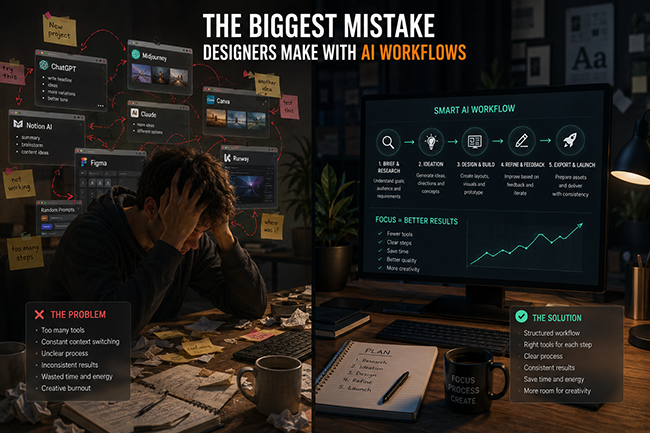
Trying to automate everything.
That usually kills creativity.
The best AI workflows still leave room for:
- experimentation
- intuition
- human taste
- creative decisions
- emotional storytelling
AI is incredible at speed.
It is still mediocre at emotional depth.
And people absolutely feel that difference.
Especially in branding.
Especially in storytelling.
Especially in premium design work.
My Honest Opinion on AI Workflows in 2026
I think AI is removing a lot of unnecessary suffering from design work.
And honestly, some of that suffering never needed to exist in the first place.
Nobody becomes a better designer because they manually resized 45 Instagram exports.
Nobody becomes more creative because they spent three hours renaming layers.
AI should remove friction.
That’s where it shines.
But I also think many designers are becoming visually lazy because AI makes “good enough” work too easy.
And that’s dangerous.
Because now that everyone has access to AI tools, taste becomes the real competitive advantage.
Not generation speed.
Not prompts.
Not automation.
Taste.
The designers who combine:
- strong creative direction
- smart AI workflows
- fast execution
- clear systems
are going to dominate the industry over the next few years.
And honestly, we’re already seeing it happen.
Explore more AI tools, workflows, and resources on DesignRise:
- The AI Design Workflow Blueprint: How Top Designers Work Faster and Smarter in 2026
- Best Tools for 2026: Create Content Without Filming
- How Designers Can Build Consistent Visual Styles With AI
Final Thoughts
The future of design workflows is not about replacing designers.
It’s about removing repetitive friction so designers can spend more time thinking creatively.
The best AI workflows in 2026 are not complicated.
They are structured.
Simple.
Repeatable.
Fast.
And most importantly — they still leave space for human ideas.
Because no matter how advanced AI becomes, people still connect with work that feels human.
FAQ
What are AI design workflows?
AI design workflows are structured systems that combine AI tools with creative design processes to automate repetitive tasks, improve productivity, and speed up project execution. Instead of randomly using AI tools, designers build repeatable workflows for research, wireframing, content generation, visual exploration, feedback management, and asset production.
Why are AI workflows important for designers in 2026?
In 2026, design projects move faster than ever, and clients expect quicker turnaround times without sacrificing quality. AI workflows help designers save time, reduce repetitive manual work, organize production systems, and focus more on creative thinking instead of technical busywork.
Which AI tools do designers use most?
Some of the most popular AI tools designers use in modern workflows include ChatGPT for content and ideation, Figma AI for interface design, Midjourney for visual exploration, Framer for website creation, Notion AI for organization, and Runway ML for creative video production.
Can AI replace designers?
No. AI can automate repetitive tasks and speed up production, but it still struggles with creative direction, emotional storytelling, brand thinking, and human taste. The best results happen when designers use AI as a creative assistant instead of relying on it to make every decision.
What is the best AI workflow for UI/UX design?
A strong AI workflow for UI/UX design usually includes research, user analysis, wireframing, interface generation, UX writing, and rapid prototyping. Many designers start with AI-assisted brainstorming and structure planning before moving into manual refinement inside tools like Figma.
How do AI workflows save time?
AI workflows save time by automating repetitive production tasks such as resizing assets, generating content variations, organizing feedback, creating templates, summarizing research, and accelerating design exploration. This allows designers to spend more time on strategy, creativity, and decision-making.
What are the biggest mistakes designers make with AI workflows?
One of the biggest mistakes is trying to automate the entire creative process. Overusing AI often leads to generic-looking work that lacks originality and emotional depth. The best designers use AI to support creativity, not replace human thinking.
Are AI workflows useful for freelance designers?
Yes. Freelancers often benefit the most from AI workflows because they handle multiple roles at once, including design, content creation, presentations, revisions, and client communication. AI systems can dramatically speed up solo creative work and improve consistency across projects.
How do agencies use AI workflows?
Agencies use AI workflows to streamline large-scale production, organize revisions, automate repetitive design tasks, generate faster concepts, improve team collaboration, and speed up campaign delivery. Many agencies now use AI as part of their daily production pipeline.
What is the future of AI design workflows?
The future of AI design workflows is focused on smarter creative systems, faster collaboration, and more automation inside everyday design tools. However, human creativity, storytelling, and creative direction will remain the most valuable part of the design process.
Discover more from DesignRise
Subscribe to get the latest posts sent to your email.