












Personalized Email Design: Strategies, Examples & Best Practices for Modern Marketing
Personalized email design has become one of the most effective ways to improve email marketing performance, increase customer engagement, and build stronger relationships with subscribers. In today’s crowded inboxes, generic email campaigns are often ignored, while personalized emails feel more relevant, timely, and useful to the recipient.
Modern email personalization goes far beyond simply adding a subscriber’s first name to the subject line. Successful brands use audience segmentation, behavioral triggers, dynamic content, product recommendations, personalized visuals, automated workflows, and responsive design techniques to create highly targeted email experiences.
Whether you are running an eCommerce store, SaaS company, creative agency, startup, online publication, or personal brand, implementing personalized email marketing strategies can help improve open rates, click-through rates, conversions, customer retention, and overall marketing ROI.
For designers and marketers, personalization is closely connected to UI/UX design principles. Just as websites and applications adapt to user behavior, email campaigns should deliver content that feels relevant to individual subscribers. When personalization is done correctly, email becomes less intrusive and more valuable.
In this DesignRise guide, you will learn how personalized email design works, why it matters, which tools support personalization, common mistakes to avoid, and practical strategies for creating more effective email marketing campaigns.
What Is Personalized Email Design?
Personalized email design is the process of adapting email content, layout, visuals, product recommendations, offers, and calls to action based on subscriber data. This can include basic personalization, such as using a first name, or more advanced personalization based on browsing behavior, purchase history, location, customer lifecycle stage, or content preferences.
A strong personalized email experience combines data, design, copywriting, automation, and user experience. The goal is not to make an email feel overly automated. The goal is to make each message feel useful, relevant, and aligned with what the subscriber actually needs.
The Evolution of Personalized Email Marketing
Email marketing has evolved dramatically over the past decade. Early campaigns often focused on sending the same newsletter to every subscriber. Today, advances in customer data, marketing automation, and AI-powered analytics allow brands to deliver highly relevant content tailored to individual behaviors and interests.
Subscribers now expect personalized experiences across all digital channels. When emails align with customer preferences, purchase history, browsing behavior, and engagement patterns, they are more likely to generate positive results.
As personalization technologies continue to improve, marketers have more opportunities than ever to create meaningful customer experiences that feel authentic rather than robotic. This is especially important for brands that want to build trust, reduce unsubscribe rates, and create long-term customer relationships.
Why Personalized Email Design Matters
In a crowded inbox, relevance matters. Subscribers are more likely to open, read, and click emails when the message feels connected to their needs, behavior, location, purchase history, or design preferences.
Personalized email design helps brands create more meaningful communication instead of sending the same message to every subscriber. It can make campaigns feel more human, improve customer experience, and increase the chances that users take action.
On DesignRise, we see personalized email design as part of a larger branding and user experience strategy. A well-designed email should not only look good — it should feel relevant, clear, and easy to act on.
Benefits of Personalized Email Campaigns
- Better engagement: Relevant messages usually receive more attention than generic campaigns.
- Stronger customer relationships: Personalization helps subscribers feel understood instead of treated like a mass audience.
- Improved conversions: Targeted content can guide users toward products, offers, downloads, or sign-ups that match their interests.
- Cleaner brand experience: Personalized visuals and messaging can make email campaigns feel more consistent with the brand.
Key Elements of Effective Personalized Email Design
Effective personalized email design is built on more than one tactic. The strongest campaigns combine strategy, content, automation, design consistency, and clear performance tracking.
- Audience segmentation: Divide subscribers into groups based on behavior, demographics, interests, customer stage, or purchase history.
- Dynamic content blocks: Show different content to different subscribers inside the same campaign.
- Personalized product recommendations: Suggest products or resources based on browsing and purchase activity.
- Behavioral automation workflows: Trigger emails based on actions such as sign-ups, abandoned carts, downloads, or repeat visits.
- Responsive email layouts: Make every campaign readable and easy to use on mobile, tablet, and desktop.
- Clear calls to action: Align buttons and links with subscriber intent and campaign goals.
- Consistent branding: Keep visuals, typography, tone, and layout aligned with the brand identity.
Combining these elements creates a more engaging and relevant experience that helps improve campaign performance and supports stronger customer relationships.
Top Email Personalization Strategies
1. Segment Your Audience
Audience segmentation is the foundation of effective personalized email design. Instead of sending one campaign to everyone, divide your email list into smaller groups based on behavior, interests, purchase history, location, engagement level, or customer stage.
For example, a new subscriber may need an introduction to your brand, while a returning customer may respond better to product recommendations or exclusive offers.
Segmentation examples:
- Location-based offers or event announcements
- Recommendations based on past purchases
- Welcome emails for new subscribers
- Re-engagement emails for inactive users
- VIP offers for loyal customers
2. Use Dynamic Email Content
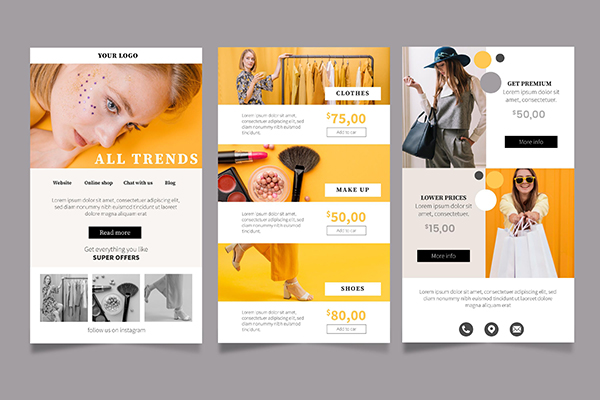
Dynamic content allows different subscribers to see different blocks inside the same email campaign. This can include product recommendations, location-based offers, personalized banners, or content based on browsing history.
For eCommerce brands, dynamic email content is especially useful because it can show products that match a customer’s previous activity. For service-based businesses, it can highlight relevant guides, resources, or offers based on user interest.
3. Personalize Subject Lines and Preheaders
The subject line and preheader are often the first parts of an email a subscriber sees. Personalizing them can make the message feel more specific and relevant before the email is even opened.
Example:
- Generic: “Check our new collection!”
- Personalized: “Emma, your favorite summer styles are here.”
Personalization should still feel natural. Overusing names or overly specific data can make an email feel uncomfortable rather than helpful.
4. Add Behavioral Email Triggers
Behavioral triggers are automated emails sent after a user takes a specific action. These emails often perform well because they arrive at the right moment and respond to something the subscriber actually did.
Common behavioral email triggers:
- Abandoned cart emails: Remind users to complete a purchase.
- Browse abandonment emails: Follow up after someone views a product or service.
- Product recommendations: Suggest items based on previous behavior.
- Birthday or anniversary emails: Send personalized offers for special occasions.
- Post-purchase emails: Share care tips, related products, or helpful resources.
5. Design for Mobile First
Many subscribers read emails on mobile devices, so personalized email design should be responsive, lightweight, and easy to scan. A personalized campaign can still fail if the layout is hard to read on a small screen.
Use clear hierarchy, short paragraphs, large clickable buttons, optimized images, and enough spacing around calls to action. The goal is to make the email feel effortless to read and interact with.
6. Use Personalized Visuals Carefully
Personalized visuals can make emails more memorable. This may include custom banners, product images, personalized recommendations, or content blocks based on a subscriber’s preferences.
However, visual personalization should support the message rather than distract from it. Keep the design clean, readable, and consistent with your brand identity.
7. Test and Analyze Your Campaigns
Personalized email design works best when it is tested and improved over time. A/B testing can help you understand which subject lines, visuals, layouts, buttons, and offers perform better with different audience segments.
Track open rates, click-through rates, conversions, unsubscribe rates, and revenue or lead quality depending on your campaign goals.
8. Respect Privacy and Build Trust
Personalization depends on customer data, so trust is essential. Be clear about how data is used, follow privacy regulations, and give subscribers control over their preferences.
The best personalized email experiences feel helpful, not invasive. If users understand why they are receiving a message, they are more likely to trust the brand behind it.
Tools for Personalized Email Marketing
There are many tools that help marketers create personalized email campaigns, automate workflows, test layouts, and analyze performance. The best choice depends on your business model, list size, budget, and technical needs.
- Klaviyo: Strong for eCommerce automation, product recommendations, and behavioral triggers.
- Mailchimp: Useful for small businesses that need segmentation, automation, and basic personalization tools.
- Campaign Monitor: Good for clean email design, segmentation, and branded campaign management.
- Litmus: Helpful for testing email layouts across different devices, inboxes, and platforms.
AI and Personalized Email Design
Artificial intelligence is becoming an increasingly important part of email marketing personalization. AI tools can analyze customer behavior, predict preferences, optimize send times, generate content variations, and improve audience segmentation.
Many modern marketing platforms now use machine learning to recommend products, identify engagement patterns, personalize offers, and automate campaign timing at scale. These capabilities help marketers create more relevant campaigns while reducing manual workload.
AI can also support designers by helping generate subject line ideas, test content variations, analyze engagement trends, and improve layout decisions based on user behavior. However, AI should support human strategy rather than replace thoughtful brand communication.
At DesignRise, we regularly explore how AI workflows can improve creative processes, marketing automation, and customer communication strategies.
How to Measure Personalized Email Performance
To understand whether your personalization strategy is working, track both engagement and business results. A campaign may get clicks, but the most important question is whether it supports your overall marketing goals.
- Open rate: Helps evaluate subject lines and sender trust.
- Click-through rate: Shows whether the content and CTA are relevant.
- Conversion rate: Tracks whether subscribers complete the desired action.
- Unsubscribe rate: Helps identify if content is too frequent or not relevant enough.
- Revenue or lead quality: Shows the actual business impact of email campaigns.
Use these insights to refine your audience segments, improve email design, and make future campaigns more relevant.
Common Mistakes in Personalized Email Design
Personalization can improve email marketing, but only when it feels useful and natural. Poor personalization can make a message feel robotic, uncomfortable, or overly automated.
- Using a subscriber’s name too often
- Sending irrelevant product recommendations
- Overloading the email with too much dynamic content
- Ignoring mobile design and readability
- Using customer data without clear context or permission
- Testing subject lines but not testing layout or CTA design
Personalized Email Design Best Practices
The best personalized email campaigns feel helpful, timely, and useful. They do not overwhelm subscribers with unnecessary data or overly complex automation. Instead, they use personalization to make communication clearer and more relevant.
- Start with audience segmentation before adding advanced personalization.
- Focus on relevance rather than excessive customization.
- Use dynamic content only when it adds value to the subscriber.
- Keep layouts responsive and mobile-friendly.
- Maintain strong visual hierarchy and clear calls to action.
- Continuously test subject lines, visuals, content blocks, and CTA placement.
- Use responsive design techniques to improve readability across devices.
- Respect subscriber privacy and data preferences.
- Balance automation with authentic, human communication.
When personalization is supported by good design, clear copy, and responsible data use, it can make email marketing feel more useful rather than more aggressive.
Examples of Personalized Email Design in Practice
Personalized email design can be used in many different marketing situations. An eCommerce brand may show product recommendations based on past purchases. A SaaS company may send onboarding tips based on the features a user has already tried. A design blog may recommend articles based on the categories a subscriber reads most often.
For example, a user who downloads branding resources may receive follow-up emails about logo fonts, mockups, and brand identity tools. A subscriber interested in UI/UX content may receive more resources about interface design, Figma workflows, and usability principles. This makes the email experience feel more relevant and increases the chance that the subscriber will continue engaging with the brand.
The same principle applies to visual design. Personalized banners, product blocks, article recommendations, and CTA sections should be selected based on real user intent. The more closely the email matches the subscriber’s needs, the more valuable it becomes.
Conclusion
Personalized email design is no longer optional for modern marketers. As customer expectations continue to evolve, brands need to deliver relevant, useful, and engaging email experiences that feel tailored to individual needs.
Successful personalization combines audience segmentation, behavioral automation, dynamic content, responsive design, responsible data use, and thoughtful user experience principles. When implemented effectively, these strategies can improve engagement, increase conversions, strengthen customer relationships, and support long-term business growth.
Strong email personalization should never feel invasive. The best campaigns feel natural, helpful, and aligned with the subscriber’s interests. By testing your campaigns, improving your design system, and respecting user preferences, you can create email experiences that support both your audience and your business goals.
DesignRise regularly shares marketing, branding, AI workflow, and creative resources for designers, marketers, and digital professionals. Explore more guides to improve your marketing strategy and create better customer experiences.
Frequently Asked Questions About Personalized Email Design
What is personalized email design?
Personalized email design is the process of tailoring email content, visuals, offers, layouts, and messaging to individual subscribers or audience segments based on behavior, demographics, interests, purchase history, or preferences.
Why is email personalization important?
Email personalization helps improve engagement, increase click-through rates, strengthen customer relationships, and deliver more relevant content to subscribers.
Does personalized email marketing improve conversions?
Yes. Personalized campaigns often generate higher conversion rates because the content, offer, and call to action are more closely aligned with subscriber interests and behavior.
What tools support personalized email design?
Popular tools for personalized email marketing include Klaviyo, Mailchimp, Campaign Monitor, HubSpot, ActiveCampaign, and Litmus. These platforms can support segmentation, automation, testing, dynamic content, and performance analysis.
How can designers improve personalized email experiences?
Designers can improve personalized email experiences through responsive layouts, clear visual hierarchy, dynamic content blocks, audience segmentation, behavioral triggers, optimized calls to action, and continuous testing.
What is dynamic email content?
Dynamic email content allows different subscribers to see different text, images, products, or offers inside the same email campaign based on their behavior, preferences, or customer data.
Explore More DesignRise Marketing and Design Resources
- AI Workflows for Modern Designers
- Best AI Mockup Tools & Generators for Designers
- Best Powerful Logo Fonts for Strong Brand Identity
- Figma Auto Layout: The Secret to Building Responsive Designs
- UI/UX Design Resources and Tutorials
Discover more from DesignRise
Subscribe to get the latest posts sent to your email.


